February 19, 2024
Solved

Help needed to delete the imported 1099 B Documents

  • February 19, 2024
  • 1 reply
  • 0 views

I am using the TT that was sold in Costco. I have imported few 1099 B from my brokerages. However, I found them wrong and I need to change something. Hence, I was trying for an option to delete and it seems like it does not let me to do that. Can you please help with the same? 

    Best answer by DoninGA

    Not only that. I entered a 1099 B entry manually but I want to correct it. It does not have any option to correct as well. This is strange and looks like a serious bug. Please help ASAP


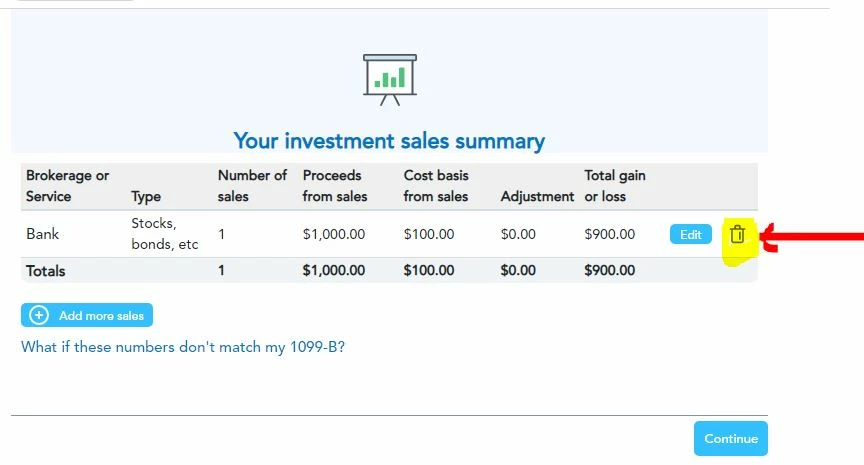
    You can delete the sale using the interview method in TurboTax.  On the Investment Summary screen click on the Trash Can symbol for the sale you want to delete


    To enter, edit or delete an investment sale -

    Click on Federal Taxes (Personal using Home and Business)
    Click on Wages and Income (Personal Income using Home and Business)
    Click on I'll choose what I work on (if shown)
    Under Investment Income
    On Stocks, Cryptocurrency, Mutual Funds, Bonds, Other, click the start or update button


    Or enter investment sales in the Search box located in the upper right of the program screen. Click on Jump to investment sales



    1 reply

    February 19, 2024

    The best way, and often the only way, to delete income forms (including forms W-2, 1098, 1099, and K-1) is to do it from the summary screen for that particular form.


    So, try that first — here's how:

    1. Open or continue your return.
    2. Go to the Search bar and search for the form by typing the form name (for example, W-2 or 1099-R).
    3. Select the Jump to link with the form name.
    4. Then, see if that takes you to a summary screen.
      • If searching for a 1099-R, for example, typing 1099r in the search bar and selecting the Jump to link in the search results takes you to the Your 1099-R info so far screen.
      • You can remove the 1099-R on this screen by selecting the trash can icon.
      • If Search doesn't work. then: Click on Federal, then Wages & Income, Investments and Savings (1099-B, 1099-INT, 1099-DIV, 1099-K, Crypto), and then Add/Edit.

    Here's the general procedure for viewing a list of all the forms in your return and deleting unwanted forms, schedules, and worksheets in TurboTax Online:

    1. Sign in to TurboTax and open your return by selecting Continue or Pick up where you left off
    2. In the left menu, select Tax Tools and then Tools
    3. In the pop-up window Tool Center, choose Delete a form
    4. Select Delete next to the form, schedule, and worksheet in the list and follow the instructions
    **Say "Thanks" by clicking the thumb icon in a post**Mark the post that answers your question by clicking on "Mark as Best Answer"
    February 19, 2024
    Hello There, 
     
    I tried to follow the steps here but I don't see any option to delete. Is this a bug in 2023 software ? I don't see delete button or trash icon
     
    I also don't find the tax tool like you described. Please help.
     
    Thanks,
    Ravi
    February 19, 2024

    Not only that. I entered a 1099 B entry manually but I want to correct it. It does not have any option to correct as well. This is strange and looks like a serious bug. Please help ASAP




