
July 13, 2024
Question

How can I produce a summary of carryovers to the next year?

  • July 13, 2024
  • 1 reply
  • 0 views

In the past, I had my taxes done, and my CPA produced a summary of carryovers for the following year, e.g.:
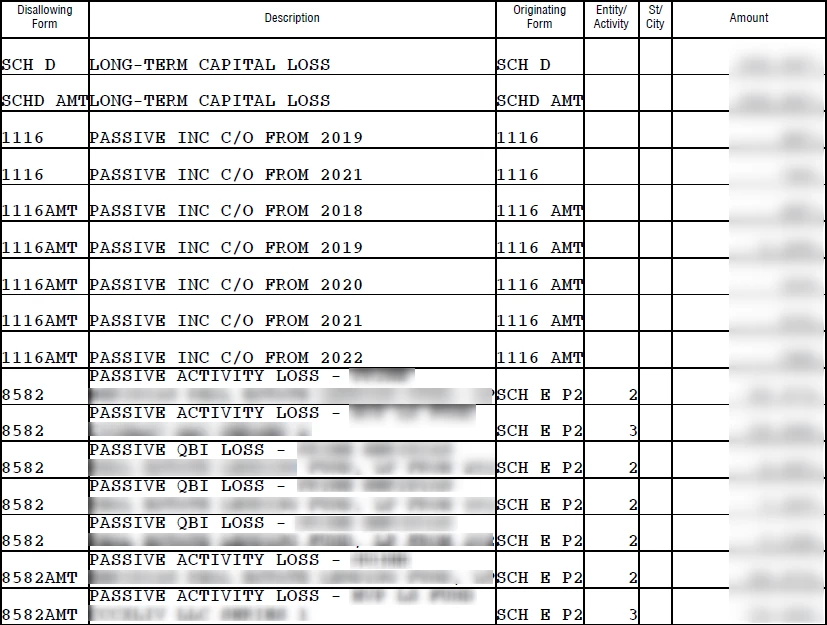
I just finished using TT to prepare my taxes for 2023, and I'd like a comprehensive list of carryovers to 2024 akin to the above.  How can I get TT to produce one? I'm using the desktop Home & Business edition under Windows.

1 reply

VolvoGirl
Employee
July 14, 2024

Yes you can find it in Forms mode.  You can find 2 worksheets.


On the income page The 2023 column shows the carryover to 2024 (not your current loss for 2023).  Schedule D doesn't actually show the carryover amount. To find your  Capital Loss Carryover amount  you need to look at your  return schedule D page 2.  Line 16 will be your total loss and line 21 should be a max loss of 3,000.  The difference between line 16 and 21 is the carryover loss for next year.


There is also a Carryover Worksheet showing the carryover from the prior year and the current amounts.  Then there is also the Capital Loss Carry Forward worksheet showing the amount transferring over to next year.


July 14, 2024

Can you please clarify what you mean by "On the income page"? 


Thanks.

VolvoGirl
Employee
July 14, 2024

Just when you go to Personal then Income (choose I’ll pick what to enter) you get the page listing all the kinds of income with 2 columns showing 2022 and 2023.  I have Windows Home & Business too so I can  make you screen shots.




