
January 19, 2021
Solved

I logged into my Turbotax account and my Inuit account. I need to access my 2020 tax return, but there is no Documents tab on the top left of the page. Please help?

  • January 19, 2021
  • 1 reply
  • 0 views
No text available
    Best answer by DoninGA

    @kimdoe 

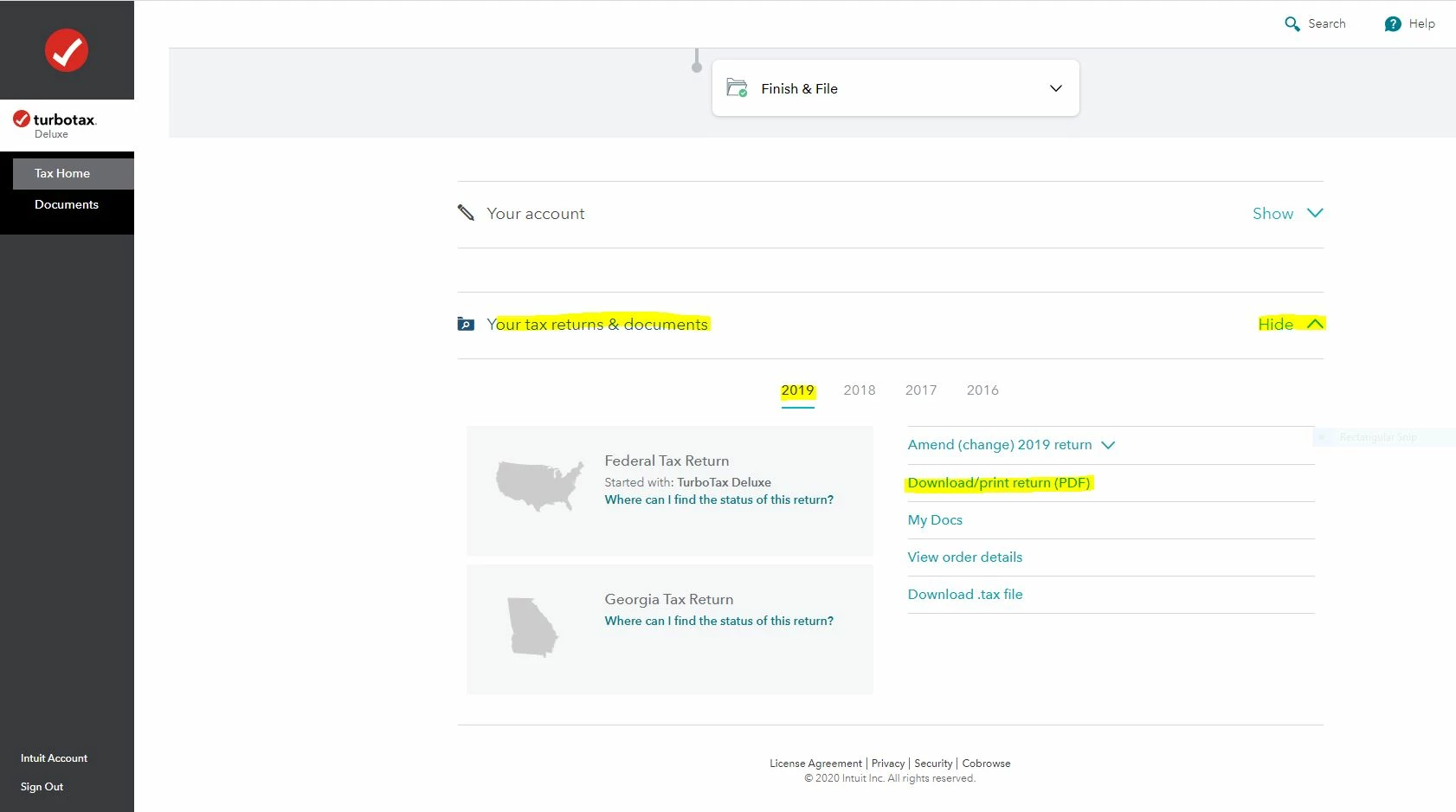
    You may have to start a 2020 tax return before the links on the Tax Home web page become available.  In that case start the 2020 tax return with the User ID you used for the 2019 return.  Once some basic information has been transferred over, Tax Home should be visible on the left column.  Click on Tax Home and then the other links will be shown as in this screenshot.


    To access your prior year online tax returns sign onto the TurboTax website with the User ID you used to create the account - https://myturbotax.intuit.com/

    Scroll down to the bottom of the screen and on the section Your tax returns & documents click on Show.  Click on the Year and Click on Download/print return (PDF)
     

    1 reply

    DoninGA
    Employee
    January 19, 2021

    The current tax year being reported is tax year 2020.

    You need to create a 2020 online account using the same User ID you used for the 2019 online account - https://turbotax.intuit.com/personal-taxes/online/


    Or were you referring to tax year 2019?


    You have to sign onto your 2019 online account using the exact same User ID you used to create the online account.

    Close all TurboTax windows on your web browser (including this one).  Copy and paste the account recovery website link onto a new web browser window and run the tool.

    Use this TurboTax account recovery website to get a list of all the User ID's for an email address.  Run the tool against any email addresses you may have used - https://myturbotax.intuit.com/account-recovery

    If none of the user ID's received will access your 2019 account, then use the option shown in blue on the account recovery website, "Try something else"


    If you used the desktop CD/Download editions installed on your computer, the only copy of your tax data file and any PDF's will be on the computer where the return was created.  TurboTax does not store online any returns completed using the desktop editions.


    To access your prior year tax returns sign onto the TurboTax website with the User ID you used to create the account - https://myturbotax.intuit.com/

    Scroll down to the bottom of the screen and on the section Your tax returns & documents click on Show.  Click on the Year and Click on Download/print return (PDF)

    kimdoeAuthor
    January 19, 2021

    Honestly, this process is maddening. I am trying to download my 2019 tax return (last year's).  I had my account User ID and password written down from last year.  I tried to run the account recovery tool, but it just brought me to the same page.  It says, Welcome back to your 4th year of using Turbotax and lists my 2019 details, but there are no menu items listed on the left side or the bottom of the page.  


    I tried the Try Something New tab, but when I filled out all the personal info, it just took me right back to the same page I've been to maybe 10 times in the last 30 minutes.  It looks like an IT issue because I don't see a menu listing any options anywhere.  Sigh... is there anything else I can do to get this pulled up?


    DoninGA
    DoninGAAnswer
    Employee
    January 19, 2021

    @kimdoe 

    You may have to start a 2020 tax return before the links on the Tax Home web page become available.  In that case start the 2020 tax return with the User ID you used for the 2019 return.  Once some basic information has been transferred over, Tax Home should be visible on the left column.  Click on Tax Home and then the other links will be shown as in this screenshot.


    To access your prior year online tax returns sign onto the TurboTax website with the User ID you used to create the account - https://myturbotax.intuit.com/

    Scroll down to the bottom of the screen and on the section Your tax returns & documents click on Show.  Click on the Year and Click on Download/print return (PDF)




