
November 19, 2023
Solved

Print/Download all worksheets from prior tax years

  • November 19, 2023
  • 3 replies
  • 0 views

Typically these are available at the Print Center, however there isn't an obvious way to access the Print Center for prior tax years (i.e. the typical "Add State" approach doesn't work as that option no longer appears).


To be clear I'm not asking about how to download just my tax return, I'm asking about all of the worksheets as well. I hope this is possible.
Best answer by DoninGA

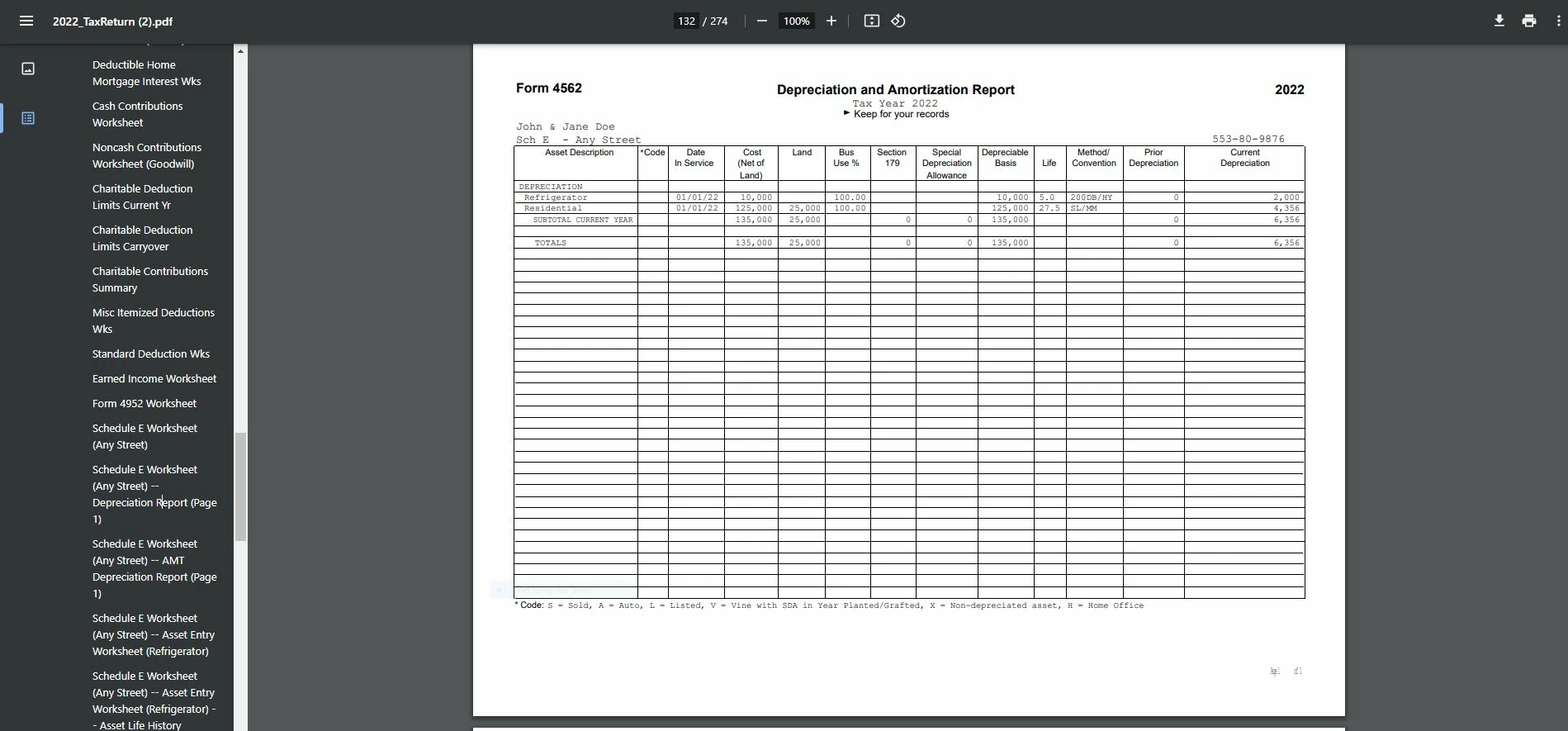
@lck_rules I just downloaded a PDF of a 2022 tax return from the online editions.  It includes all the worksheets for the 2022 return.

This screenshot is an example of what is included in the 2022 download -


3 replies

DoninGA
Employee
November 19, 2023

Prior year tax returns for the online editions will include all forms, schedules and worksheets in the PDF download.

However during the transition from tax year 2022 to tax year 2023, the PDF of the prior year online tax returns will only include the forms and schedules for the tax return, no worksheets will be included.


Once the the TurboTax online editions for tax year 2023 become available all the prior year PDF's will include the worksheets.

The TurboTax online editions for tax year 2023 should be available in late November or early December.


To access your prior year online tax returns sign onto the TurboTax website with the User ID you used to create the account - https://myturbotax.intuit.com/


Scroll down to the section Your tax returns & documents.  Click on the Year and Click on Download/print return (PDF)


If you used the desktop CD/Download editions installed on your computer, the only copy of your tax data file and any PDF's will be on the computer where the return was created.  TurboTax does not store online any returns completed using the desktop editions.

lck_rulesAuthor
March 26, 2024

Is this still the case? I cannot easily find things like my depreciation schedules (i.e. worksheets) using this method. Please help.

CatinaT1
March 26, 2024

Click on Tax Tools on the left side of the online program screen.  Then click on Print Center.  Then click on Print, save or preview this year's return.  Choose the option Include government and TurboTax worksheets 

**Say "Thanks" by clicking the thumb icon in a post**Mark the post that answers your question by clicking on "Mark as Best Answer"
lck_rulesAuthor
March 27, 2024
PatriciaV
Employee
March 27, 2024

On the screenshot posted above, you would click on the tax year under "Your Tax Returns $ Documents," then "Download/Print PDF."


After you open your current year tax return, the Tools menu will appear in the left column. Follow the instructions from CatinaT1 above to print/save your prior year return. The depreciation schedule is included in the full set of tax return documents.


@lck_rules 

**Say "Thanks" by clicking the thumb icon in a post**Mark the post that answers your question by clicking on "Mark as Best Answer"
April 2, 2024

For the online version, the trick seems to be:


 - start an "amended return" for the year you want.

 - go to print center

 - print it again, with worksheets included


April 10, 2024

This works 👍




