March 3, 2025
Question

Check This Entry CA 565, p1-3: Line 8: Total Sched D-1 gain shouldn't be less than or equal to zero.

  • March 3, 2025
  • 2 replies
  • 0 views

This is on TT business edition to create Form 1065 for partnership.  

This is the final tax and there are sales of business property. 

At California Partnership\Reviewing your return,  it showed:

Check This Entry 

   CA 565, p1-3: Line 8: Total Sched D-1 gain shouldn't be less than or equal to zero.

   Line 8 0 

   Line 8  is "Total gains included on Schedule D-1, Part II, line 17 (gain only)

   Line 9  is "Total losses included on Schedule D-1, Part II, line 17 (loss only)


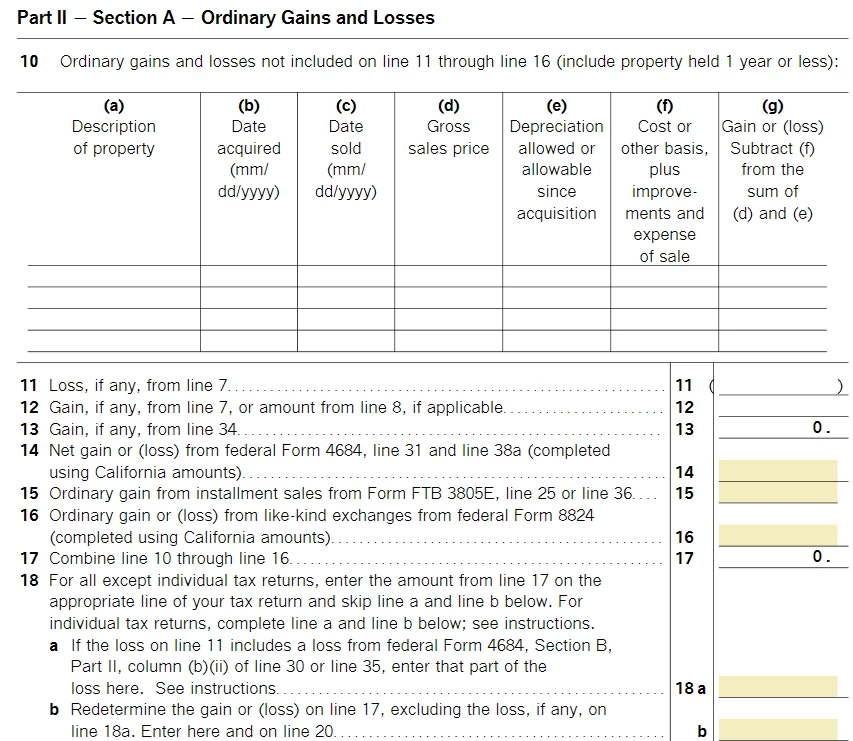
But Line 17 in California Schedule D-1, is 0. It looks like TT didn't  calculate Line correctly.

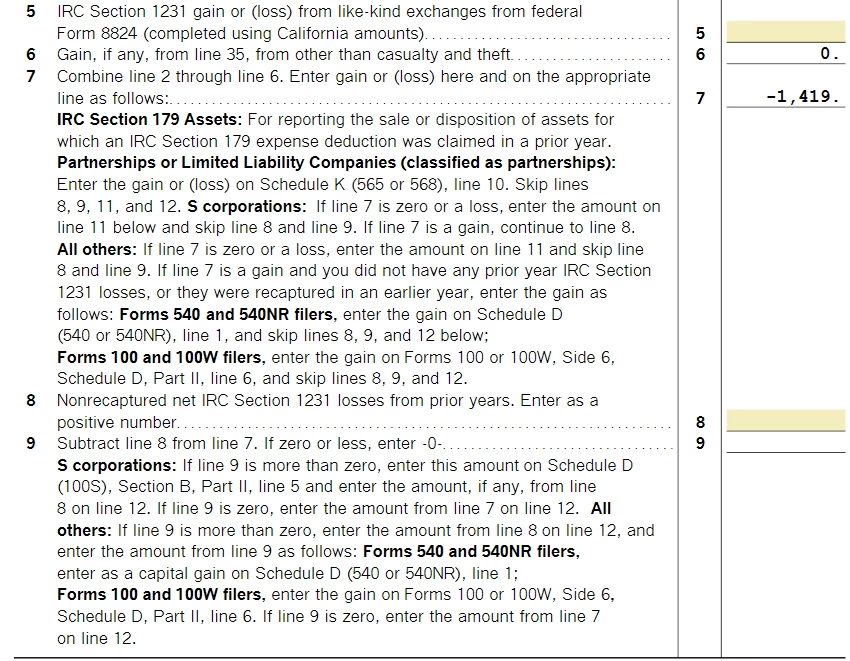
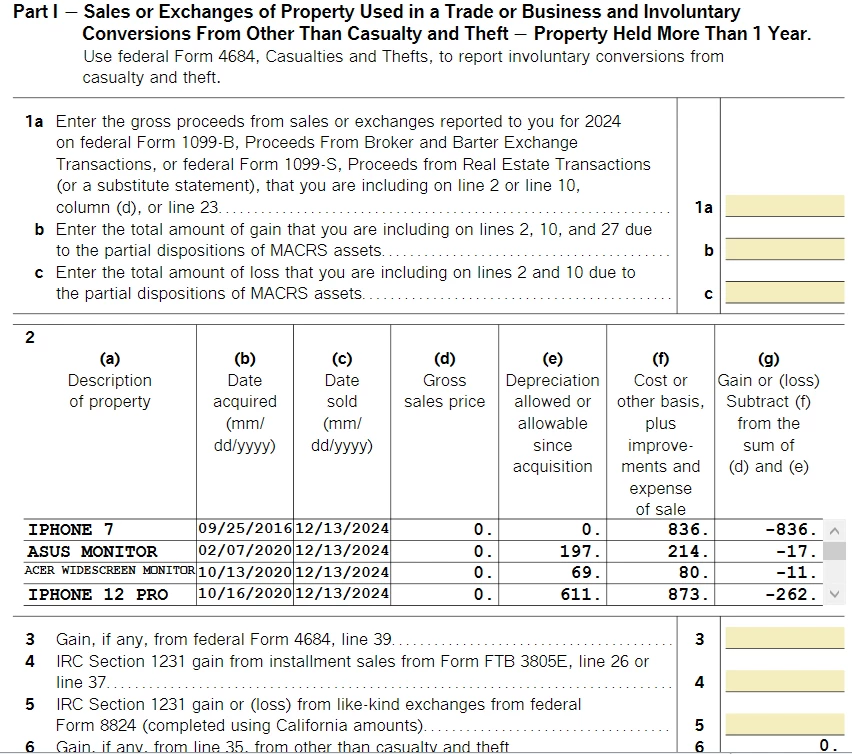
As shown in screenshots attached,

Line 17 "Combine line 10 through line 16" = 0

Line 11 or line 12 is from Line 7 empty

Line 7 is -1419.

So Line 17 shouldn't be zero. 

What should I do?
 

2 replies

PatriciaV
Employee
March 6, 2025

It would be helpful to have a TurboTax ".tax2024" file to test this issue further.


If you would be willing to send us a “diagnostic” file that has your “numbers” but not your personal information, please follow these instructions: 


In TurboTax Desktop, open your return and go to Online in the TurboTax header. (On a Mac computer, choose Share or Help.)

  1. Choose Send Tax File to Agent.
  2. You will see a message explaining what the diagnostic copy is.  Click Send on this screen and wait for the Token number to appear.
  3. Reply to this thread with a screenshot of your Token number (this avoids Community filters for numbers with a dash) and tag (@) the Expert requesting the token from you.
  4. Please include any States that are part of your return - this is VERY important.

We will then be able to see the same experience you are having. If we are able to determine the cause, we'll reply here and provide you with a resolution. 

**Say "Thanks" by clicking the thumb icon in a post**Mark the post that answers your question by clicking on "Mark as Best Answer"
xjmoAuthor
March 6, 2025

@PatriciaV 

Following the instruction, the tax file was sent. Please find out the token number as attached.

Please check if California state is included because "Sending Tax File to Agent" doesn't provide the option to include "States" or not.

As the deadline is Mar 15, it will be great to resolve the issue ahead. Thanks.


March 8, 2025

We have encountered the same error message. Since the deadline of filing is 3/15/25, it will be great if the problem can be resolved soon. 

March 17, 2025

Experiencing the very same problem with my return as noted in subject above.  Did not see a resolution on how to delete zero since there is actually a loss from D part II line 17 (which is reflected on the next line of form 565).  

xjmoAuthor
March 17, 2025

I am still waiting for the solution from TurboTax @PatriciaV 

Hopefully the case is escalated.