

Solved
Create 1099.
When attempting to create 1099 it takes me to Starting New Return.
When attempting to create 1099 it takes me to Starting New Return.
You can do them 2 different ways from the Windows Desktop Home & Business program. Either Online using Quick Employer Forms (QEF) -or- directly on your computer using Create forms on Desktop. If you use Create Forms on your Desktop you have to mail them to the IRS and not efile.
In the Window's Home & Business Desktop program to Prepare W2s or 1099s, there are 2 ways to start.
1. Go up to File - Create 1099/W-2
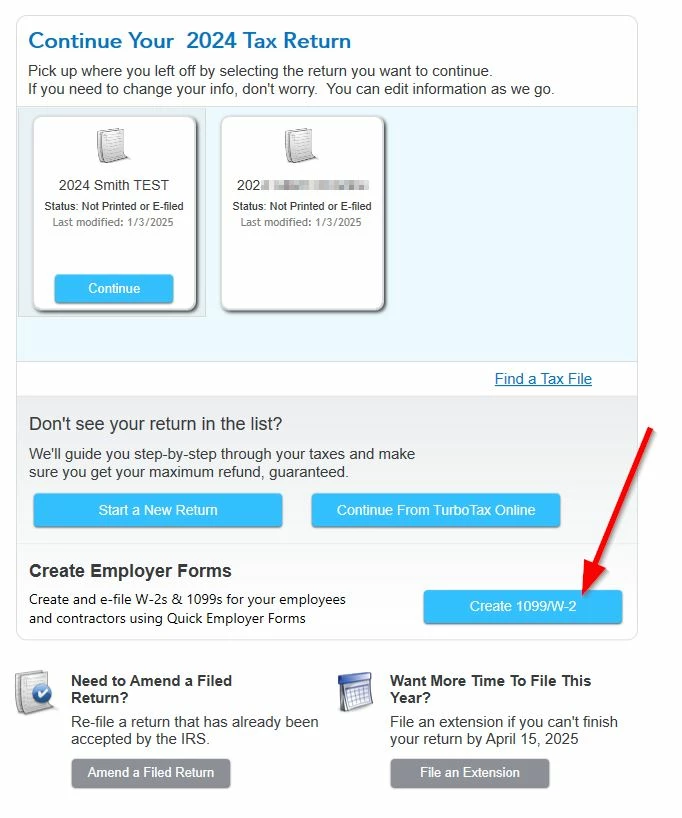
2. On the beginning screen that has the Continue box and Start a New Return blue button, below is the Create 1099/W-2 button.
Then you will get a box to Create employer forms using Quick Employer Forms OR you can pick Create forms on Desktop at the bottom. If you use Create Forms on your Desktop you have to mail them to the IRS and not efile.
Enter your E-mail address. We'll send you an e-mail with instructions to reset your password.





©1997-2022 Intuit, Inc. All rights reserved.
Intuit,
QuickBooks, QB, TurboTax, ProConnect, and Mint are registered
trademarks
of Intuit Inc. Terms and conditions, features, support, pricing,
and service options
subject to change without notice.
Security
Certification of the TurboTax Online application has been
performed by
C-Level Security.
By accessing and using this page you
agree to the
Terms of Use.
Accessibility


