
March 23, 2024
Solved

Final K-1 without sale or disposition (No Entry)

  • March 23, 2024
  • 1 reply
  • 0 views

I have a final K-1.  I selected "This partnership ended in 2023" and "no entry", the K-1 should look like this, and that should be the end of it.
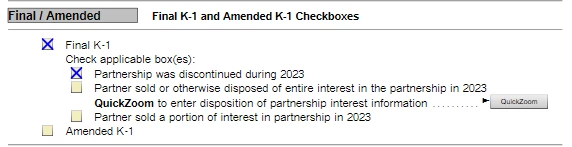
Instead, TurboTax is treating this as if the checkbox "Partner sold or otherwise disposed of the entire..." is checked.  This causes an error to be reported when I try to complete my return since there is another form ("Schedule K-1 Partnership Additional Information") needed if the "Partner sold..." checkbox is checked.  However, my return should not need this additional information form.


How can I complete the final K-1 correctly and complete my return when TurboTax is incorrectly requiring the additional form?

    Best answer by dpalmour

    I was able to resolve this issue by deleting the K-1 forms and starting over.  Apparently, I had originally selected something other than "No Entry", but when I updated the answer to No Entry, TurboTax did not clean up after itself.


    Deleting the K-1 forms and entering without making any mistakes or changes solved the problem.

    1 reply

    dpalmourAuthorAnswer
    March 23, 2024

    I was able to resolve this issue by deleting the K-1 forms and starting over.  Apparently, I had originally selected something other than "No Entry", but when I updated the answer to No Entry, TurboTax did not clean up after itself.


    Deleting the K-1 forms and entering without making any mistakes or changes solved the problem.

    September 17, 2024

    thank you! this simple advice worked




