
February 28, 2023
Solved

Other additions/subtractions stmt (225) - code A-101 must be entered HELPPP

  • February 28, 2023
  • 5 replies
  • 0 views

I am trying to file the NY nonresident state tax, and I can't E-File due to this issue I went through a previous similar form and I tried going over  the instruction below to clear your Form IT-225 error:

  1. Go to your New Your return.
  2. Continue through the screens until you get to a page titled, Changes to Federal Income.
  3. Scroll down to the section Other New York adjustments to federal income and click Start next to Other Changes (adjustments) to your federal income.
  4. Delete any entries on the next two screens (including any zeros). 

but i don't have anything there in the first place. However, i do have on my W2 Box 14 (Other) NY-PFL  $

not sure if that is what's causing the issue. other than that all of my Changes to Federal Income are blank.

so if anyone can please help me out that would be much appreciated.

PS: in the screenshot attached that's what i see when is prompting me to fix mt NY State
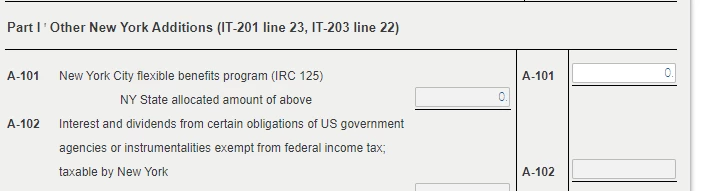
 

Best answer by AbrahamT

Why don't you try to simply delete it from the form and see what happens.  Double check your initial input in the federal side and make sure the category  box in Line 14  correctly indicates that this is "Other(not classified). The program seems to be confusing this with the IRC 125 for some reason. Also try clearing cache and cookies. Log out and log back into the program again. It might simply be a browser issue.


If all is done and it works out, I invite you to join us back and share the good news with us.


Lots of luck!   

5 replies

February 28, 2023

Typically, Code A-101 which is an IT 225 adjustment  would be the NYC flexible benefits program (IRC 125) which usually appears on Box 14 input on your W2,  The NY Paid Family Leave which sometimes also appears on that Box 14 is not Code A-101 and is not an IT-225 adjustment.  See HERE. And scroll down to Addition Modifications for a listing of the codes. Recheck your federal input and make sure you entered the input on that Box 14 correctly. You may have miscode the input seems that the program recognized that you put something in for the IRC 125 when it should have been the NY PFL. 

Here's what you do

In that Box 14, your would enter NYPFL, followed by the amount, followed by Other like this

Hit continue, continue and then continue. When you get to this screen, choose Paid Family Leave.


See if this rectifies the solution. This is disability insurance which is paid by your employer with after tax dollars and is not a taxable event.

It worked for me. See if it works for you.


**Say "Thanks" by clicking the thumb icon in a post**Mark the post that answers your question by clicking on "Mark as Best Answer"
nelsakr1Author
March 1, 2023

Thank you for Abraham, Unfortunately, it didn't work, I went back to the Federal part and marked the PFL box , and made sure box 14 is corrected. also made sure there is nothing added to the Changes to Federal Income. however, I do see this in the summary,  the $397 is the PFL that i added in box 14.


I just don't understand where is this zero coming from on the left side. like there are no boxes with zero.

This is driving me crazyyyy.


Thank you for all your help

March 12, 2025

I ran into the same issue:

When I scanned my W2 with my phone, Turbo Tax incorrectly categorized field #14:

The form showed the text "Other", but Turbo Tax picked some weird random category.


Much later during the NY state validation I got the error mentioned in this post.

I had to go back and correct the W2, but that was not enough:

I also had to delete the NY part and redo it.


I hope this helps.

March 14, 2025

I had this exact same issue and was getting extremely frustrated until I discovered the solution. You have to go back through your NY state return. There are a bunch of places where it asks what portion of income was attributable to NY. For me, these were all 0, so I was just entering 0 quickly and moving on. However, on one part the pre-filled number was blank and I still put 0 as the amount attributable to NY. This is what caused the circular issue. When I went back and left that part blank instead of entering 0, it solved the problem immediately. Hope this helps!

March 14, 2025

I went back and redid my NY from scratch and carefully did not enter any 0's anywhere.


Didn't work.

March 15, 2025

I would like to take a deeper look at this. However, I need a diagnostic file which is a copy of your tax return that has all of your personal information removed. You can send one to us by following the directions below:


TurboTax Online:

  1. Sign into your online account.
  2. Locate the Tax Tools on the left-hand side of the screen.
  3. A drop-down will appear. Select Tools
  4. On the pop-up screen, click on “Share my file with agent.”
  5. This will generate a message that a diagnostic file gets sanitized and transmitted to us.
  6. Please provide the Token Number that was generated in the response.

TurboTax Desktop/Download Versions:

  1. Open your return.
  2. Click the Online tab in the black bar across the top of TurboTax and select “Send Tax File to Agent” *
  3. This will generate a message that a diagnostic copy will be created.  Click on OK and the tax file will be sanitized and transmitted to us.
  4. Please provide the Token Number (including the dash) that was generated in the response.

*(If using a MAC, go to the menu at the top of the screen, select Help, then, “Send Tax File to Agent”)


**Say "Thanks" by clicking the thumb icon in a post**Mark the post that answers your question by clicking on "Mark as Best Answer"
March 22, 2025

We ran into the same issue. A very patient TurboTax agent helped us resolve it. Here is our solution.


Step 1
On your TurboTax home page, click "Add a State" at the bottom. This allows you to edit your tax forms.


Step 2

Go to Wages and Incomes and edit box 14 for your NY W2 . Fill in NYPFL with category "Other (not classified)" as other people recommended. 


Step 3

Go back to home page -> Tax Tools -> Tools -> Delete a form -> scroll down to NY state documents, delete the document related 225 adjustment (can't recall the exact file name). Then you should be able to e-file NY return.


March 22, 2025

OH MY GAWDDD!!!!!!!!!!!!!! This is the answer!!!!!  Thank you so so so so much!!


The form to delete is titled, "Other Additions/Subtractions Stmt (225)"


Finally, my taxes are filed!!!


THANK YOU SO MUCH!!!

March 27, 2025

My solution was when it takes you to the page showing you the error, just delete the zero. Don’t put anything in that field. Nothing at all. Leave it blank. That fixed it for me. Weird error.




