
March 6, 2023
Question

Schedule F loss carryover

  • March 6, 2023
  • 1 reply
  • 0 views

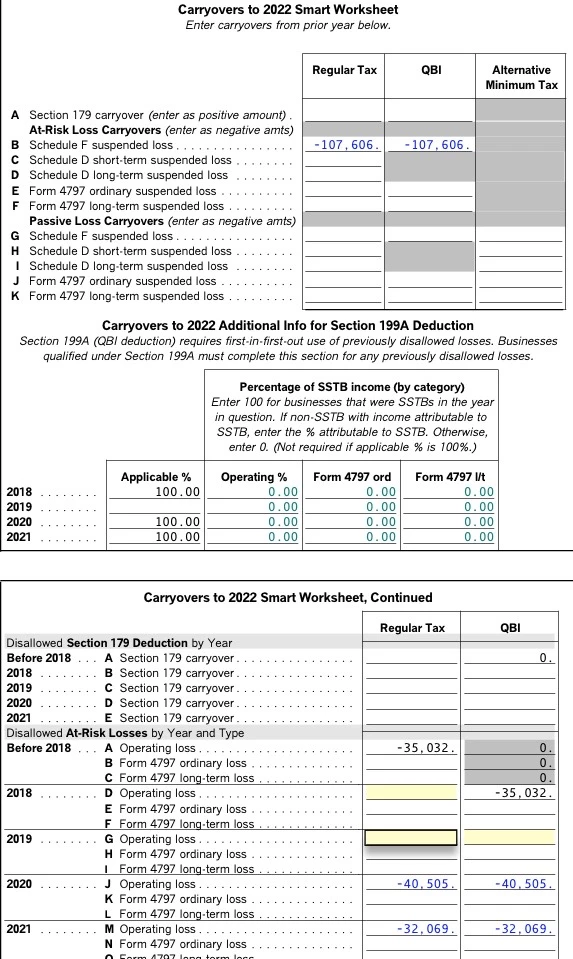
On schedule F I need to carryover QBI loss. Im confused about the regular tax column vs the QBI column. The second worksheet was prefilled from previous years of turbo tax and I needed to fill Line B of the top page. Im assuming I add up the prefilled numbers and use them for Line B on the top. Please advise if I've done this correctly. Also any any advice on the suspended loss "regular tax" vs "QBI". The easy step was even more confusing and not much help. Thanks
    1 reply

    AliciaP1
    March 6, 2023

    Yes, you have filled it out correctly.  There are 2 columns because there are some instances where all the income or loss from a business does not qualify as QBI so there may be a difference between regular (NOL) and QBI.  Since your page 2 of your Carryover Worksheet populated and shows the amounts as the same, you correctly totaled them and included them on Line B of page 1.

    **Say "Thanks" by clicking the thumb icon in a post**Mark the post that answers your question by clicking on "Mark as Best Answer"
    farmer875Author
    March 6, 2023

    Ok great but my next question is why does it add both QBI loss and Regular tax loss together on line 3. It only shows $-107606 for schedule F deduction but here they are both added together and looks like a have a far greater loss. Mabe I'm reading into too much? Thanks

    AliciaP1
    March 6, 2023

    No, you're not reading into it too much!  It would be helpful to have a TurboTax ".tax2022" file that is experiencing this issue.


    You can send us a “diagnostic” file that has your “numbers” but not your personal information.  If you would like to do this, here are the instructions: 


    In TurboTax Online, go to the black panel on the left side of your program and select Tax Tools. 

    1. Then select Tools below Tax Tools. 
    2. A window will pop up which says Tools Center.  
    3. On this screen, select Share my file with Agent. 
    4. You will see a message explaining what the diagnostic copy is.  Click okay through this screen and then you will get a Token number. 

    In TurboTax CD/Download versions, go to the black panel on the top of your screen and select Online. 

    1. Scroll down to and select Send tax file to Agent. 
    2. You will see a message explaining what the diagnostic copy is.  Click send through this screen and then you will get a Token number. 

    Reply to this thread with your Token number. This will allow us to open a copy of your return without seeing any personal information.   

    We will then be able to see exactly what you are seeing and we can determine what exactly is going on in your return and provide you with a resolution.


    @farmer875 

    **Say "Thanks" by clicking the thumb icon in a post**Mark the post that answers your question by clicking on "Mark as Best Answer"




