
January 28, 2021
Solved

Charitable contributions error

  • January 28, 2021
  • 7 replies
  • 0 views

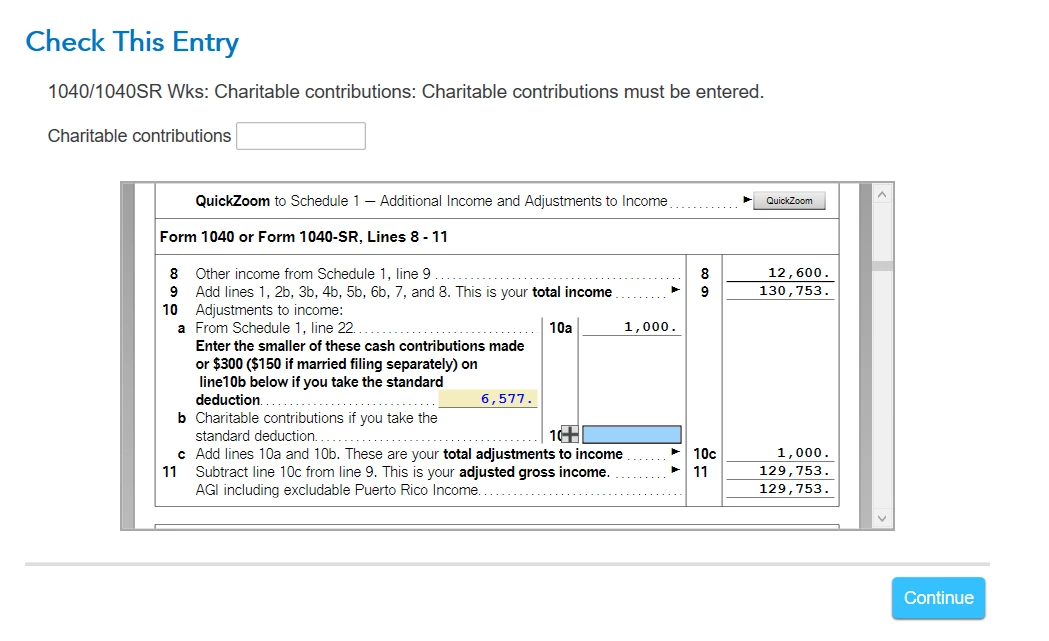
see image below.  Not sure what to enter.  I think it's $25, that's the smallest cash contribution made.  please advise.
    Best answer by VolvoGirl

    Enter nothing.  You don't get a credit on that line.  You are already taking it as part of your Itemized Deductions.  You only get the extra on 10b if you are taking the Standard Deduction.  And if you do qualify for an amount on 10b Turbo Tax will automatically fill it in.  


    WAIT!  You are getting the Standard Deduction.  You must both be over 65.  The Standard Deduction is 24,800+1,300 each = 27,400 for Joint.  So go though the deduction section and enter your charity amounts.  Then keep going and finish that section.  It should say the Standard Deduction is right for you.  Then it will add the amount to line 10b.

    7 replies

    January 28, 2021

    are you itemizing? if so you don't get the page 1 deduction.  if you aren't, despite what TT may say

    10b has to be entered manually . note I use desktop version and found no matter how I entered contributions for schedule A nothing flowed to 10a or b

    bobaloisiAuthor
    January 28, 2021

    yes, our itemized deds is $27,400 (line 12, 1040), standard deds is $24,800.  still not sure what to enter in line 10b?

    VolvoGirl
    Employee
    January 28, 2021

    Enter nothing.  You don't get a credit on that line.  You are already taking it as part of your Itemized Deductions.  You only get the extra on 10b if you are taking the Standard Deduction.  And if you do qualify for an amount on 10b Turbo Tax will automatically fill it in.  

    April 8, 2021

    2020 Premier Desktop

    Itemized Deductions

    Charitable Deductions entered

    1040 Worksheet line 10b = $0 (TT generated amount)

    Federal Tax error check says this is incorrect.

    --------------

    Isn't the standard deduction amount irrelevant for itemized deductions?

    Why is TT marking this as an error?


    April 8, 2021

     Yes. There is an issue with the contributions deduction and TurboTax is working to fix it.  We do not have an estimated date of correction, at this time.  I suggest you check back often to see if the correction has been made.


    There is a problem with the Contributions section of the Itemized deductions and also the above the line $300.00 deduction.  Because of the many changes due to the CARES Act, IRS is still developing the forms and publications on this issue.  Last update was January 13th where everything is still in draft.  Once IRS finalizes the forms, we will be able to update TurboTax to accurately reflect your Contributions deduction.


    Here are some of the changes due to the CARES ACT

    The new legislation allows tax deductions on two types of charitable gifts. First, it allows up to $300 given to a qualified charity to be claimed as an above-the-line deduction. After the Tax Cuts and Jobs Act, which went into effect in 2018, increased the standard deduction, many taxpayers had less incentive to donate to charities. Instead, they took the standard deduction and stopped itemizing.


    For taxpayers who will itemize deductions, the CARES Act effectively suspends the limit on deductions for cash contributions to public charities for 2020.  “That allows individuals to completely wipe out their AGI, and their tax liability, with a charitable contribution.

    **Say "Thanks" by clicking the thumb icon in a post**Mark the post that answers your question by clicking on "Mark as Best Answer"
    April 27, 2021

    @Cynthiad66I believe my situation is common to most users encountering this issue, which I'll just spell out for clarity -- I am taking the Standard Deduction. Then I try to put $300 on the "Charitable Cash Contributions under Cares Act" page. Then, when I get to review my federal return, it says there is a problem -- "Cash Charitable is too large". It displays a form. Line 10a has two boxes -- one on the upper right and one on the lower left. The upper right box is empty and is not modifiable in my UI, the lower left box is modifiable and has the 300 value, which is apparently problematic. Line 10b also has 300 in it, and is also apparently problematic. Although, according to conversations in this thread, and also according to TurboTax's software, these numbers should not be problematic.


    Is this issue something that will be resolved by the tax deadline of May 17? If I zero these values out, my federal refund decreases, so I would lose money. It seems this is an issue with TurboTax, not the customers' fault -- TurboTax tells us we can claim something, but then it errors out. If we are forced to zero these values out before filing, will TurboTax reimburse us for lost refund values, given it seems to be their issue?


    In short, what course of action should we take, given this is an issue that TurboTax has been working on for at least 3 weeks (according to your message).


    Thanks

    April 16, 2021

    I checked the box for itemized deduction by mistake.  I want standard deduction but my e-mail return was rejected (031) and I cannot make a correction because I e-mailed.  How can I get help ?

    May 2, 2021

    My itemized deduction is 24,955, which includes charitable contribution of $2,400. Standard deduction is 24,800. Because IRS allows for up to $300 deduction for charitable contribution on top of the $24,800, it makes sense for me to use standard deduction and put $300 in line 10b. TurboTax doesn't how to do that yet..according to the post, they are working on an update. So I went into the forms and manually change both boxes in 10b to $300. For some odd reason, it already used standard deduction amount in 1040 form and I didn't have to change that. After that, there's no more errors reported by the software. I hope that is an ok change and it won't have issues when I e-file my taxes. Has anyone else tried that?

    DaveF1006
    May 13, 2021

    It depends. Are you itemizing or taking the standard deduction? If itemizing, the amount should be zero but if you are taking a standard deduction, you should put $25 into that section.

    **Say "Thanks" by clicking the thumb icon in a post**Mark the post that answers your question by clicking on "Mark as Best Answer"
    May 13, 2021

    Thank you @DaveF1006 for the quick response!


    My full story is a few comments, above, here. But the short version is that I'm taking the standard deduction. So, just to clarify, the $300 charitable contributions deduction has been finalized with the IRS to max out at $25, instead, and will not change from there?


    Thanks

    DaveF1006
    May 13, 2021

    If you made cash donations up to $300, that is the amount that is recorded in Box10B. I am not sure what you mean by the maximum cash contribution allowed is $25 but Turbo Tax might be taking this from what you entered in the charitable contribution section in deductions and credits.  If this is the case, remove all your entries from federal>deductions and credits>charitable donations. Delete everything entered in this section and then go back a record up to a $300 cash donation for standard filers.


    You may need to go to your forms:

    1. IF TT Online, go to tax tools>tools>delete a form>delete and charitable contribution worksheet in the forms.
    2. If using software, go to the forms mode>locate the charitable contribution worksheet 
    3. Locate it in your list of forms>select it>delete at the bottom

    After this is done, go to federal>deductions and credits>scroll through each page until you reach a page informing you that the standard deduction is right for you. in the very next page is where you will enter up to $300 cash donation made.

    ,  

    **Say "Thanks" by clicking the thumb icon in a post**Mark the post that answers your question by clicking on "Mark as Best Answer"
    May 15, 2021

    I receive an error for line 10a and 10b. The software populated 10a with 3810 and 10b with 300. I have reviewed my chartable donations which total 12885.  I am at a loss as to how to correct the error. I have deleted my charitable  deductions and re-entered them and still get the same error.

    KathrynG3
    May 15, 2021

    To clear this error, return to the Deductions & Credits section of your return. Scroll down to the end and select Done with This Donation


    Continue through the screens so that TurboTax will optimize between the standard deduction and itemizing deductions. There will eventually be a Cares Act Charitable Donation screen. Do not enter anything in this field. Highlight and delete it completely so that TurboTax will not count the entry as an override.


    Form 1040, page 1, Line 10a is coming from Schedule 1, Part II, Line 22. This is separate from the total Charitable Contributions. 


    Form 1040, page 1, Line 10b is the Charitable contributions if you take the standard deduction. 


    To qualify for the Cares Act above-the-line deduction up to $300 for all taxpayers except married filing separate, who would each have a maximum of $150, for standard deduction filers, the IRS clarifies that the contribution must be:

    1. a cash contribution;
    2. made to a qualifying organization;
    3. made during the calendar year 2020

    @spbeck3629


    May 17, 2021

    There is a small bug in Turbo Tax if you don't go thru the "Guide Me" option first.

    Here is the scenario:

    You are an experienced TurboTax user and open a previous year tax form.  You are then given two options initially, either "Guide Me" or "I'll explore on my own".  You decide that since you know what you are doing, you go and start immediately down the "I'll explore on my own" and begin updating the old fields with new info.  This turns out not to be a good idea.

    You should always go down the "Guide Me" path so that TurboTax can make sure that all essential fields are visited & set up.  After going down the "Guide Me" option at least once, you then can use the "I'll explore on my own" to make changes & corrections. 

    I ended going back to the "Guide Me" path and TurboTax fixed itself without me having to figure out what to do.




