February 1, 2024
Solved

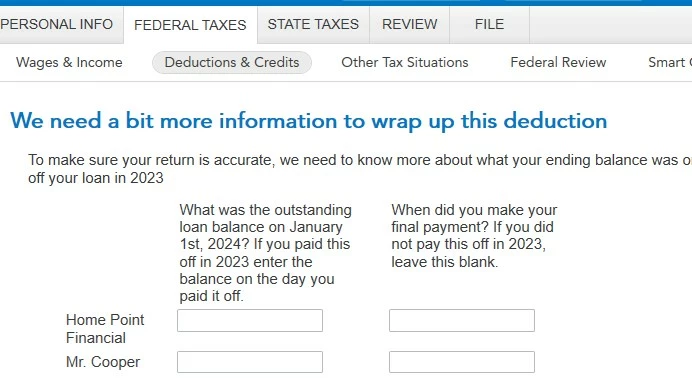
How am I supposed to fill out this mortgage interest deduction form if my loan was bought out?

  • February 1, 2024
  • 1 reply
  • 0 views
 

So I had a different company purchase my loan in the middle of 2023, it is the same loan just with a different company. How should I be filling out this form?

Best answer by MonikaK1

When a loan is sold to another lender, it’s not the same as a refinance, but you’ll still need to enter each 1098 separately.

Enter the original (sold) loan first

  1. Sign in to TurboTax and select Pick up where you left off or Review/Edit under Deductions & Credits.
  2. Select Show more next to Your Home and Start or Revisit next to Mortgage Interest and Refinancing (Form 1098).
  3. Answer Did you pay any home loans in 2023? and Continue.
  4. You can either sign in to your financial institution and import your 1098 forms, or select Change how I enter my form.
  5. Next, you can either upload a digital copy or Type it in myself.
  6. Continue through and be sure to enter this 1098 exactly as it appears.
  7. Answer the questions, and when you get to the Let's see if this is the most recent form for this loan screen, answer No to Is the 1098 you're working on now the most recent for your loan?.
  8. On the next Let's get some details about this loan screen, answer Yes to Is this the original loan you used to buy your property?
  9. Select Continue to be taken back to the Your 1098 info so far screen.

Then enter the 1098 for the new loan

  1. On the Your 1098 info so far screen, select Add another 1098 and continue through to either import or enter your information manually.
  2. Answer the questions accordingly and complete your 1098 info exactly as it appears on your form.
  3. On the Let's see if this is the most recent form for this loan screen, answer Yes to Is the 1098 you're working on now the most recent for your loan?
  4. On the next Let's get some details about this loan screen, answer Yes to Is this the original loan you used to buy your property? Even though the loan is with a new lender, it's still considered the original loan for this calculation.
  5. When you're all done, you'll see both your forms on the Your 1098 info so far screen. You can Continue through to finish and file your return.

See this TurboTax help article for more information.


@kevinguyen1128 

 

1 reply

February 1, 2024

On the old loan, the balance would  be zero. On the new loan, it would be the amount that was transferred over from the old loan.  See HERE under yzhong

**Say "Thanks" by clicking the thumb icon in a post**Mark the post that answers your question by clicking on "Mark as Best Answer"
February 1, 2024

It seems strange that you are getting this screen. See if this works better for you: For the first 1098, do not pick that it has been refinanced or paid off in 2023. It hasn't. Select 'Not The Latest 1098' for this 1098 and 'Is The Latest 1098' for the second 1098. Enter all info exactly from both 1098s.

MonikaK1Answer
February 3, 2024

When a loan is sold to another lender, it’s not the same as a refinance, but you’ll still need to enter each 1098 separately.

Enter the original (sold) loan first

  1. Sign in to TurboTax and select Pick up where you left off or Review/Edit under Deductions & Credits.
  2. Select Show more next to Your Home and Start or Revisit next to Mortgage Interest and Refinancing (Form 1098).
  3. Answer Did you pay any home loans in 2023? and Continue.
  4. You can either sign in to your financial institution and import your 1098 forms, or select Change how I enter my form.
  5. Next, you can either upload a digital copy or Type it in myself.
  6. Continue through and be sure to enter this 1098 exactly as it appears.
  7. Answer the questions, and when you get to the Let's see if this is the most recent form for this loan screen, answer No to Is the 1098 you're working on now the most recent for your loan?.
  8. On the next Let's get some details about this loan screen, answer Yes to Is this the original loan you used to buy your property?
  9. Select Continue to be taken back to the Your 1098 info so far screen.

Then enter the 1098 for the new loan

  1. On the Your 1098 info so far screen, select Add another 1098 and continue through to either import or enter your information manually.
  2. Answer the questions accordingly and complete your 1098 info exactly as it appears on your form.
  3. On the Let's see if this is the most recent form for this loan screen, answer Yes to Is the 1098 you're working on now the most recent for your loan?
  4. On the next Let's get some details about this loan screen, answer Yes to Is this the original loan you used to buy your property? Even though the loan is with a new lender, it's still considered the original loan for this calculation.
  5. When you're all done, you'll see both your forms on the Your 1098 info so far screen. You can Continue through to finish and file your return.

See this TurboTax help article for more information.


@kevinguyen1128 


**Say "Thanks" by clicking the thumb icon in a post**Mark the post that answers your question by clicking on "Mark as Best Answer"