June 6, 2019
Solved

How and on what proceeds do I report the sale of a second home where there is no 1099-B, 1099-S or Escrow Settlement Statement? If it was a private sale?

  • June 6, 2019
  • 1 reply
  • 0 views

This was a private sale between relatives handled by a family attorney using a "Purchase and Sale Agreement" with no Real Estate agents involved. Buyer paid the Seller via a cashiers check. Grant Deed transfer and recording were handled by the attorney.

    Best answer by Irene2805

    UPDATED FOR TAX YEAR 2019


    The sale of a second home or vacation home is considered a sale of an investment.  You can report the sale in TurboTax using these steps:

    1. Click on Federal > Wages & Income
    2. In the Investment Income section click on the Start/Revisit box next to Stocks, Mutual Funds, Bonds, Other.  
    3. If you have already entered some investment sales, you will see a screen Here's the investment sales info we have so far.  Click on the Add More Sales link.  
    4. If you haven't yet entered some investment sales, you will see a screen Did you sell any investments in 2019?  Click the Yes box.
    5. On the screen, Did or will you receive a 1099-B form, mark the No button and click Continue
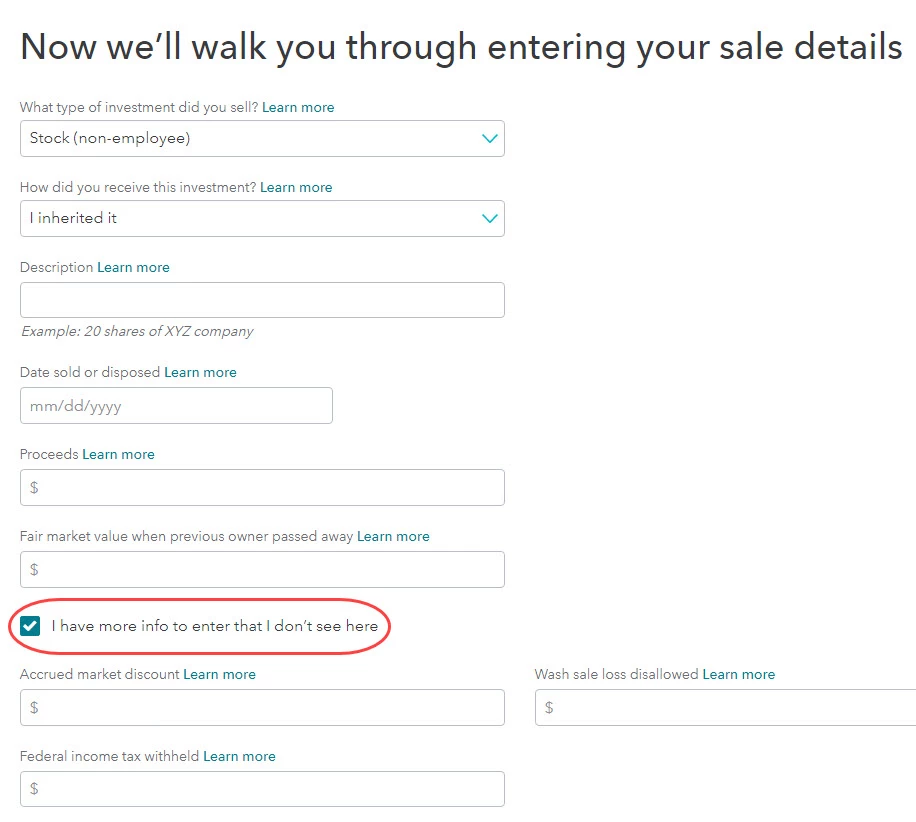
    6. On the screen, Now we’ll walk you through entering your sale details, select Second home from the list in the first box.
    7. Fill in the rest of the boxes with the sale information.  Be sure to enter the NET proceeds. 
    8. If taxes were withheld from the sale, click the box I have more info to enter that I don’t see here.  Enter the taxes in the boxes that appear.  [See screenshot below.]
    9. Click Continue when done.  
    10. Continue through the screens, entering the requested information.


    [Edited | 3/31/2020 |  1:20pm PDT]

     

    1 reply

    Irene2805Answer
    June 6, 2019

    UPDATED FOR TAX YEAR 2019


    The sale of a second home or vacation home is considered a sale of an investment.  You can report the sale in TurboTax using these steps:

    1. Click on Federal > Wages & Income
    2. In the Investment Income section click on the Start/Revisit box next to Stocks, Mutual Funds, Bonds, Other.  
    3. If you have already entered some investment sales, you will see a screen Here's the investment sales info we have so far.  Click on the Add More Sales link.  
    4. If you haven't yet entered some investment sales, you will see a screen Did you sell any investments in 2019?  Click the Yes box.
    5. On the screen, Did or will you receive a 1099-B form, mark the No button and click Continue
    6. On the screen, Now we’ll walk you through entering your sale details, select Second home from the list in the first box.
    7. Fill in the rest of the boxes with the sale information.  Be sure to enter the NET proceeds. 
    8. If taxes were withheld from the sale, click the box I have more info to enter that I don’t see here.  Enter the taxes in the boxes that appear.  [See screenshot below.]
    9. Click Continue when done.  
    10. Continue through the screens, entering the requested information.


    [Edited | 3/31/2020 |  1:20pm PDT]




