April 6, 2024
Solved

How do I get Turbotax to use the 3 year GDS MACRS schedule for my race horses?

  • April 6, 2024
  • 1 reply
  • 0 views
No text available
    Best answer by DianeW777

    You are correct. The steps below will show you how to arrive at the correct recovery period of 3 years GDC MACRS.


    3-year property.

    • Tractor units for over-the-road use.
    • Any race horse over 2 years old when placed in service.
    • Any other horse (other than a race horse) over 12 years old when placed in service.
    • Qualified rent-to-own property (defined later).

    Steps to entry of your race horse:

    1. Sign into your TurboTax return > Search (upper right) > Type schedule c > Click the Jump to... link> Edit or Update beside your business
    2. Scroll to Assets > Add or Update your Asset > On the page 'Describe this Asset' select Intangibles, Other property > Continue
    3. Select Other asset type > Enter the details of your asset/race horse > Continue > Check the box 'I purchased this asset and Yes I've always used this item 100% of the time for business'
    4. Enter the date you first started using it for business > Continue > Select Asset class 3 year > Continue > Select 200% Declining Balance > Continue > 
    5. Select No 'Does this asset qualify as listed property' > Select 'I'll spread the deduction over several years (or other selection) > Continue
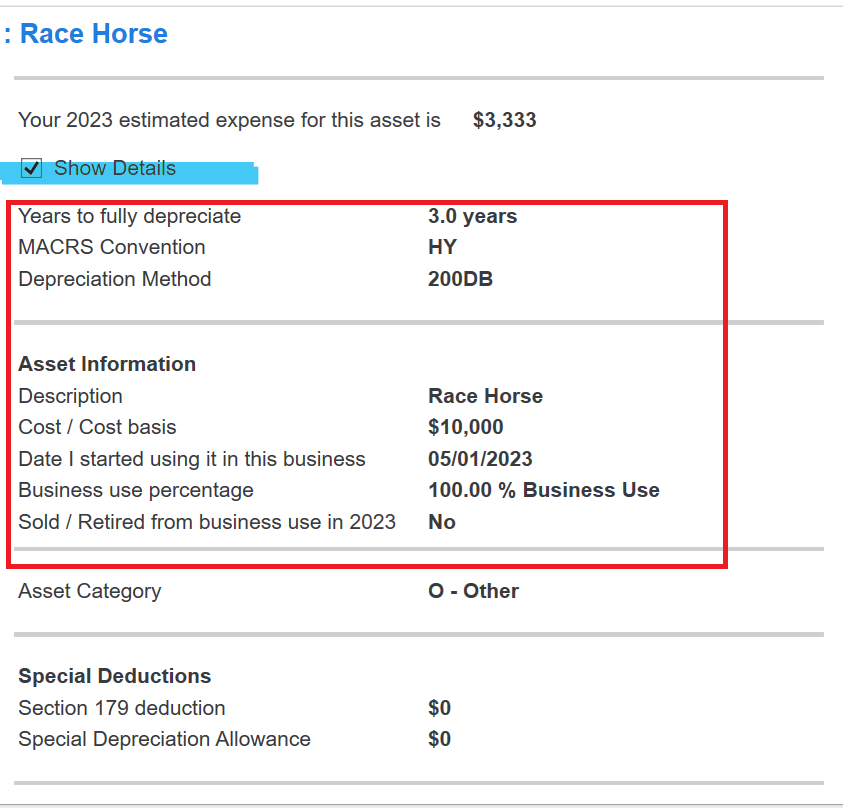
    6. Arrive at the Asset Summary > Click Show Details to see your depreciation calculations


    1 reply

    DianeW777Answer
    April 6, 2024

    You are correct. The steps below will show you how to arrive at the correct recovery period of 3 years GDC MACRS.


    3-year property.

    • Tractor units for over-the-road use.
    • Any race horse over 2 years old when placed in service.
    • Any other horse (other than a race horse) over 12 years old when placed in service.
    • Qualified rent-to-own property (defined later).

    Steps to entry of your race horse:

    1. Sign into your TurboTax return > Search (upper right) > Type schedule c > Click the Jump to... link> Edit or Update beside your business
    2. Scroll to Assets > Add or Update your Asset > On the page 'Describe this Asset' select Intangibles, Other property > Continue
    3. Select Other asset type > Enter the details of your asset/race horse > Continue > Check the box 'I purchased this asset and Yes I've always used this item 100% of the time for business'
    4. Enter the date you first started using it for business > Continue > Select Asset class 3 year > Continue > Select 200% Declining Balance > Continue > 
    5. Select No 'Does this asset qualify as listed property' > Select 'I'll spread the deduction over several years (or other selection) > Continue
    6. Arrive at the Asset Summary > Click Show Details to see your depreciation calculations


    **Say "Thanks" by clicking the thumb icon in a post**Mark the post that answers your question by clicking on "Mark as Best Answer"
    April 7, 2024

    Thank you!  That worked!  I tried it yesterday, but must made an error when I put the info in.