
March 30, 2024
Solved

K-1 smart worksheet appears to overlay prior year information for Tax Loss Carry-Forward

  • March 30, 2024
  • 1 reply
  • 0 views

I have several K-1 PTP's and each seem to have this same issue.  Box 1 is a passive loss and seems to create a tax loss carry-forward properly in the 2023 Tax Return.  As I view the "Carry Forwards to 2023 Additional Info for Section 199A Deduction, I see the following for this PTP, which is the correct information carried forward into 2023 from the prior tax year: 
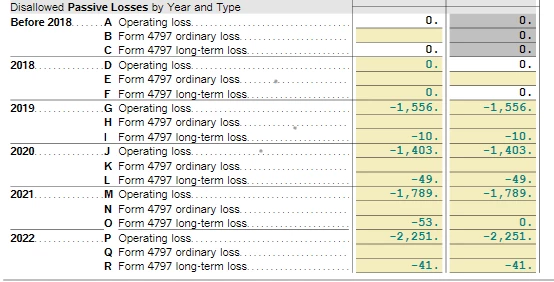


However, when scrolling further down in the form, I see the following, which appears that the new 2023 carry-forward information overlays the 2022 information for "Regular Tax":
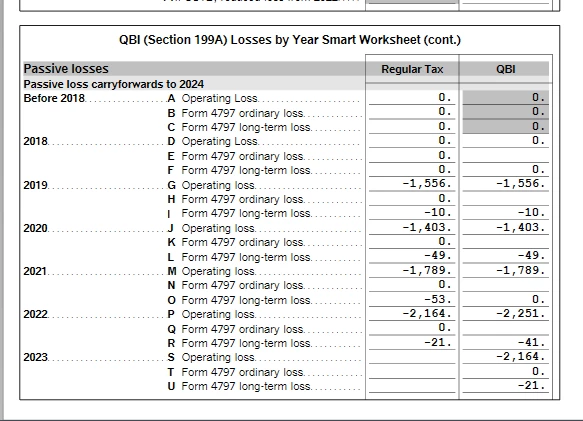
 
 
While this doesn't seem to affect this years' filing, I fear that next year the carry forward will not function properly.   I'm using TT Premier on a Windows Laptop, loaded from Disc.
    Best answer by PatriciaV

    PatriciaV


    Token # 1225649

    "K-1 smart worksheet appears to overlay prior year information for Tax Loss Carry-Forward" 


    NY state is included.

    Thank you for your help!

    @bankervp 


    We have confirmed the experience you reported and submitted this to our tech support team for investigation. We aren't expecting any updates before the filing deadline, however.


    You may wish to make note of this for next year. The carryover information will be included if you save your return in PDF format. This will allow you to refer to the correct carryover amounts when you start a new return next year and make adjustments as necessary.

    1 reply

    bankervpAuthor
    April 1, 2024

    As you can see by this screen, the "QBI suspended loss - passive" is correct and agrees to the first screen and the "Carryforward loss to 2024" is correct at -9,163.  However, in the second screen above, the 2023 detail overlays the 2022 data and the total is now short by the 2022 loss.  Is there a way to fix this information in TT or must the carryforward be adjusted in next years' filing?  Anyone have any ideas?  Is anyone else experiencing this issue?


    PatriciaV
    Employee
    April 3, 2024

    It would be helpful to have a TurboTax ".tax2023" file to test this issue further.


    If you would be willing to send us a “diagnostic” file that has your “numbers” but not your personal information, please follow these instructions: 


    In TurboTax Desktop, open your return and go to Online in the TurboTax header. (On a Mac computer, choose File >> Share.)

    1. Choose Send Tax File to Agent.
    2. You will see a message explaining what the diagnostic copy is.  Click Send on this screen and wait for the Token number to appear. 
    3. Reply to this thread with your Token number and tag (@) the Expert requesting the token from you. 
    4. Please include any States that are part of your return. 


    We will then be able to see the same experience you are having. If we are able to determine the cause, we'll reply here and provide you with a resolution. 


    @bankervp 

    **Say "Thanks" by clicking the thumb icon in a post**Mark the post that answers your question by clicking on "Mark as Best Answer"
    bankervpAuthor
    April 3, 2024

    PatriciaV


    Token # 1225649

    "K-1 smart worksheet appears to overlay prior year information for Tax Loss Carry-Forward" 


    NY state is included.

    Thank you for your help!

    @bankervp




