October 1, 2024
Solved

last year's tax refund applied for this year tax return

  • October 1, 2024
  • 1 reply
  • 0 views

I have last year's tax refund used for current year tax, how can I enter it for this year's tax return ? I can find it for Fed tax return, but can't find it for Oregon state tax return in Turbo tax

    Best answer by VolvoGirl

    It should be in the same place right under Federal.  You enter it on the federal side because it can be a federal itemized deduction if you itemize.


    Federal on left

    Deductions and Credits at top

    Then scroll way down to Estimates and Other Taxes Paid

    Income Taxes - Click the Start or Revisit


    Next page scroll down to 2022 Refund Applied to 2023

    Click Start or Update by the tax you applied


    Then for state, you need to click on the state tab and go through state again for it to update.


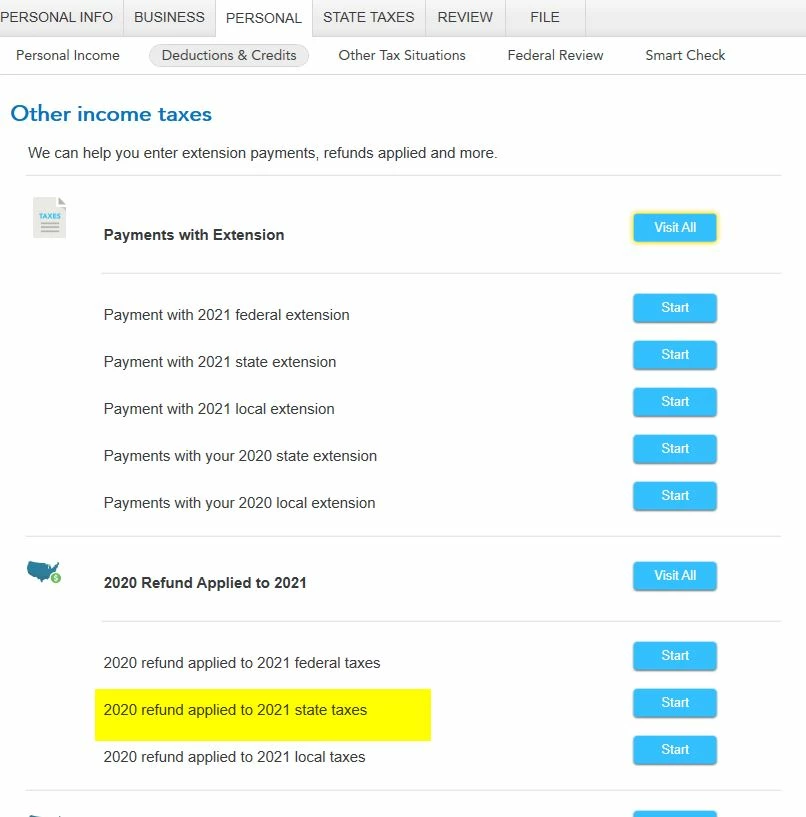
    Here is the screen from 2021.  So it should be 2022 refund  applied to 2023 state taxes


    1 reply

    VolvoGirl
    VolvoGirlAnswer
    Employee
    October 1, 2024

    It should be in the same place right under Federal.  You enter it on the federal side because it can be a federal itemized deduction if you itemize.


    Federal on left

    Deductions and Credits at top

    Then scroll way down to Estimates and Other Taxes Paid

    Income Taxes - Click the Start or Revisit


    Next page scroll down to 2022 Refund Applied to 2023

    Click Start or Update by the tax you applied


    Then for state, you need to click on the state tab and go through state again for it to update.


    Here is the screen from 2021.  So it should be 2022 refund  applied to 2023 state taxes



    October 2, 2024

    thank you!




