
March 20, 2020
Solved

1098-T

  • March 20, 2020
  • 2 replies
  • 0 views

On my 1098-T it won' t let me input the value for Box 1. It says I already inputted it, but I have not. There's not even the box available to type into and does not show the value for which it claims I already inputted.
Best answer by linaj20201

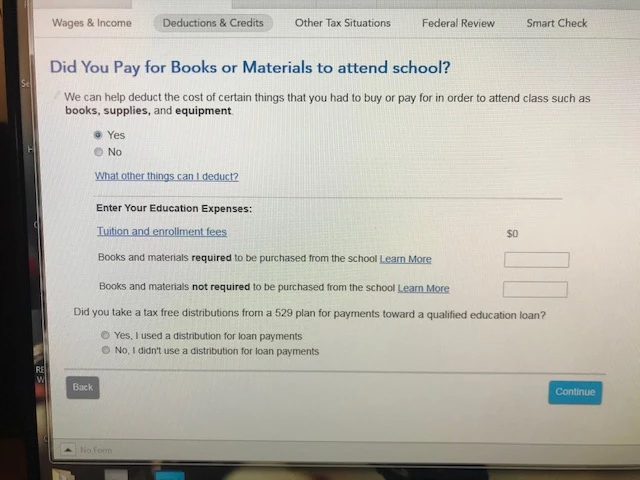
so this is what I see it never gives me the acual 1098T place to input all info...I had done 1 earlier in the day then turbo tax did an update??? could that have been the problem??


You are on the right path.  You have not reached the 1098-T screen yet.  Leave that screen blank if you did not pay for any books and supplies, then select continue. See my post and images from above. 


  • Follow prompts
  • Next screen, Your Education Expenses Summary, select Edit
  • Next screen Here's Your Education Summary, under Tuition, select Edit to enter tuition information
  • See the images above

@Zebnarz22

2 replies

March 20, 2020

I have the same problem.

March 20, 2020

To enter your Form 1098-T information, here are the steps:


In TurboTax online,

  • Sign in to your account, select Pick up where you left off
  • At the right upper corner, in the search box, type in "1098t" and Enter
  • Select Jump to 1098t
  • On the screen, Now Let's gather XYZ's Additional Education Expenses
  • Follow prompts
  • Next screen, Your Education Expenses Summary, select Edit
  • Next screen Here's Your Education Summary, under Tuition, select Edit to enter tuition information
  • See the images below.

@250935  @Zebnarz22

Zebnarz22Author
March 21, 2020

my turbo tax premier screen does not look like your and does not have the option to edit the 1098t

March 21, 2020

Try this and see if this helps.  I understand some steps may be repetitive but it should fix whatever is going on and let you continue working on your return. 

  1. Go to the input section for the 1098-T. 
  2. You will probably skip to the section titled books and supplies.  Just continue as you probably will not be able to enter any information here.  Just continue through the screen. 
  3. Do Not enter any scholarship amounts when it asks if the scholarship is listed in Box 5 of the 1098-T.  We want to avoid potentially doubling up any input already made.  Hit continue instead. 
  4. Continue through all the screens. 
  5. You may get a message which says you can't maximize because there are no expenses.  Just select continue until it takes you back to the Wages & Income screen. 
  6. Now, Go back into the "Education Credit" section. 
  7. Select "Edit" next to the student. 
  8. It will ask you if you had an education credit and show you the summary. 
  9. Select "Edit" to the right of Tuition. 
  10. It will ask you if you received a 1098-T.  Select Yes and continue. 
  11. The next page should show you your input on the 1098-T. 
  12. Continue through the screens 

This should eventually take you to the screen showing which deduction you can take. 


After you pass this screen, run a review.  The issue should resolve itself allowing you to continue to work on your return. 

**Say "Thanks" by clicking the thumb icon in a post**Mark the post that answers your question by clicking on "Mark as Best Answer"




