April 12, 2024
Solved

Can Someone Please Explain Why Entering The Actual Tuition/Expenses For 1098-T Can Reduce Fed Refund

  • April 12, 2024
  • 2 replies
  • 0 views

Our 1098-Ts are wrong. 

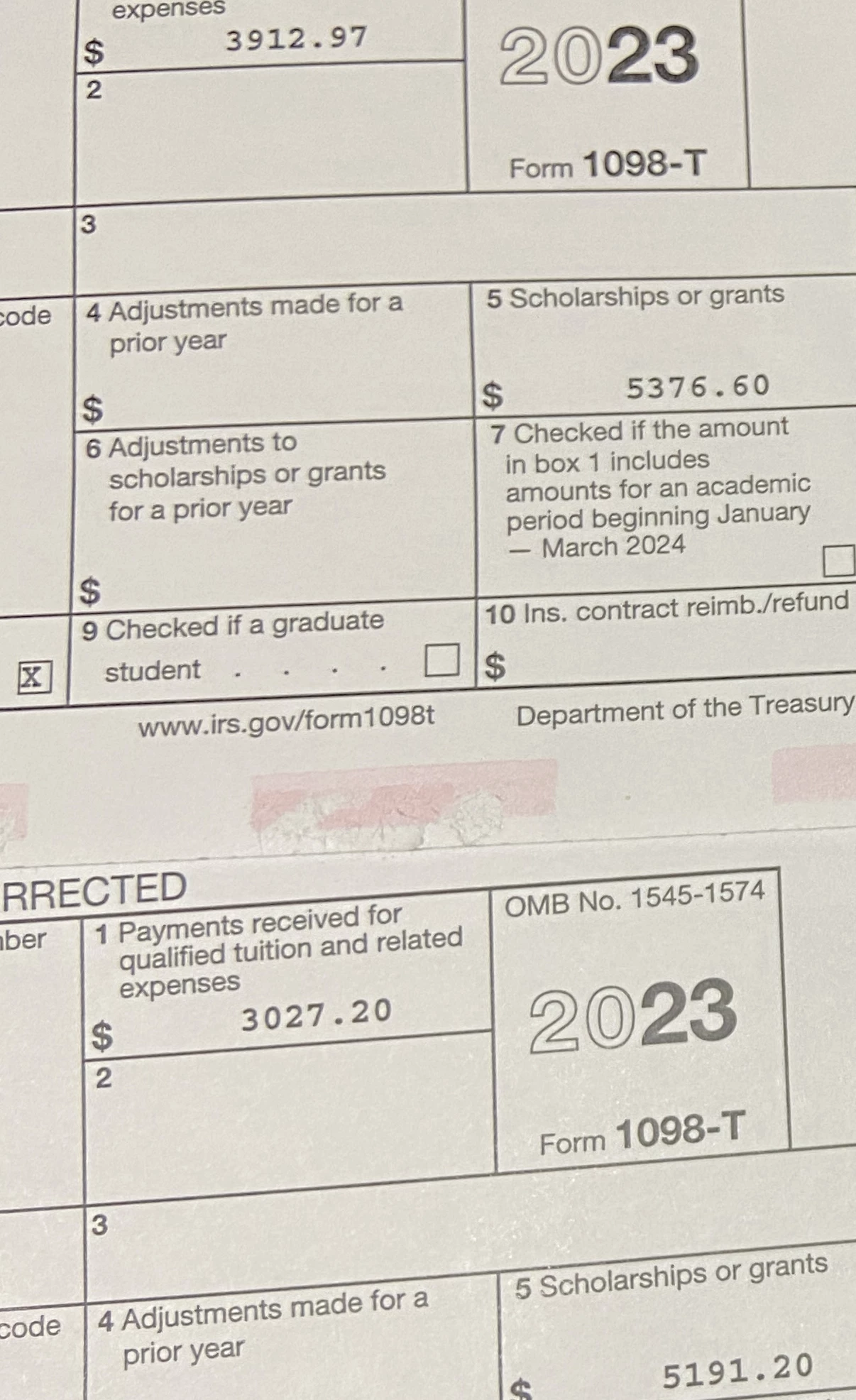
The amounts in Box 5 are Zell Miller 100% tuition scholarships, paid in January and August directly from the state of Georgia to the school, and they are correct. I simply don't understand why the numbers in Box 1 are not AT LEAST equal to the numbers in Box 5. We had to pay additional fees/expenses for each student for each semester, so the Box 1 amounts should be well over Box 5. How does this still happen in 2023/24?


The really frustrating part is that when I try to correct the Box 1 amounts in Turbotax for one student and change them from the wrong $3,027 to the correct $6,345, our Fed Refund drops by $3,053!!! This is the first time I've felt like lying on my taxes because of the extreme punishment just for trying to correct the wrong numbers distributed by the school.
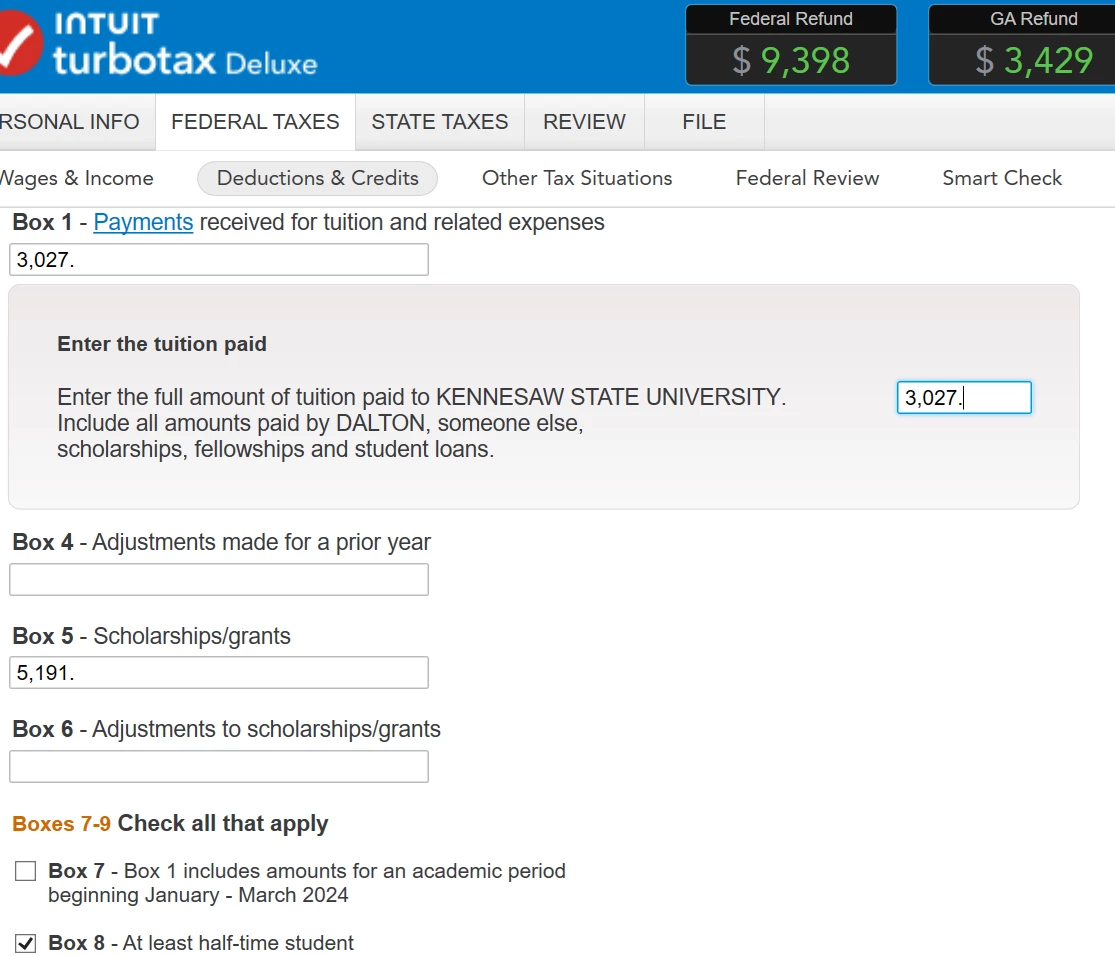
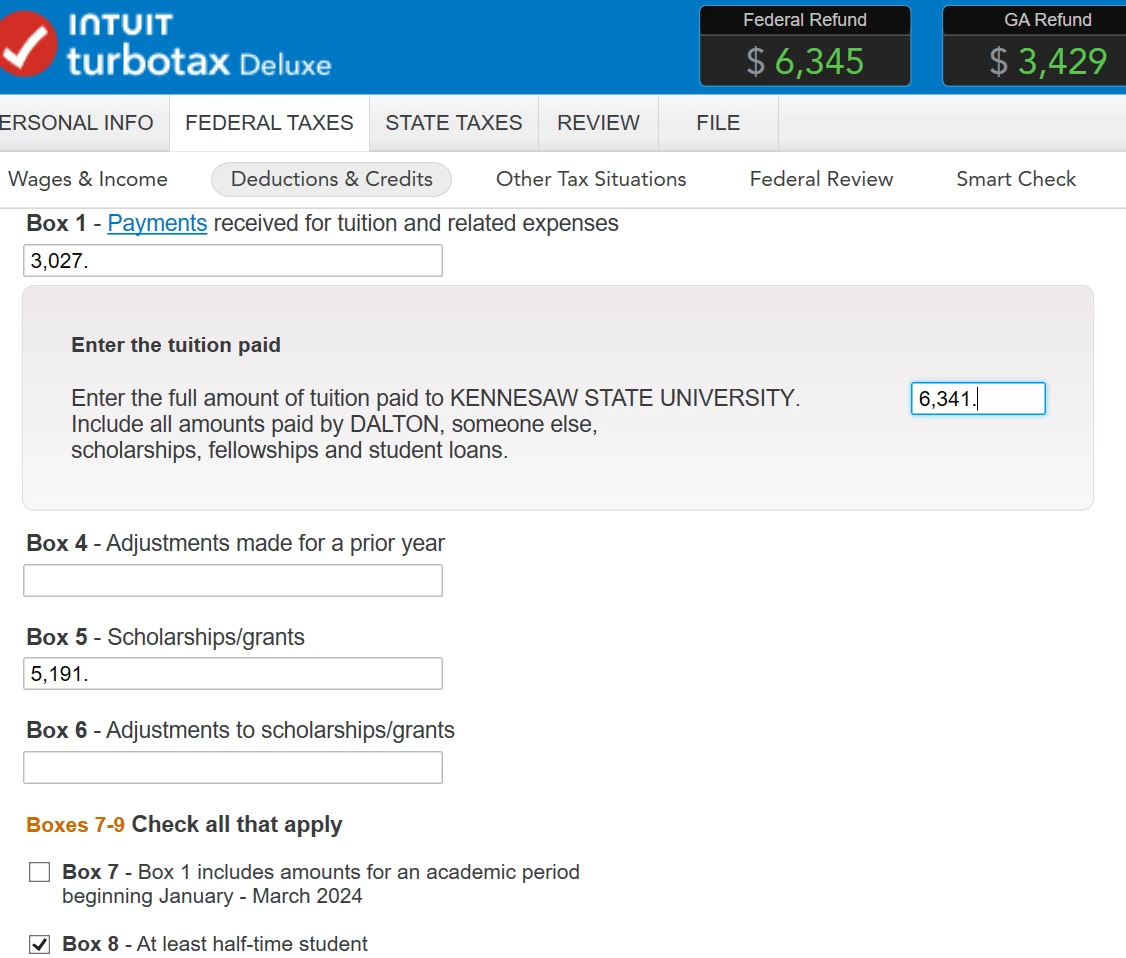


It appears to me that the Box 5 surplus over the reported Box 1 amounts is being taxed as income and providing a much larger refund than the true and accurate Box 1 numbers provide. However, if I simply DELETE all 1098-T worksheets and run the final checks before filing, TurboTax doesn't find any errors or say "you're missing 1098-T worksheets" or anything like that. And that results in the highest refund.
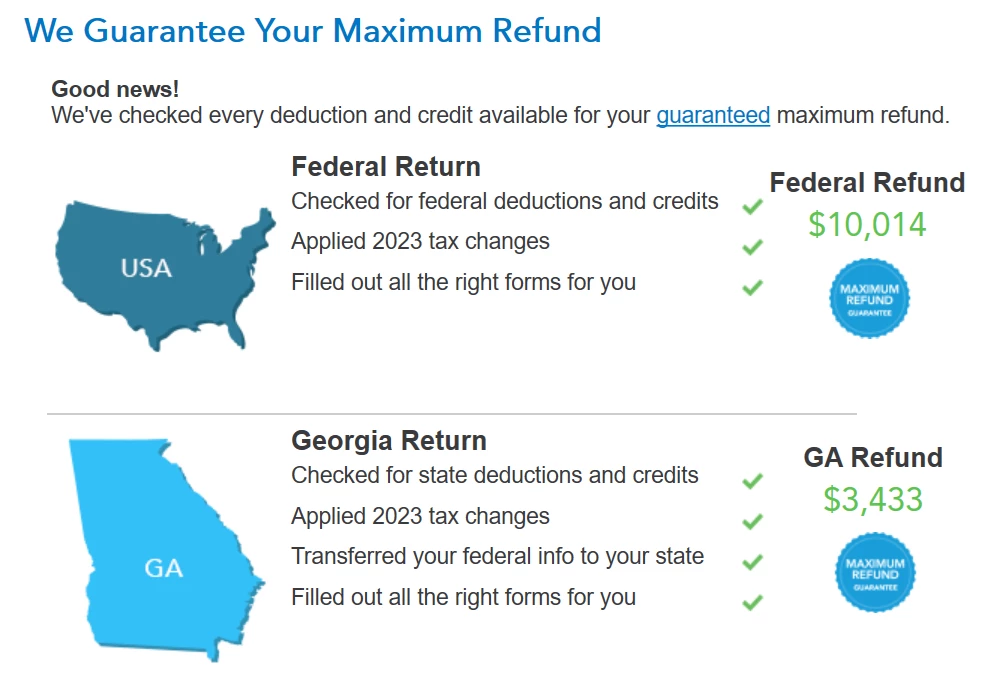
 

Obviously, I want to file legal and correct tax returns. But I'm really lost here and my head is hurting. Can someone please make some sense out of this mess? I would LOVE to wrap this up and file today and the Education Credits are the only thing preventing me from doing that.
    Best answer by TheBeaz

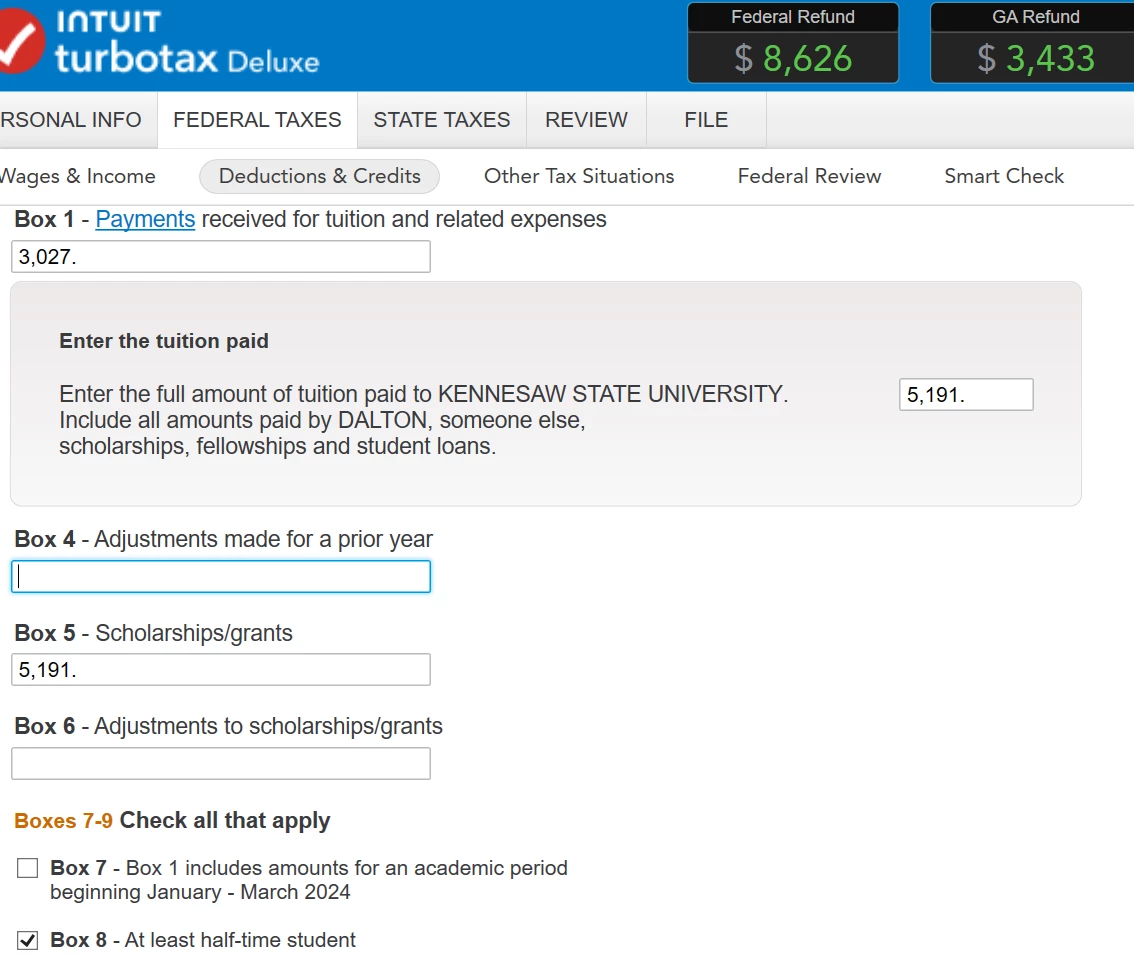
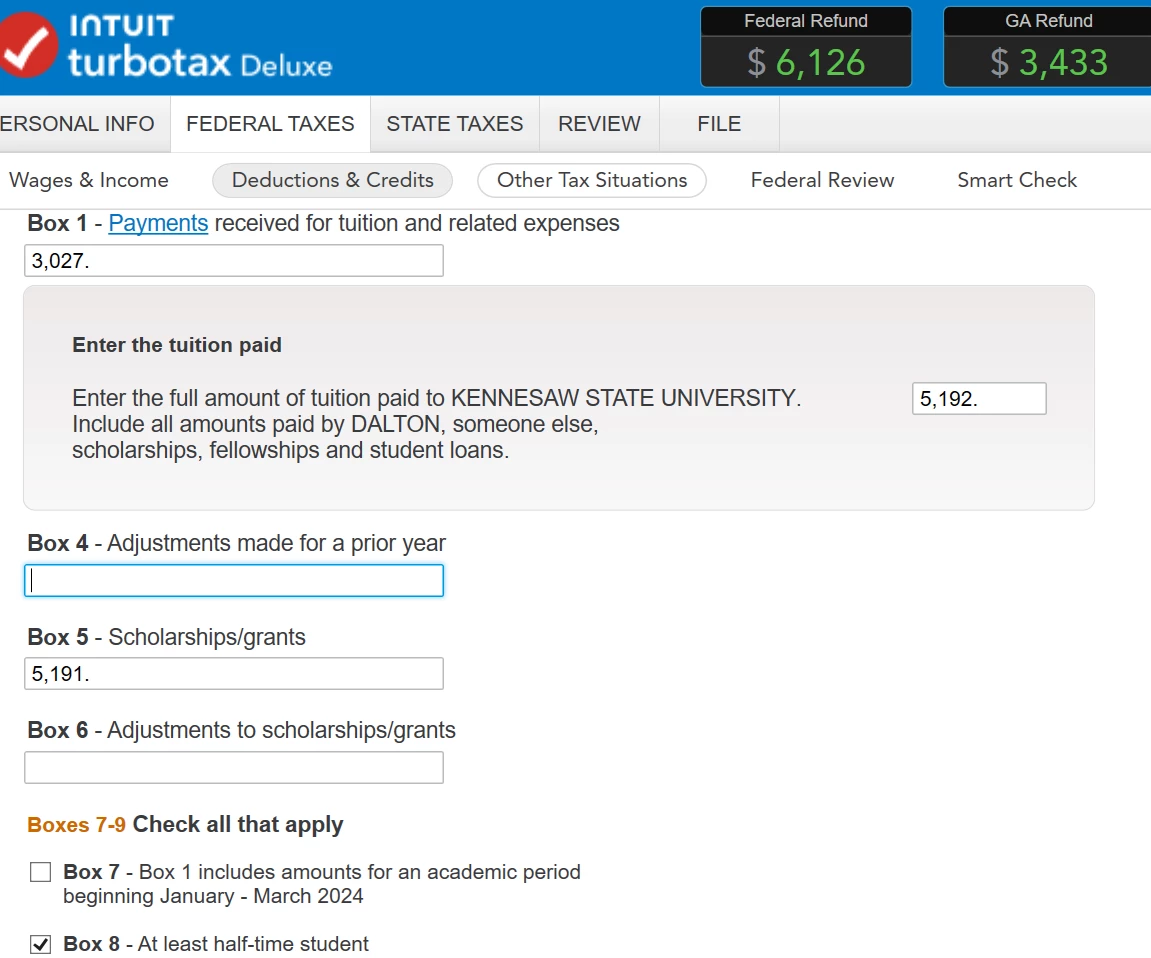
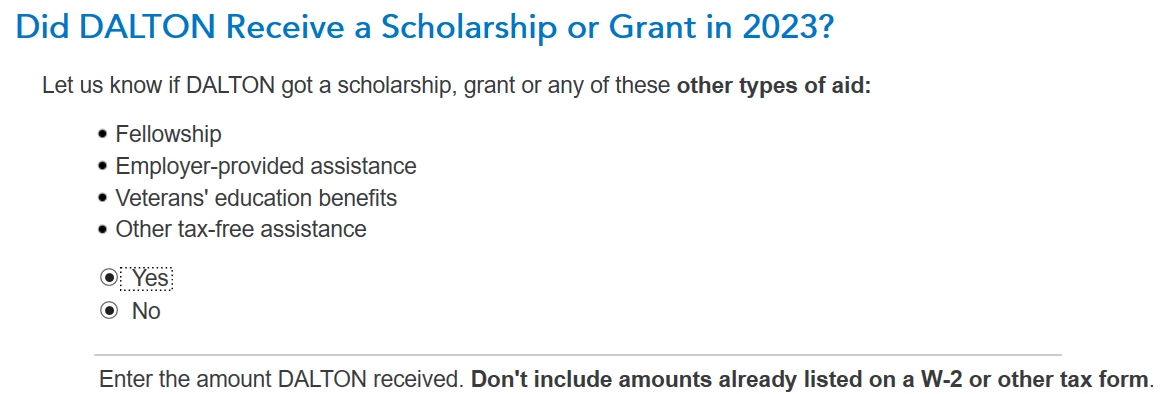
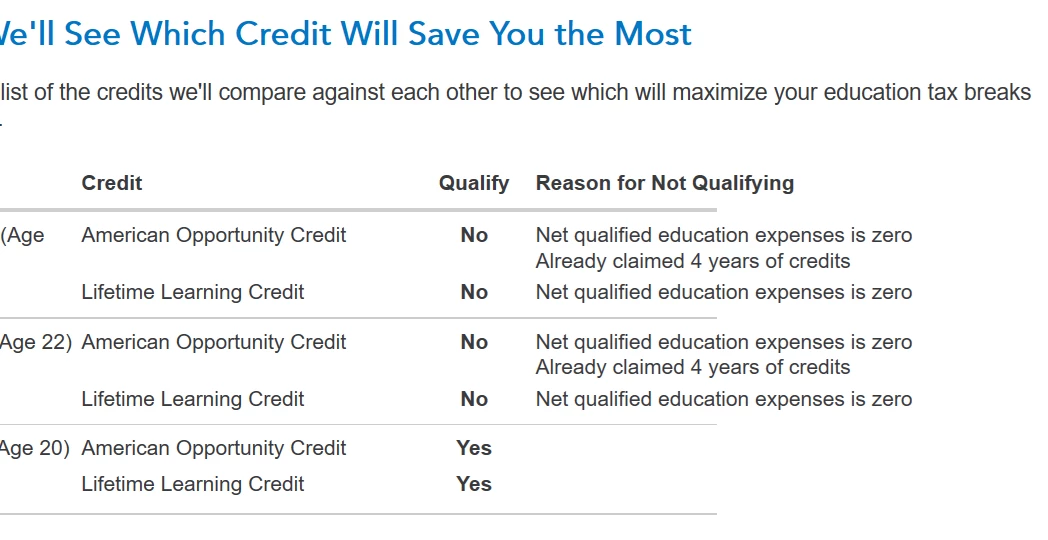
    For anyone else having trouble with Education Credits in 2023 TurboTax Deluxe, I found an answer. I don't know the program's coding since most of us deal with a new version each year for only about a week. However, in the past few days, I've noticed weird stuff happening in different parts of the Education Credits section. Here are a couple of screenshots to illustrate.


    Clearly, it's impossible to answer a question when TurboTax has already selected both YES and NO.


    After saving my tax file to a flash drive, deleting TurboTax, and reinstalling it, it told me that 2 of our students had "Net qualified education expenses is zero," which is just wrong. It followed that by saying that all 3 of the 1098-T Box 5 scholarship amounts were "100% taxable income" and had to be included on each of our students' own tax returns. This completely disregarded all Box 1 amounts for each student.


    SOLUTION

    Again, I don't know TurboTax's internals. But I could delete worksheets or even entire student files, reenter their information, and get different refund amounts each time. I have no idea if this solution will work for anyone else, but it worked for me. First, I noticed that correcting our Box 1 amounts for the 1098-T forms reduced our Fed refund by $2,500 if I changed it to $1 over the $5,191 Box 5 amount for one of our students. I don't know why because he had already had 4 years of AOTC and didn't even qualify for it in 2023.


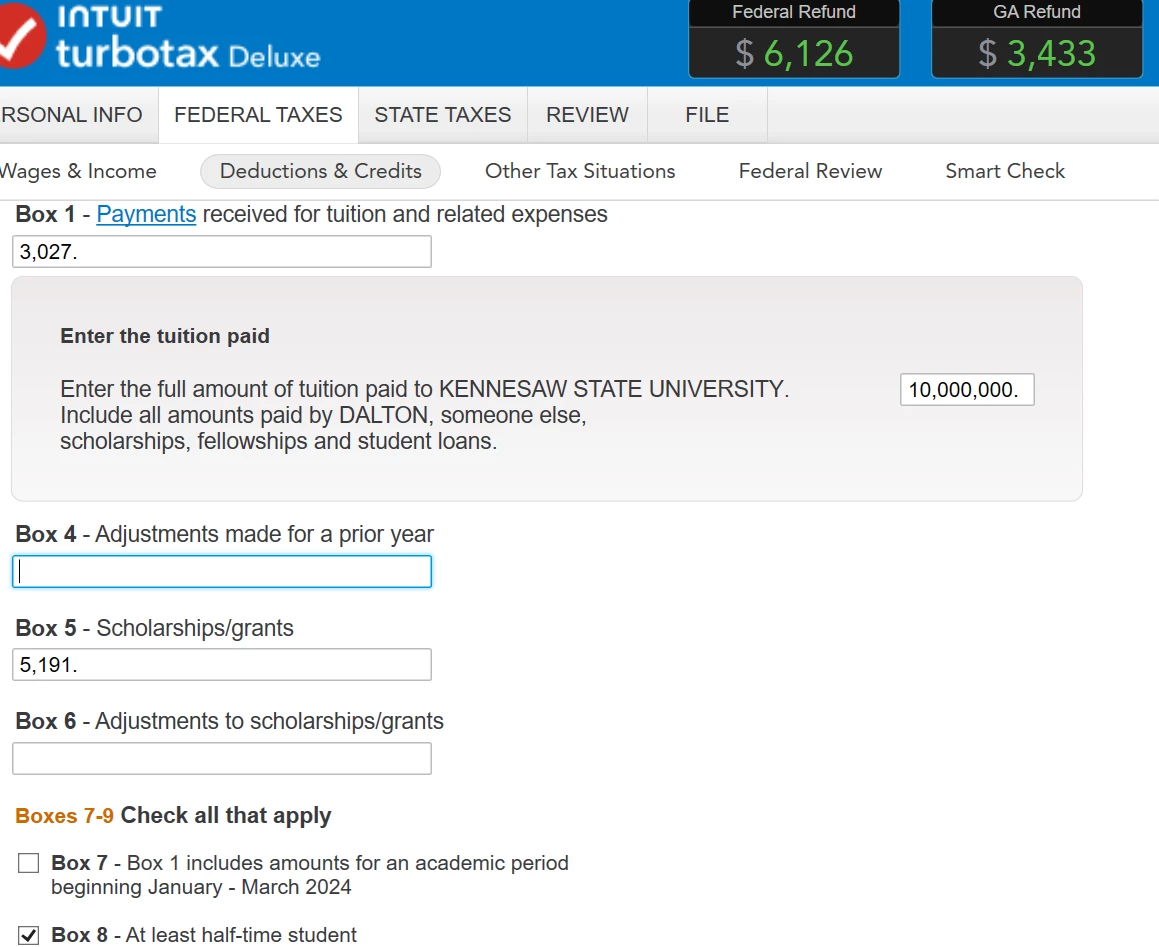
    So, I started adding higher expenses paid to the school to see how much it would take to maybe raise our Fed refund. $10K, $20K, $50K didn't work so I unloaded with $10,000,000. I put in that amount for each of our 3 students and ran through the rest of the "Continue" clicks until TurboTax recalculated the education credits and BAM!, 2 students got LLC credits and the 3rd got his AOTC credit. I went back and changed the $10,000,000 amounts to actual qualified fees and expenses we paid, plus the Box 5 scholarship amounts and everything worked like it should.


    Our particular problem was exacerbated by the University sending us 1098-Ts with Box 5 numbers larger than Box 1 numbers, so TurboTax was (correctly) trying to declare the excess scholarship amount as taxable income. If the 1098-Ts had been correctly processed for us, then the 2023 Box 1 numbers would have been larger than the Box 5 numbers.


    So, the large $10,000,000 number did something. I don't know what, but it was like hitting "reset" for me because TurboTax was working normally again. YMMV. Good Luck!

    2 replies

    AmyC
    Employee
    April 12, 2024

    You don't mention education credits. If your income is too high for the education credit, you do not enter the 1098-T. In addition, if there is taxable scholarship income, it goes on the student's return.


    The 1098-T is an informational form rather than a legal form. However, because of the way your numbers look, I wonder if the missing money is on last year's return.  Tuition paid for the first 3 months of the next year are allowed on the 1098-T so perhaps winter 2023 was listed on the 2022 1098-T by the college.


    You will need to check your records for actual 2023 expenses. Scholarships can also be wrongly credited but must be claimed when the 1098-T says.

    **Say "Thanks" by clicking the thumb icon in a post**Mark the post that answers your question by clicking on "Mark as Best Answer"
    Hal_Al
    Employee
    April 12, 2024

    The 1098-T is only an informational document. The numbers on it are not required to be entered onto your tax return. However receipt of a 1098-T frequently means you are either eligible for a tuition credit or possibly your student has taxable scholarship income. If you KNOW neither is true, just don't enter the 1098-T.

    If you claim the tuition credit, you do need to report that you got one or that you qualify for an exception (the TurboTax interview will handle this)

    You claim the tuition credit, or report scholarship income, based on your own financial records, not the 1098-T. In the 1098-T screen, click on the link "What if this is not what I paid the school" underneath box 1. You will then be able to enter the actual amounts paid. You will also reach a screen that allows you to adjust the scholarship amount for "amounts not awarded for 2023 expenses".

    Or if you find it easier, just change the numbers in boxes 1& 5 to what your records show. The 1098-T that you enter in TT is not sent to the IRS.

    __________________________________________________________________________________________

    There is a tax “loop hole” available to claim an education credit, for the parents of students on scholarship. The student reports all his scholarship, up to the amount needed to claim the American Opportunity Credit (AOC), as income on his return. That way, the parents  (or himself, if he is not a dependent) can claim the tuition credit on their return. They can do this because that much tuition was no longer paid by "tax free" scholarship.  You cannot do this if the school’s billing statement specifically shows the scholarships being applied to tuition or if the conditions of the grant are that it be used to pay for qualified expenses.

    Using an example: Student has $10,000 in box 5 of the 1098-T and $8000 in box 1. At first glance he/she has $2000 of taxable income and nobody can claim the American opportunity credit. But if she reports $6000 as income on her return, the parents can claim $4000 of qualified expenses on their return.

    Books and computers are also qualifying expenses for the AOC. So, extending the example, the student had another $1000 in expenses for those course materials, paid out of pocket, she would only need to report $5000 of taxable scholarship income, instead of $6000.

    The IRS actually encourages use of this technique. From the form 1040 instructions: “You may be able to increase an education credit if the student chooses to include all or part of a Pell grant or certain other scholarships or fellowships in income. For more information, see Pub. 970, the instructions for Form 1040 and IRS.gov/EdCredit".  PUB 970 even has examples of how to do the “loop hole”.

    TheBeazAuthorAnswer
    April 13, 2024

    For anyone else having trouble with Education Credits in 2023 TurboTax Deluxe, I found an answer. I don't know the program's coding since most of us deal with a new version each year for only about a week. However, in the past few days, I've noticed weird stuff happening in different parts of the Education Credits section. Here are a couple of screenshots to illustrate.


    Clearly, it's impossible to answer a question when TurboTax has already selected both YES and NO.


    After saving my tax file to a flash drive, deleting TurboTax, and reinstalling it, it told me that 2 of our students had "Net qualified education expenses is zero," which is just wrong. It followed that by saying that all 3 of the 1098-T Box 5 scholarship amounts were "100% taxable income" and had to be included on each of our students' own tax returns. This completely disregarded all Box 1 amounts for each student.


    SOLUTION

    Again, I don't know TurboTax's internals. But I could delete worksheets or even entire student files, reenter their information, and get different refund amounts each time. I have no idea if this solution will work for anyone else, but it worked for me. First, I noticed that correcting our Box 1 amounts for the 1098-T forms reduced our Fed refund by $2,500 if I changed it to $1 over the $5,191 Box 5 amount for one of our students. I don't know why because he had already had 4 years of AOTC and didn't even qualify for it in 2023.


    So, I started adding higher expenses paid to the school to see how much it would take to maybe raise our Fed refund. $10K, $20K, $50K didn't work so I unloaded with $10,000,000. I put in that amount for each of our 3 students and ran through the rest of the "Continue" clicks until TurboTax recalculated the education credits and BAM!, 2 students got LLC credits and the 3rd got his AOTC credit. I went back and changed the $10,000,000 amounts to actual qualified fees and expenses we paid, plus the Box 5 scholarship amounts and everything worked like it should.


    Our particular problem was exacerbated by the University sending us 1098-Ts with Box 5 numbers larger than Box 1 numbers, so TurboTax was (correctly) trying to declare the excess scholarship amount as taxable income. If the 1098-Ts had been correctly processed for us, then the 2023 Box 1 numbers would have been larger than the Box 5 numbers.


    So, the large $10,000,000 number did something. I don't know what, but it was like hitting "reset" for me because TurboTax was working normally again. YMMV. Good Luck!