

Question
Confusing/Incorrect 1098-T
1098-T 2020 Form
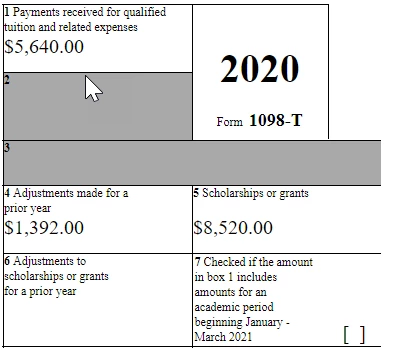
For the last week or so I've been going back and forth with my school's 1098-T "expert" about some discrepancies on my form. The expert said that only Fall 2020 was counted on my 2020 1098-T. My 1098-T form is only showing tuition and payments (box 1) for fall 2020, leaving out spring 2020. However, in box 5, the scholarships & grants box, the form is including both fall 2020 and spring 2020 scholarships and grants. Spring 2020 scholarships & grants should have already been accounted for on my 2019 1098-T (due to the way college bills in advance), so I'm confused.
Also, there's some adjustment listed on my form due to a dropped course before the spring 2020 semester even started (the school bills in advance).
Note:
-Fall 2020 was my last semester, apparently the only semester's tuition being counted on the form
-I was enrolled all 2020 as well
Here is my 2020 1098-T. Box 1 is correct, $5,640, that was my total tuition for fall 2020 (spring 2020 tuition not included I guess). Box 5 is incorrect. In fall 2020 I had a total of $4,423 in scholarships and grants (Pell+another grant+scholarship).
Fall 2020 loan amount was $2,721, though I'm not sure where it's being accounted for.
How am I supposed to report the correct amounts on my tax return?
Thanks in advance.









