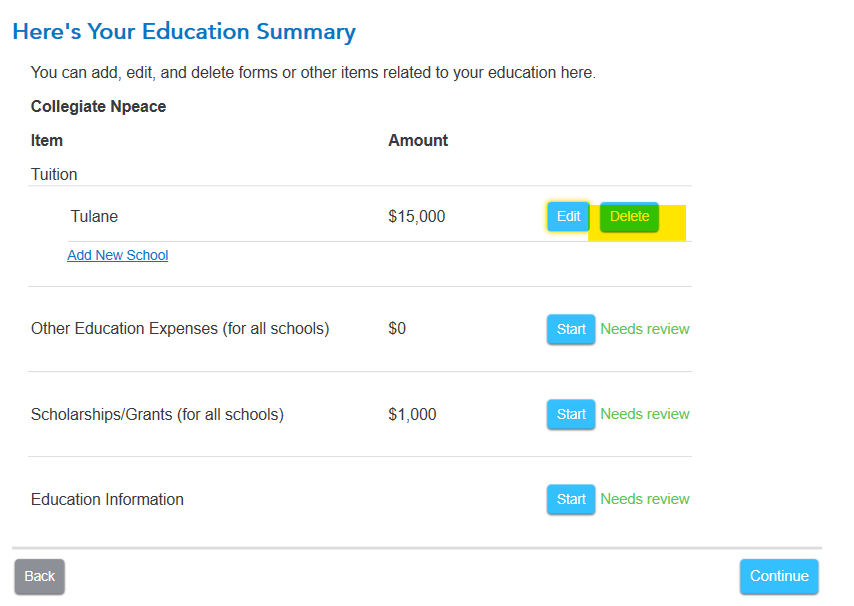
1. You should delete the college information that is no longer in use and add this year's college to the program. Return to the education section to make these changes. Edit your education summary and then either:
- delete the school no longer attended OR
- select edit and change the information to the current school.
If you have a 1098-T from each school, you need to enter both 1098-T forms. If you have the college entered correctly and the program is holding the old information, you may a piece of data stuck.
Follow these steps:
Online version:
A full or corrupted cache can cause problems in TurboTax, so sometimes you need to clear your cache (that is, remove these temporary files).
For stuck information follow these steps:
- Delete the form/ worksheet- if possible, see How to Delete
- Log out of your return and try one or more of the following:
- Don't use Internet Explorer.
- Clear cache and cookies,
- Sign in using a different browser.
- Sign in using a different device.
- Log back into your return.
- Enter the information again.
Desktop version:
- Delete the form
- Save your return while closing the program.
- Update the program
- Open
- Enter the information again.
2. You printed tax forms match what goes to the IRS so be sure your forms are correct before submitting your return.
To delete an entire form:
If you are using:
- Online: see How do I view and delete forms in TTO?
- Desktop: If you are working in the cd/download TurboTax program:
- On the top right, there is a FORMS button.
- Click on FORMS.
- Locate the form you want to delete.
- Click on the form name.
- Below the form, bottom left, select DELETE FORM button.










