
February 21, 2022
Solved

Confusion about public transit credits

  • February 21, 2022
  • 2 replies
  • 0 views

Hi Guys, 


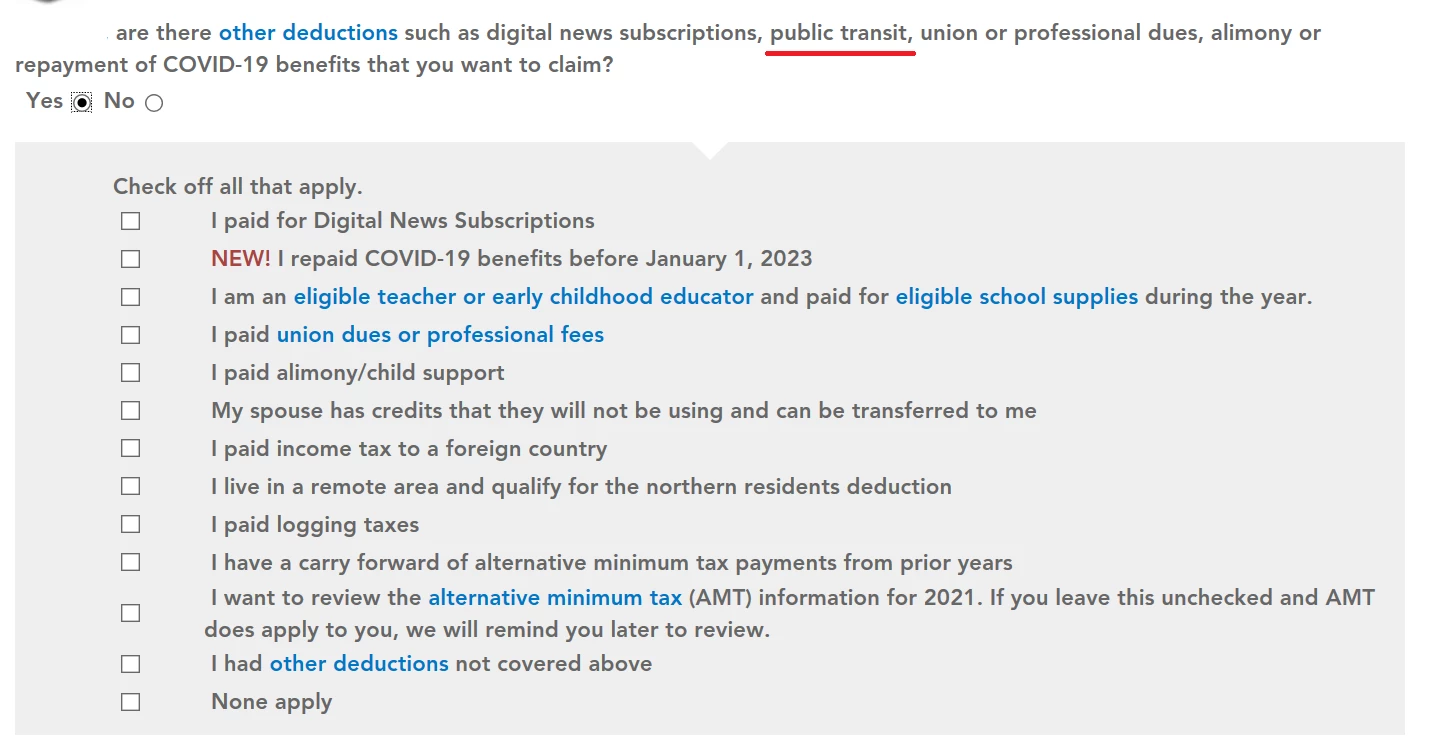
According to everything I've read, in Ontario (where I am filing my taxes), for the 2021 tax year, I can't claim public transit as an expense in my taxes (note that I am not a senior either). However, in this screen in TurboTax, it clearly lists "public transit" (underlined in the pic for emphasis) as an example. Was that an error? Or does that refer just to seniors who apply for the credit?


Thanks!
Best answer by TurboTaxSusan

Yes, "public transit" refers to the credit for seniors. You won't see that in your list of credits if you are too young to apply for it.

2 replies

TurboTaxSusan
February 23, 2022

Yes, "public transit" refers to the credit for seniors. You won't see that in your list of credits if you are too young to apply for it.

February 24, 2022

Thanks a ton!

March 8, 2024

The Seniors' Public Transit tax credit for tax year 2023, which ends up on my Ontario provincial taxes, is calculated on ON form 879 line 63100.  The calculation begins on the Tax Forms/Receipts page, where you select Transit Pass and enter the eligible amounts.


This process worked fine for my return, and I had no need to override anything.


My spouses' return, however, didn't work.  She turned 65 during 2023.  I was able to enter the receipt amount eligible for the credit on her Tax Forms/Receipts page, which then calculated the correct amount of the refundable credit.  However, this didn't carry forward to ON form 879 line 63100.  When I overrode that, the 2023/2024 version of TurboTax Canada set a warning that her return might be rejected from Netfile.  In fact, her TurboTax screen for form ON 479 doesn't show the Seniors' Public Transit credit at all (but mine does).


The CRA has her accurate residency and birthdate, as does the PINFO screen on TurboTax.  Can we try submitting her return on Netfile, even with a warning, and see if the CRA accepts it?  Or is there some field we need to update to remove the TurboTax warning?  Or does the TurboTax screen for ON879 needs to be fixed?


The earlier solution in this thread is no longer for the 2023 tax year.




