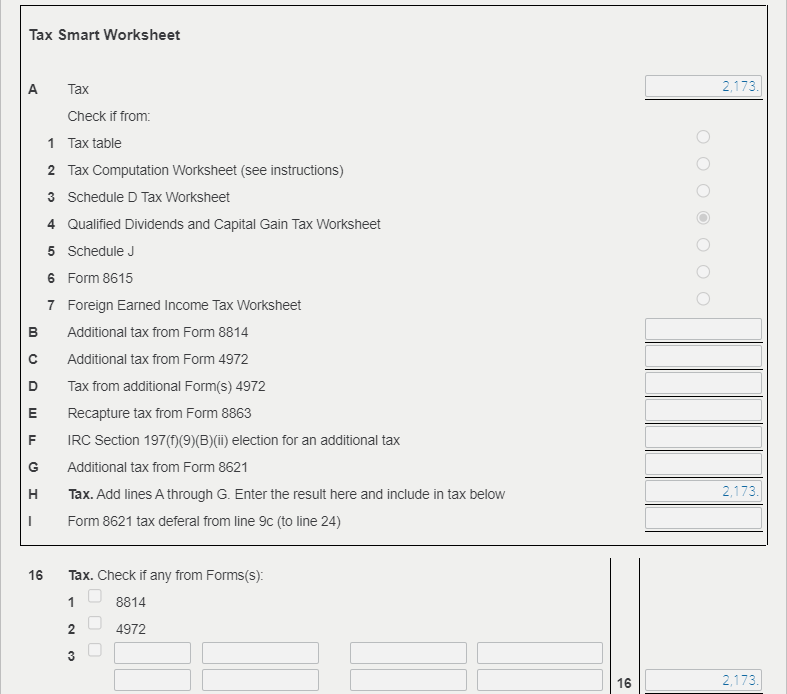
Yes, if your tax on line 16 doesn't match the tax tables, you should look for a smart worksheet for that line. This will indicate whether an alternative calculation was used.
The image below shows the smart worksheet for a return where the Qualified Dividends and Capital Gain Tax Worksheet was used to calculate the tax.
You can preview this is TurboTax Online:
- Open your return.
- Select Tax Tools from the left-side menu, then Tools.
- Select View Tax Summary in the pop up box.
- Select Preview my 1040 from the left-side menu.
- You will see the Form 1040 with Schedules 1, 2 and 3.
- Check line 16.
- When you are done, select Back from the left-side menu.
If you are using TurboTax Desktop:
- Select the Forms icon toward the upper right corner.
- Highlight Form 1040 in the list on the left.
- Find line 16.