
Employee
March 9, 2024
Solved

All my stock transactions are marked "needs review" but there are no errors.

  • March 9, 2024
  • 4 replies
  • 0 views

I downloaded information from my brokers. I have multiple stock sales from one broker and TT flagged each one with "needs review". The values displayed are correct and there is no indication of what is wrong. When I check the 1099-B worksheet form there are no errors flagged and the information also looks perfect. The basis, proceeds, gain/loss and dates are correct. Federal review flags no errors. 

If I click on one of the flagged transactions and then click bulk edit I get, I hate to say it but, a very weird form with lots of fields to fill in but no indication of what is wrong. And it says to leave anything that doesn't need changing blank. I've tried just leaving them blank (since everything is correct) and I've tried entering the correct (same) values into each field. The needs review flag does not disappear.

It may be relevant that the broker is TDAmeritrade which was taken over by Schwab during 2023.

The stock transactions from Schwab are not flagged with "needs review".
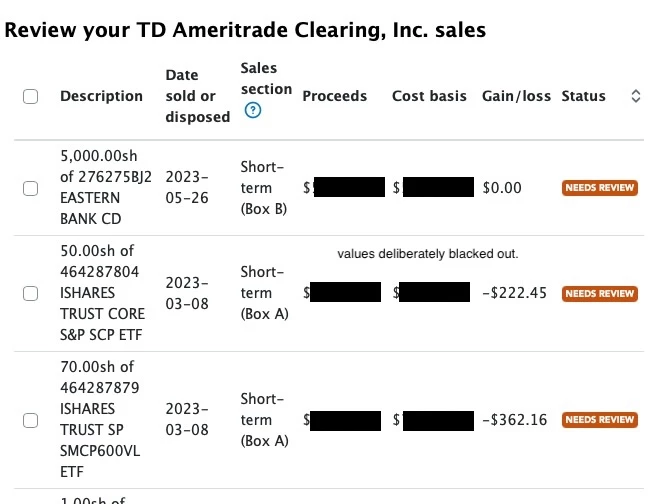
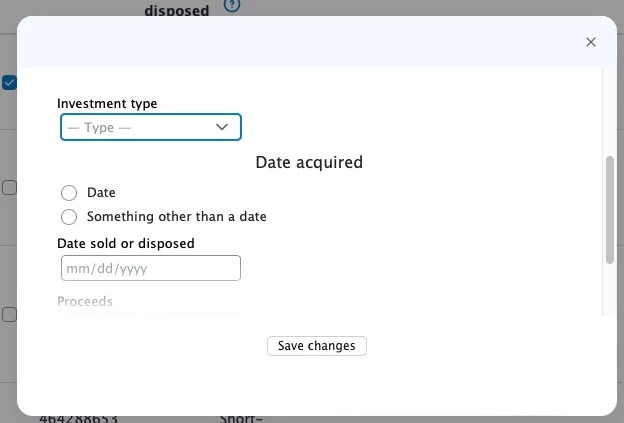
I'm lost. I have no idea of what I should do about this or, indeed, if there is anything I need to do.

I hope I've described the problems well enough for someone to understand it, but I'm happy to provide more information if needed.

thanks in advance for any help.


    Best answer by dwrobins0968

    I saw boxes or circles that were filled in with a pink color. I clicked on one and a check mark appeared in a box. Another one,  I clicked on a circle, and it filled in with a big dot.  Sometimes the "needs reviewed" wouldn't go away. That was because, there was another area on the same sheet, that needed to be clicked on to check a box, for fill in a circle. 

    4 replies

    March 9, 2024

    I went through that after I entered Edward Jones. It sounds like you are working on the Form view. If you have a box that opened up towards the top, that is telling you that somethings need reviewd, It might not be a figure or text. Look to  see if there are any circles or box's that are pink. That is where a check mark or a dot needs to be.  Just read the information, and click on the circle or box. I think the box will move around your form until it has everything it needs. Good luck!

    dottoreAuthor
    Employee
    March 9, 2024

    Thanks, but I don't understand what you mean. Circles or boxes? yes, they are there as I showed in the image I uploaded, but I entered the correct data in each box and circle and clicked Save Changes but the "needs review" remained. And when I edited it again (by clicking the check box and then bulk edit) the very same circles and boxes appeared.

    Maybe I'm missing something? or misunderstanding what you said.

    March 9, 2024

    I saw boxes or circles that were filled in with a pink color. I clicked on one and a check mark appeared in a box. Another one,  I clicked on a circle, and it filled in with a big dot.  Sometimes the "needs reviewed" wouldn't go away. That was because, there was another area on the same sheet, that needed to be clicked on to check a box, for fill in a circle. 

    March 9, 2024

    I also received the same notation.  I re-imported my broker's statement and the "needs review" notation was cleared.

    dottoreAuthor
    Employee
    March 9, 2024

    thanks. I just tried re-importing but the needs review flags remained. no change.

    March 31, 2024

    The only fix appears to be this...


    Edit the details of each transaction (click the pencil)

    Change the transaction to an option trade (it seems to default to stock)

    Make sure it is then changed from 'sold' to 'expired' (make sure you write down the proceeds number before you change it to 'Expired', because it will erase the value)

    Make sure you re-enter the cost basis to zero

    Hit "save"

    Edit it again and change it back to 'Sold" and re-enter the original proceeds amount.


    OR


    You should be able to go into the forms and see an explanation mark where the cost basis is missing and easily update to zero (in my case) or whatever cost basis you have for the naked put/calls.

    This is a PITA, but the only solve i've found.

    Enter the original 'proceeds' 

    dottoreAuthor
    Employee
    March 31, 2024

    My transactions were all stocks or bonds, thanks for covering stock options. I hope Intuit fixes this.

    April 15, 2024

    Finally found a solution for this issue after lots of struggle. Do the federal review and go to fix error and when it shows the error, click on "Forms" on top of the application. There it will show the entry(ies) that need to be fixed. For example, I had to re-enter the acquired date for one stock transaction and for another I had to enter the cost basis as zero as it was a proceed from sale of rights and not really a stock sale. Once I fixed these two issues, TurboTax didn't force me to review all the entries. This eliminates the need to go through each entry that has a "Needs review" and edit that entry to clear the error.




