
January 28, 2024
Solved

Can't see full screen of my notifications

  • January 28, 2024
  • 2 replies
  • 0 views

UPDATE: I figured it out.  I had the text size bigger under Settings for Accessibility. I reduced the size and I can see now. Hard on me since it's hard to see, but I guess that's all I can do.
----------
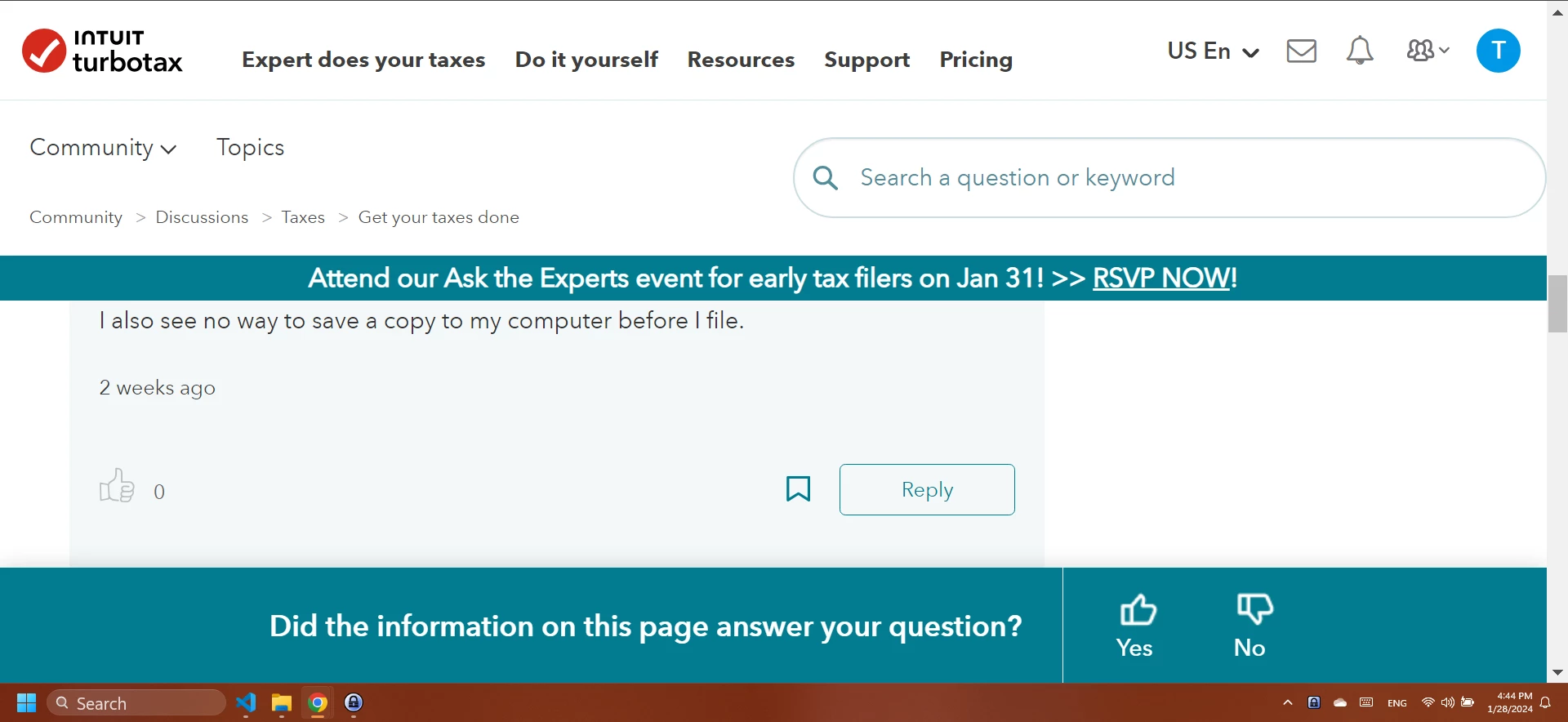
This is what I see when I am trying to look at answers to my posted questions. It's driving me crazy. I have a large screen, and I can barely see the answers without scrolling. What can I do to see more of the answers. I want to get rid of both of the green lines. They serve no purpose and make me feel like I'm trying to see past them.
Best answer by CindyKR

I figured it out.  I had the text size bigger under Settings for Accessibility. I reduced the sized and I can see now. Hard on me since it's hard to see, but I guess that's all I can do.

2 replies

VolvoGirl
Employee
January 29, 2024

Hmmm,  it displays that way on my iPhone but is right on my iPad and Windows computer.  Maybe it's your browser.  I'm using Chrome which I see in your taskbar.  Have you tried rebooting your computer?  

CindyKRAuthorAnswer
January 29, 2024

I figured it out.  I had the text size bigger under Settings for Accessibility. I reduced the sized and I can see now. Hard on me since it's hard to see, but I guess that's all I can do.




