
March 4, 2024
Solved

Cannot update self-employed health insurance deduction.

  • March 4, 2024
  • 2 replies
  • 0 views

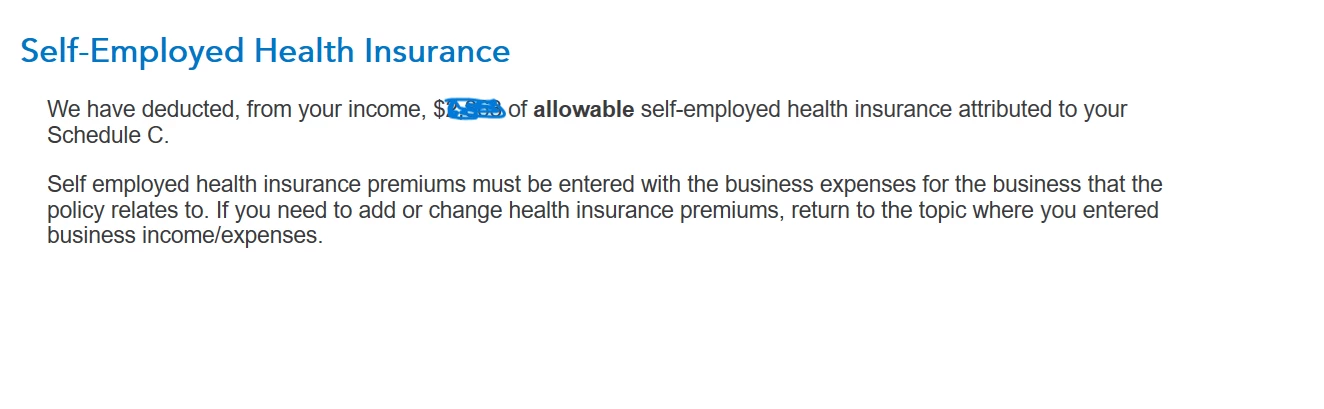
  I entered my health insurance under Less Common Business Situations. Now I want to modify that number, but Turbo Tax will not let me update it. When I click on the update button it takes me to a screen that says to "return to the topic where you entered business income/expenses." There is no place to update this number.
Best answer by AnnetteB6

To change that number, you will need to go to the Schedule C input screens.  Health insurance premiums can be found in the Common Business Expenses section of the Schedule C.  

2 replies

AnnetteB6Answer
March 4, 2024

To change that number, you will need to go to the Schedule C input screens.  Health insurance premiums can be found in the Common Business Expenses section of the Schedule C.  

**Say "Thanks" by clicking the thumb icon in a post**Mark the post that answers your question by clicking on "Mark as Best Answer"
GuyAvecAuthor
March 4, 2024

  I don't like the idea of accessing the forms directly. The main purpose of using TurboTax is avoid the complexities of using forms. Anyway, in my case, I entered on the worksheet the names of insurers and I want to review the list again and add to it. I don't recall what I included. How about fixing Turbo Tax to work as intended.

GuyAvecAuthor
March 4, 2024

  The problem is that when I click update, it does not allow me to modify the entry for insurance deduction. I can enter it once but afterwards the Update does not function.




