
February 26, 2024
Solved

Check this entry - Other income statement - Other taxable income should have a value

  • February 26, 2024
  • 1 reply
  • 0 views

I had frontline worker pay in 2022, but I am doing 2023 taxes and I am getting the following when I do the Federal review check. I think it is referring to the Frontline worker pay? But why is it here in 2023 when this applied to 2022?
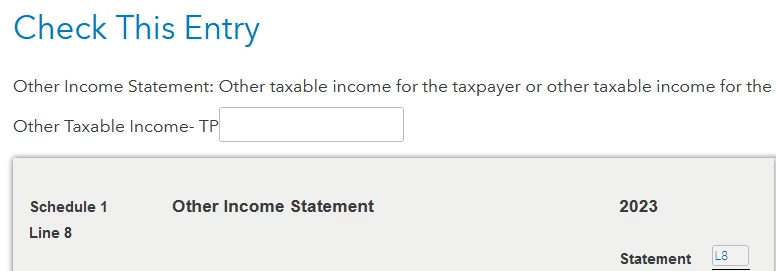
Scrolling down I see this listed (below), is this what needs a value? It should be $0 I guess as I did not have any income in 2023 from this. But why is this even here?

Appreciate any ideas!

Best answer by PatriciaV

This looks like a 1099 carried over from last year. You can enter a zero on the Check Entry screen. But the better solution is to remove the 1099.


  • Return to the Other Income section of TurboTax by searching for "other income." (Use the magnifying glass in the upper right corner of the TurboTax screen.)
  • If you see MN Frontline Worker in the list, click Delete (trashcan) to the right and confirm the deletion.

Your other option is to delete the form from the Tools menu.

  • On the left menu, Select Tax Tools and then Tools.
  • In the pop-up window Tool Center, choose Delete a form
  • Click Delete next to the form or Schedule and follow the instructions to remove the form/schedule from your return.
  • If you're using TurboTax for Desktop, go to Forms in the TurboTax header to delete the 1099.

1 reply

PatriciaV
PatriciaVAnswer
Employee
February 26, 2024

This looks like a 1099 carried over from last year. You can enter a zero on the Check Entry screen. But the better solution is to remove the 1099.


  • Return to the Other Income section of TurboTax by searching for "other income." (Use the magnifying glass in the upper right corner of the TurboTax screen.)
  • If you see MN Frontline Worker in the list, click Delete (trashcan) to the right and confirm the deletion.

Your other option is to delete the form from the Tools menu.

  • On the left menu, Select Tax Tools and then Tools.
  • In the pop-up window Tool Center, choose Delete a form
  • Click Delete next to the form or Schedule and follow the instructions to remove the form/schedule from your return.
  • If you're using TurboTax for Desktop, go to Forms in the TurboTax header to delete the 1099.
**Say "Thanks" by clicking the thumb icon in a post**Mark the post that answers your question by clicking on "Mark as Best Answer"




