
February 19, 2024
Solved

Direct 401k rollover inflating income in a way that affects deductions?

  • February 19, 2024
  • 1 reply
  • 0 views

I understand that entering a rollover amount from 1099-R that is coded G (box 7) will not be taxable.  But it causes our total income to double, as previewed on TurboTax page "Here's a Picture of Your 2023 Income." It doesn't seem to affect our tax owed, but is this inflated income affecting the level of deductions we qualify for or any other part of federal or state filings? (I don't think there is a corresponding place to back out the rollover amount, e.g., by entering it as an IRA contribution under deductions.)  Thanks for any advice.
Best answer by Vanessa A

If it is not affecting your taxes owed, it sounds like everything is correct.  


You can verify that the rollover is not part of your income by looking at your form 1040.  Retirement income is shown on line 5a and 5b.  The amount on 5a shows what you report, the amount on 5b shows the taxable amount.  So you should see the amount in 5a, but 5b should be $0 unless you had another type of retirement income that you added as well. 


There are no additional entries needed as long as you answered the questions that followed the entry of the 1099-R


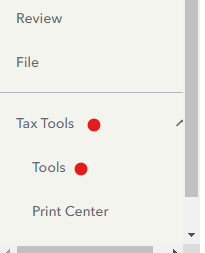
On the menu bar on the left that shows. 

  1. Select Tax Tools 
  2. On the drop-down select Tools 
  3. On the pop-up menu 
  4. Select View Tax Summary 
  5. On the left sidebar, select Preview my 1040 

Or look at forms mode if you are using the desktop version.

1 reply

Vanessa AAnswer
February 19, 2024

If it is not affecting your taxes owed, it sounds like everything is correct.  


You can verify that the rollover is not part of your income by looking at your form 1040.  Retirement income is shown on line 5a and 5b.  The amount on 5a shows what you report, the amount on 5b shows the taxable amount.  So you should see the amount in 5a, but 5b should be $0 unless you had another type of retirement income that you added as well. 


There are no additional entries needed as long as you answered the questions that followed the entry of the 1099-R


On the menu bar on the left that shows. 

  1. Select Tax Tools 
  2. On the drop-down select Tools 
  3. On the pop-up menu 
  4. Select View Tax Summary 
  5. On the left sidebar, select Preview my 1040 

Or look at forms mode if you are using the desktop version.

**Say "Thanks" by clicking the thumb icon in a post**Mark the post that answers your question by clicking on "Mark as Best Answer"




