
February 23, 2020
Question

E-File is Rejected due to Incorrect or missing information on "Tax Statements"

  • February 23, 2020
  • 1 reply
  • 0 views

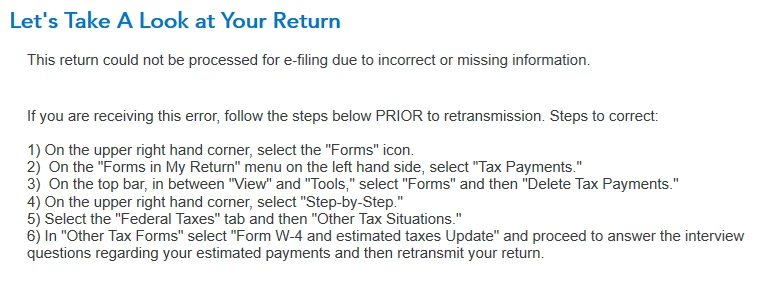
I have submitted both the Federal and State returns several times.  When I follow the directions (see below) to correct the problem, the Federal Tax changes from a refund to an amount due.  I have tried to delete the form and enter the amount (single 2019 Estimated Payment) in Schedule 3 manually, but this recreates the "Tax Statements Form" and thus the same error. 


In  my view this appears to be a technical problem in the software or how the information is transmitted to the IRS. 


If I have to print and mail the Federal, I will also have to print and mail the State, as the software will not allow a split transmission. 

This is very disappointing for this product!!

Would appreciate any comments or recommendations form the community or Intuit!!
 

    1 reply

    DMarkM1
    February 23, 2020

    I'm not sure about the instructions given there but if I read correctly you are trying to enter a payment that you made in 2019 for 2019 taxes.  In that case.  Do follow the instructions above to "delete" the tax payments.  But then follow these steps.


    1.  Go back to "Step-by-Step"

    2.  Click the "Deductions & Credits" tab

    3.  Select "I'll choose what I work on"

    4.  Scroll down to "Estimates and other taxes paid" 

    5.  Select "Estimates"

    6.  Enter the payment(s) you made in this interview


    Continue with re-file steps.


    **Say "Thanks" by clicking the thumb icon in a post**Mark the post that answers your question by clicking on "Mark as Best Answer"
    Ken_RAuthor
    February 23, 2020

    DMarkM1,

    Thanks for taking the time to review and respond to this issue.  I followed your suggestions and this method also creates the Tax Payments Form.  I followed through with another E-File and both returns were rejected again.  When I open the file again, the same steps for correcting the error are listed. 


    Thanks again for your suggestion, and let me know if there are other ideas for getting around this issue in order to complete the E-File successfully.

    DMarkM1
    February 23, 2020

    Glad to help. When in the forms view would you open the Tax Payments worksheet and screen shot to show lines 1-9? 


    **Say "Thanks" by clicking the thumb icon in a post**Mark the post that answers your question by clicking on "Mark as Best Answer"




