
April 5, 2022
Solved

Foreign Tax credit handling - Frustrated

  • April 5, 2022
  • 2 replies
  • 0 views

Friends,


I have two foreign source investment incomes (one from my mutual find and another from country where I lived). Entering these and taxes paid and figuring credit has taken more than 6 hours.  It is not straight forward at all. 


Now to my question : 

I have a form titled  Part III(1116) - Credit Carryback / Carryforward from my prior year returns. I cannot find anywhere to enter these. When I searched, I saw a post that mentioned I have to create a country "Carryback" but I am unable to add a country. Can some of you please reply with the info on how to enter "Credit Carryback  / Carryforward" from my prior year. 


Thank You
Best answer by sun244

Select Deductions and Credits

Scroll down to "Estimates and Other Taxes Paid"

Scroll down to "Foreign Taxes" and click Start or Update

YES

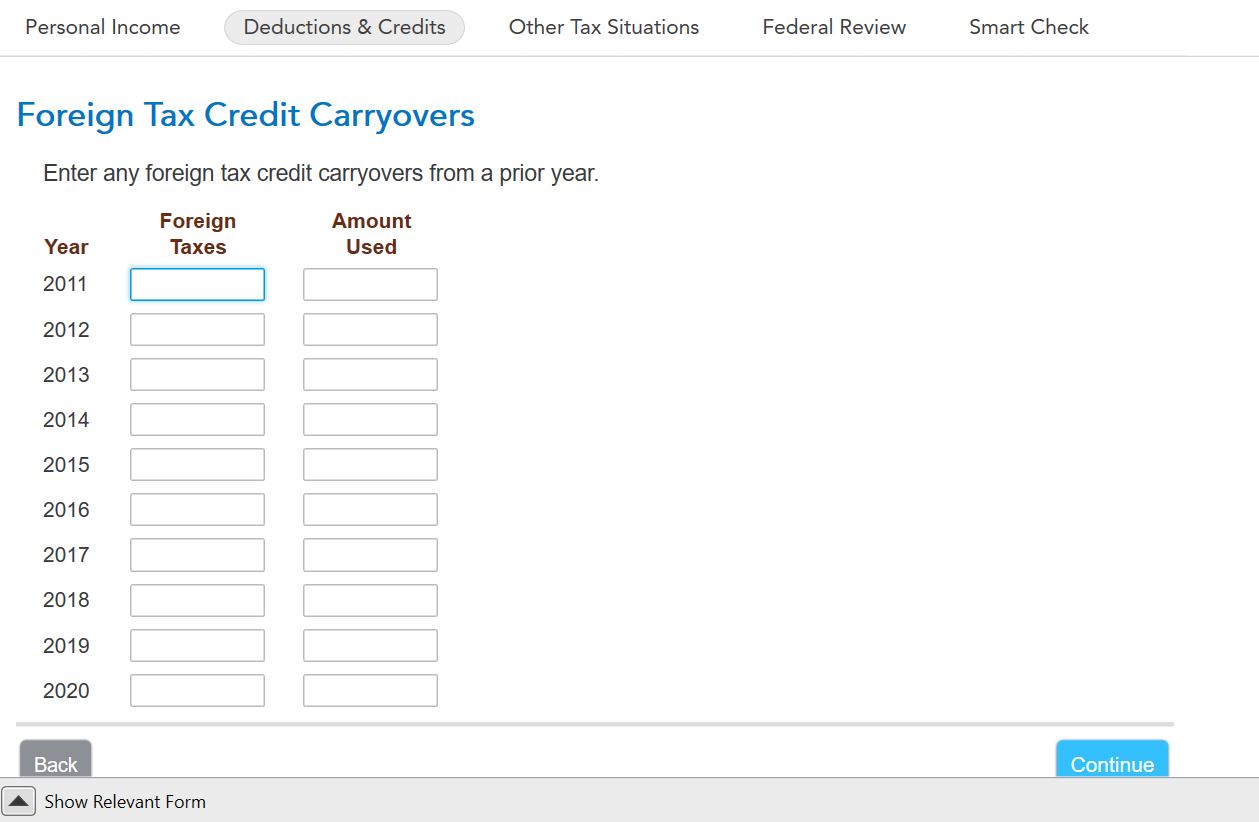
Continue through the interview until you get to this screen and enter

The amount you can use for 2021 will be applied 


Thanks for the response. Am I right in interpreting Carryforward is called as Carryover by TT? MY previous year return done by CPA shows numbers till 2027 and Turbotax does not allow beyond 2020. What happens to the numbers for years 2021 to 2027? Please refer to my screenshot.  Also where do I enter Carryback details in TT.

2 replies

April 5, 2022

yes there is a bug in the app


in forms mode

scroll down until you get to the 1116 line 

click on the +

highlight schedule B

click on open form

highlight sch b 1116

click finish

a form will open that can not be used (bug 1)

under the forms in my return you should see under form 1116 - 1116 comp wks

highlight it - the form should open

if you scroll down to part II you see certain pink areas that need to completed. they probably  were completed  previously but the data is now gone  (bug 2)

 if you scroll down further you should get to the amt c/o section. entering amounts should generate schedule B which you won't see until you close the form (bug 3?)

c/o can only be entered for the category checked.  that means if you have multiple 1116s because of different categories you must go through this process for each category for which you have a c/o


April 5, 2022

If the 1116 bug was identified, why wasn't it fixed?  The foreign tax paid was minimal less than $10 and did not warrant the pain trying to figure out what was wrong.  I didn't see your fix until after I sent the return in.  This years Turbo Tax did odd things this year and was much more frustrating that usual.  I'm thinking of changing next year. 

t

February 26, 2025

TT erroneously adds the number in Column A to Column C, unless a number is already there, on From 1116, line 3(g).  I found no way to correct this in the software, so I have to print my form and mail it in, after crossing out the incorrect number in Column C.  I can find no way to communicate this programming error to TT.

March 3, 2025

If you're reporting similar income from three different countries, you'll have amounts in Columns A, B and C, which will flow down to Line 3g.


If you have no country in Column C at the top of Form 1116, there should be no numbers in this column.  Since Line 3g is calculated, I'm unclear as to why you would need to delete the amount.  If there is an amount in Column C, but no Country, go through the Foreign Tax Credit section again.  RIC may listed as a country (for interest/dividends linked from Schedule B).


The info for Foreign Tax Credit/Foreign Income can be entered through the interview screens more easily than trying to decipher the calculations on Form 1116. 


Basically, bypass the screens asking about INT/DIV that has already been reported; indicate you have other types of foreign income/tax to report, choose the type of income (Passive for Rental, Pension, General for Wages, etc.), then enter a Country, Income, Description, Tax, Date Paid.


Here's more detailed info on Claiming the Foreign Tax Credit.


@DaveC625




