
Employee
March 16, 2025
Solved

Form 1116 bug (Line 33) -- Turbo Tax 2024 for Mac Desktop

  • March 16, 2025
  • 3 replies
  • 0 views

After successfully completing the first iteration of my 2024 taxes without errors on Feb 23rd, I came back today, March 16th, to do round 2. There was a software update waiting for me, so I installed it (Application: 2024.r22.030 Build Date: Mar 16, 2025 at 1:08:57 PM).


The software now reports an error, which truly is a software bug. I have 2 copies of Form 1116 (both are legit). On the first copy, the error says Line 33 should be blank. The thing is, it *is* blank! However, line 35 seems to be the one actually in error, as that line isn't blank and it's highlighted in yellow with the amount in red. I have no explanation why that line would be in error, so I'm stumped about that, but that's probably a separate question and possibly related to the real bug.


(Interestingly, copy 2 also has a blank in line 33, but there is no error with that one.)


Anyway, by posting this, I'm hoping that TurboTax support will flag it, since there doesn't seem to be any other way to report a software bug.


    Best answer by BrittanyS

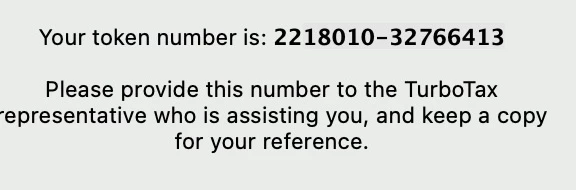
    Sent from my Mac, per your instructions. The text token is interpreted as a phone number (and edited out automatically), so I'm including a screenshot instead.


    Also, there was another update waiting for me when I opened the app. I installed it (Application: 2024.r23.034 Build Date: Mar 21, 2025 at 8:17:33 PM). The error is still there after the update.


    I have reported your issue to the developers for review.  We will post an update once we have one!


    @tranalli 

    3 replies

    March 18, 2025

    Can you clarify if the 1116 was apart of your original return prior to the update or did it after the update?

    **Say "Thanks" by clicking the thumb icon in a post**Mark the post that answers your question by clicking on "Mark as Best Answer"
    tranalliAuthor
    Employee
    March 19, 2025

    As far as I know, the form was already there before the update. I only say that because I just updated the software and ran a Review this time when this new error popped up. It wasn’t there the last time I added new data. 

    March 21, 2025

    I would like to take a deeper look at this. However, I need a diagnostic file which is a copy of your tax return that has all of your personal information removed. You can send one to us by following the directions below:


    TurboTax Online:

    1. Sign into your online account.
    2. Locate the Tax Tools on the left-hand side of the screen.
    3. A drop-down will appear. Select Tools
    4. On the pop-up screen, click on “Share my file with agent.”
    5. This will generate a message that a diagnostic file gets sanitized and transmitted to us.
    6. Please provide the Token Number that was generated in the response.

    TurboTax Desktop/Download Versions:

    1. Open your return.
    2. Click the Online tab in the black bar across the top of TurboTax and select “Send Tax File to Agent” *
    3. This will generate a message that a diagnostic copy will be created.  Click on OK and the tax file will be sanitized and transmitted to us.
    4. Please provide the Token Number (including the dash) that was generated in the response.

    *(If using a MAC, go to the menu at the top of the screen, select Help, then, “Send Tax File to Agent”)


    **Say "Thanks" by clicking the thumb icon in a post**Mark the post that answers your question by clicking on "Mark as Best Answer"
    tranalliAuthor
    Employee
    March 22, 2025

    Sent from my Mac, per your instructions. The text token is interpreted as a phone number (and edited out automatically), so I'm including a screenshot instead.


    Also, there was another update waiting for me when I opened the app. I installed it (Application: 2024.r23.034 Build Date: Mar 21, 2025 at 8:17:33 PM). The error is still there after the update.


    March 30, 2025

    I have the same error.  A quick google shows the same question from 2020:


    https://ttlc.intuit.com/community/tax-credits-deductions/discussion/foreign-tax-credit-tt-error-form-1116-copy-1-line-33-should-be-blank/00/1249178


    The response says that the error message appears if the total in line 35 is less than $600.  


    The responses say to just delete the form but I do not know how to do this.

    tranalliAuthor
    Employee
    March 30, 2025

    Good find. Interesting (?) that this bug is still in the software all this time despite being discussed at length. I haven't tried to file my return yet, so I'll keep this workaround in mind. Thanks!




