
January 16, 2024
Solved

Form 4562 not transferring prior year depreciation - Is that intentional programming of the software or is this a glitch?

  • January 16, 2024
  • 2 replies
  • 0 views

Folks,

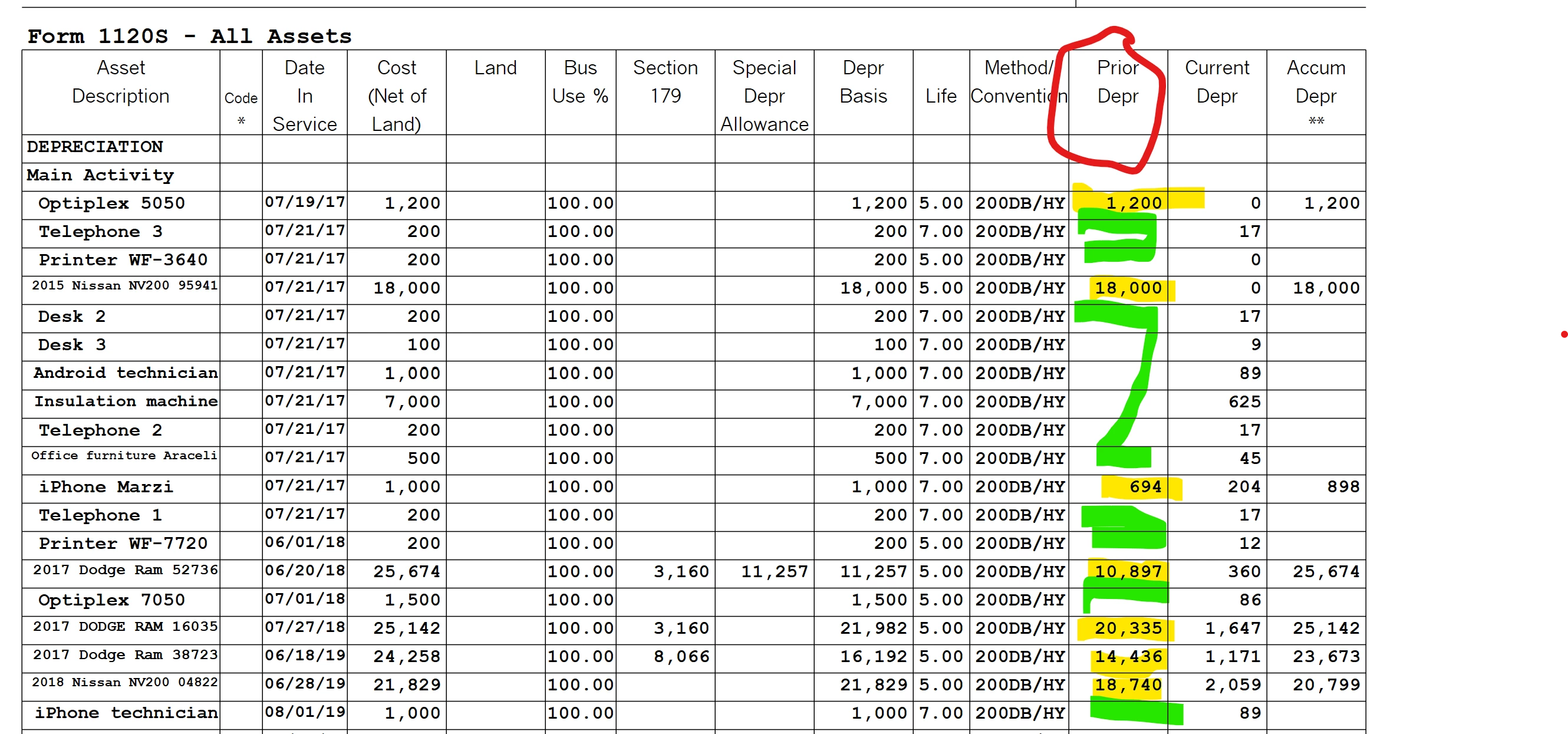
I have been using TT Business desktop since 2020 tax year.  I am reviewing form 4562 and have noticed that the column for prior year depreciation is not completely filled.  That is, the prior year depreciation value of my work vans is populated with the correct value (see yellow highlighted cells).  The prior year depreciation of my computers and printers does not show the total depreciation over the years (see green highlighted cells).


Is that intentional programming of the software or is this a glitch?
 

Best answer by ac-control

Hello @mglauner , thank you for this response.  I was on the phone for over 2 hours with Turbo Tax Desktop technical support.  They admitted that this is a flaw in the programming and that they will fix it.  It is not a failure of entering data in my 2017 return, as you suggested.

2 replies

January 17, 2024

Is there an answer for this?

January 19, 2024

I would advise looking at your 2017 return where you initially added the assets.  Unless you deducted their cost as an expense, you should have an amount in 'Prior Depreciation'  and 'Accumulated Depreciation', not just 'Current Depreciation' in your returns from 2018 going forward.  


Since we can't see your return in this forum, you may want to enlist the aid of TurboTax Live to help you with this issue.


Here's a TurboTax Community discussion of a similar issue; with a workaround. 


ac-controlAuthorAnswer
January 19, 2024

Hello @mglauner , thank you for this response.  I was on the phone for over 2 hours with Turbo Tax Desktop technical support.  They admitted that this is a flaw in the programming and that they will fix it.  It is not a failure of entering data in my 2017 return, as you suggested.




