
April 5, 2025
Question

Help filing state extensions!

  • April 5, 2025
  • 1 reply
  • 0 views

I filed a federal extension and it was accepted. However, when I follow the steps from last year to file state extensions (State → Your State Returns → Edit → Other Situations → File an Extension), I don’t see any options related to state extensions.


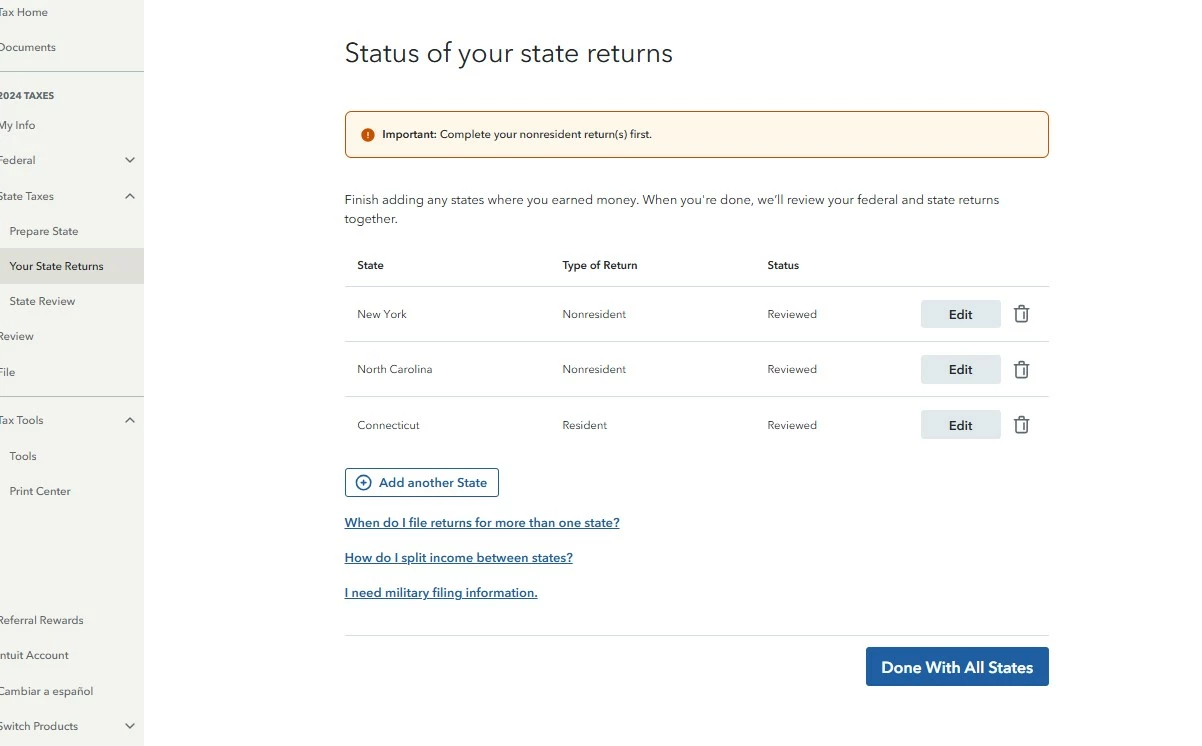
Here's the screen I currently see. I need to file extensions for Connecticut (CT), North Carolina (NC), and New York (NY). I owe taxes in CT, but I’m expecting refunds from NC and NY.

Can anyone provide step-by-step instructions for how to file extensions for these states?


1 reply

April 5, 2025

Have you tried this yet?


Filing State Extension:

  1. Open your return (if not already open).
  2. Under "2024 Taxes" (left-side column), Click on Tax Tools.
  3. Click on Tools.
  4. Click, on File an extension.


Connecticut:

To file a Connecticut extension, print and mail Form CT-1040 EXT or file your extension online by April 15, 2025. Either of these options will extend your filing deadline six months to October 15, 2025. If you owe, you will still need to submit payment by April 15, 2025 to avoid penalties and interest.


New York:

You must file a New York state extension (Form IT-370-PF) by April 15, 2025. The state of New York won't accept a copy of federal Form 4868 in place of Form IT-370-PF.


The extension gives you until October 15, 2025 to file. However, if you owe, make sure to pay by April 15, 2025 to avoid penalties and interest, either by paying with your extension or by going to the New York State Department of Taxation and Finance website.


North Carolina:

Filing an extension gives you until October 15, 2025 to file but doesn't give you until then to pay. To file an extension, either fill out Form D-410 and mail it in, or submit an online extension, by April 15, 2025.


To receive an automatic state extension, verify on your tax return that you were granted an automatic federal extension, by filling in the “Federal Extension” circle on page 1 of your Form D-400.

If you owe, submit payment by April 15, 2025 to avoid penalties, either by including a check and Form D-400V when mailing Form D-410.


TurboTax FAQ: How do I file an extension for my personal state taxes?


**Say "Thanks" by clicking the thumb icon in a post**Mark the post that answers your question by clicking on "Mark as Best Answer"
aE77_2Author
April 5, 2025

@TomK2023 So is this a new process for this year? Last year, I was able to file a New York extension directly through TurboTax and even for Connecticut, TurboTax directed me to the state’s website through a prompt.

Am I understanding correctly that TurboTax no longer allows you to file state extensions through its interface?

April 5, 2025

Unlike IRS Form 4868, which applies to all taxpayers throughout the country, you must file the correct state-specific form to obtain the extension. TurboTax also offers TurboTax Easy Extension, an online tool that allows you to file extensions for both your federal and state tax returns.


Go back into your state and look for a Need more time to file? or similar extension question or option, usually towards the end of the interview (step through your state again from the beginning if you didn't find it). Then follow the onscreen instructions in TurboTax.

**Say "Thanks" by clicking the thumb icon in a post**Mark the post that answers your question by clicking on "Mark as Best Answer"




