January 20, 2025
Solved

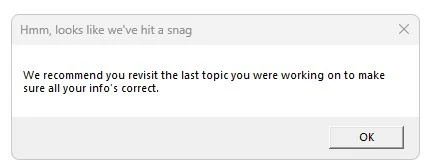
'Hit a snag' trying to enter car property tax

  • January 20, 2025
  • 2 replies
  • 0 views

With the latest Turbo tax Home and Business 2024 fully updated. Click on 'Update' under 'Cars and other things you own': 'Personal Property Taxes'.  


Going back to the last topic (mortgage interest) did not help. Re-starting Turbo tax didn't help.

Best answer by hftaylor01

Hi, DaveF1006


The updates that were applied this morning when I opened TurboTax did not resolve my issue with Personal Property Taxes.  I still get the error "Hmm, looks like we've hit a snag" when accessing the Personal Property Tax topic in the step-by-step navigation. 

As I documented last week, entering the details on the forms themselves does not carry through to the step-by-step screen - it is still showing $0


Have you been able to replicate this issue?


Go to View "Forms"

Go to Tax & Int Wks

Go to 3c Other Personal Property Taxes

Type in the value of the Personal Property Tax(s) on the line_________________


It will show up on the Step-By-Step under Cars and Other Things You Own

Personal Property Taxes _______________

2 replies

January 21, 2025

I tested Personal Property Tax entries in TurboTax Home and Business today and didn't encounter this issue.  You might try it again today; let us know if you still need assistance.


Please see this tax tips article for more information about deducting property taxes.


**Say "Thanks" by clicking the thumb icon in a post**Mark the post that answers your question by clicking on "Mark as Best Answer"
exbrit9Author
January 21, 2025

Thank you for looking at this, but I tried again today and got the same result.

The other buttons under Cars etc all work.


exbrit9Author
January 21, 2025

There's another glitch related to property tax. Under Your Home:property taxes I cannot edit the amount I paid. If I click on the amount it just tells me how much I paid. If I click on UPDATE it just tells me "We've got all your property tax information".  Perhaps these bugs are related.

January 31, 2025

We are encountering the same "Hmm, looks like we've hit a snag" issue for Personal Property Taxes.


This error can be reproduced

(1) By going to Deductions & Credits > Cars and Other Things you Own, and then click <Update> next to Personal Property Taxes.   

(2) By going to Deductions & Credits > Cars and Other Things you Own  > Visit All, and then walking through the first two screens related to Car Registration. When  you click <Done> on the screen "Thanks, we got all your car registration fee info", the error message "Hmm, looks like we hit a snag" appears.  When you click <OK> on the error, Turbo Tax then displays the "Energy-Efficient Vehicles" screen.


Troubleshooting

1. Forms > Open Form Tax and Interest Deduction Worksheet

In row 2a, Real estate taxes paid on principal residence not entered on Form 1098, right click on the number field to open the supporting details screen. I can see the descriptions of the details we used in 2023 (but no dollar amounts). I updated the rows to reflect new Descriptions and this year's dollar amounts (6 rows total for us), and then clicked <Close>. Correct: The dollar amount shows on the Form view!

Now, navigate to View > Step by Step and note the issue: The dollar amount for Personal Property Taxes is still $0. If you click the hyperlink on the dollar amount, the program incorrectly tells you "Her is the information abou tyou personal property taxes you've entered so far: Personal property taxes $0"  This is incorrect


DaveF1006
February 6, 2025

It depends. You may try to update the software to see if this may help. open your return, go to the black stripe at the top and click on online. Select check on updates.


**Say &#34;Thanks&#34; by clicking the thumb icon in a post**Mark the post that answers your question by clicking on &#34;Mark as Best Answer&#34;
February 7, 2025

Hi, DaveF1006


The updates that were applied this morning when I opened TurboTax did not resolve my issue with Personal Property Taxes.  I still get the error "Hmm, looks like we've hit a snag" when accessing the Personal Property Tax topic in the step-by-step navigation. 

As I documented last week, entering the details on the forms themselves does not carry through to the step-by-step screen - it is still showing $0


Have you been able to replicate this issue?