
Employee
February 8, 2023
Solved

How can I claim a business item expense using DeMinims safe harbor election in Home and Business version?

  • February 8, 2023
  • 1 reply
  • 0 views

I purchased a $1700 laptop for my business and would like to report it as the business expensive per DeMinims safe harbor election.

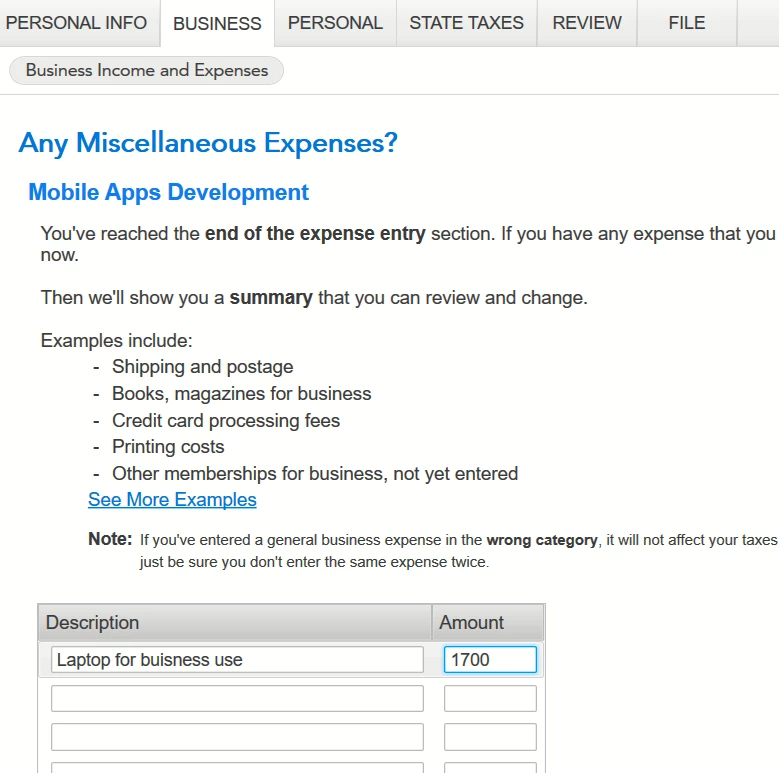
I use Home and Business version. I went to BUSINESS tab, then selected 'Let's write off some business expenses", I selected  'Other Miscellaneous Expenses'. I added description and amount for the laptop, but there was no place or checkbox that allowed me to let IRS know I planned to use "DeMinims safe harbor election" for this laptop.

Please advise.
 

    Best answer by Anonymous_

    Enter the laptop in the Business Assets section of the program to make the election.


    Untitled.png2.png3.png

    1 reply

    Employee
    February 8, 2023

    Enter the laptop in the Business Assets section of the program to make the election.


    Untitled.png2.png3.png

    manbeingAuthor
    Employee
    February 8, 2023

    Yes, I selected these options in the Business Assets Section.

    The turbotax said 'OK. Make sure these purchases are entered as other miscellaneous expenses, not assets" (see the screenshot below)., then I clicked 'Continue' button and it returned to Business Main page. I selected Business expenses --- other miscellaneous expenses --- enter the info ---- Save the data.

    but the De Minimis Safe Harbor Election form didn't create for me. 

    I clicked right upper corner -- Forms icon and didn't find De Minimis Safe Harbor Election form  there.

    The laptop just listed as an expense with other expenses on Schedule C.


    Employee
    February 8, 2023

    Look for this:


    Untitled.png




