
February 16, 2024
Solved

How Can I Open my Schedule D to Edit and Add Cost Basis for All Transactions Missing It

  • February 16, 2024
  • 2 replies
  • 0 views

Hi - I have recurring issues year to year where my imported financial data for stock sales is often missing data and during the review it asks me to add it but I can barely read what transaction it is asking about because the popup window it appears in is so very small. I would recommend  instead jumping people to the form directly where they can edit in the full screen and see overall what is missing or needed. But for now can you help guide me to where I can jump to the form to enter all of the missing cost basis data because I need to research each transaction?  Thank you!


    Best answer by kspies007

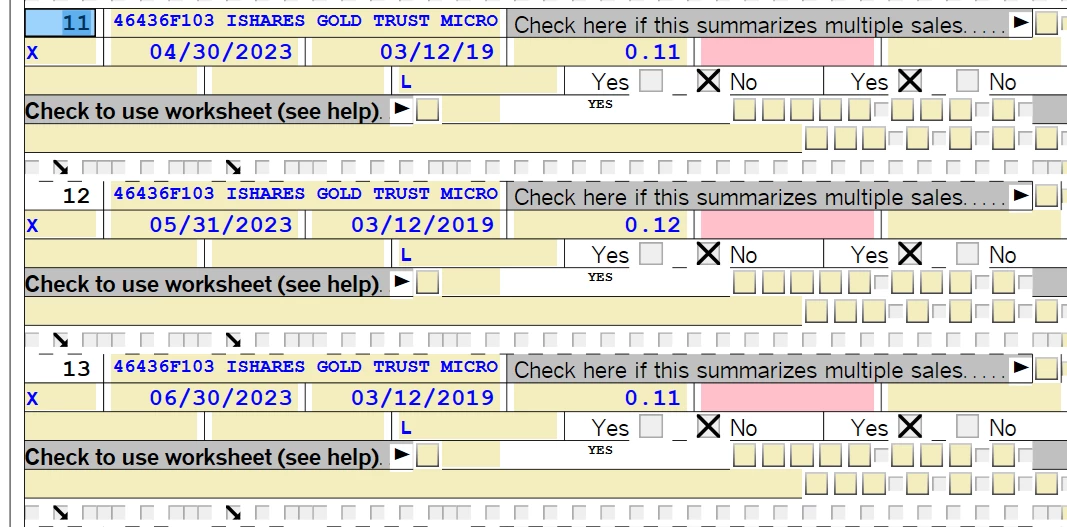
    Ok, I found the answer.  To avoid all of those small window corrections that pop up to adjust your stock sale transactions do this. 1) Go to the Search Box and type in Schedule D  2) From the search results look for the Jump Link to Schedule D and open it.  You'll then see ALL the transactions that need review and can complete them on the full screen.  Way, way, way better!

    You're welcome!  🙂

    2 replies

    February 23, 2024

    You can't make sales or cost basis entries for investment sales directly on any of the forms in TurboTax. You will have to use the step by step menu options to do that. You will find your investment sale entries in the Investment Income section of TurboTax, then Stocks, Cryptocurrency, Mutual Funds, Bonds, Other in the Wages and Income area. 

    **Say "Thanks" by clicking the thumb icon in a post**Mark the post that answers your question by clicking on "Mark as Best Answer"
    kspies007Author
    February 23, 2024

    Hi - No, I found that I can edit the entries by simply doing a search for Schedule D and then using the Jump Link that will appear in the search results to open it.

    February 10, 2025

    Jump to link doesn't do anything in the desktop version of Turbotax 2024.


    I have tried repeatedly. I need to access Scedule D


    Help 

    Dee

    kspies007AuthorAnswer
    February 23, 2024

    Ok, I found the answer.  To avoid all of those small window corrections that pop up to adjust your stock sale transactions do this. 1) Go to the Search Box and type in Schedule D  2) From the search results look for the Jump Link to Schedule D and open it.  You'll then see ALL the transactions that need review and can complete them on the full screen.  Way, way, way better!

    You're welcome!  🙂




