April 5, 2024
Solved

How do I get to rentals expenses in TT Deluxe?

  • April 5, 2024
  • 1 reply
  • 0 views

Schedule E keeps evading me in TT Deluxe.  I can get to Form with Schedule E, but I want to get to step by step

rentals expenses. Somehow I did it several times and today keep circling through TT and simply can NOT find that section. And I have some updates I need to enter for rentals expenses. 

Using Search does not help, it refuses to take me to that section.

    Best answer by DoninGA

    The same page will be in the Deluxe edition.


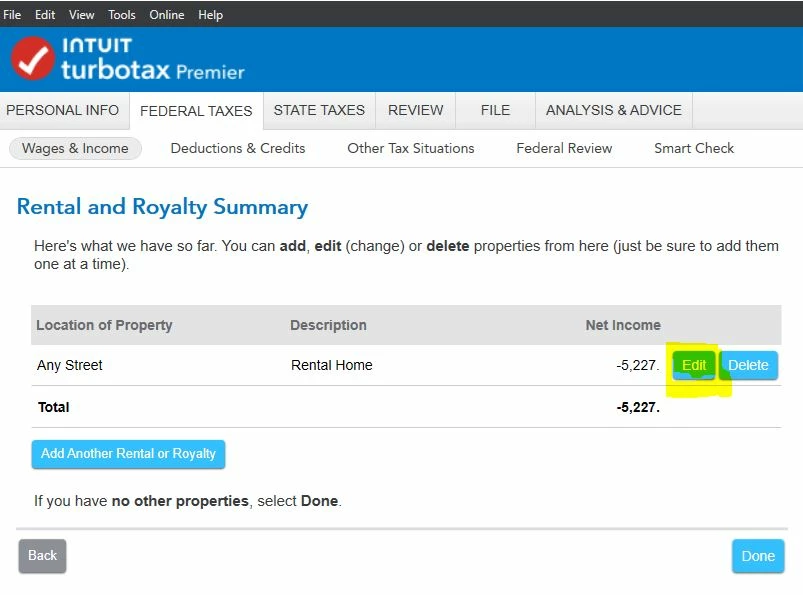
    When you update your Schedule E in the Wages & Income section, under Rental Properties and Royalties, the third screen in should be the Rental and Royalty Summary screen.  Clicking on Edit for the property listed should take you to the screen I provided as a screenshot.

    What happens when you click on Edit on the Rental and Royalty Summary screen?


    1 reply

    DoninGA
    Employee
    April 5, 2024

    When you are on the Rental Summary page and click on either start or update for Expenses, what happens?


    ukrkozAuthor
    April 5, 2024

    That's Premier. I don't have page like this in Deluxe.  Program does know all the previously entered numbers, but I simply can't get to that section.

    DoninGA
    DoninGAAnswer
    Employee
    April 5, 2024

    The same page will be in the Deluxe edition.


    When you update your Schedule E in the Wages & Income section, under Rental Properties and Royalties, the third screen in should be the Rental and Royalty Summary screen.  Clicking on Edit for the property listed should take you to the screen I provided as a screenshot.

    What happens when you click on Edit on the Rental and Royalty Summary screen?