
April 26, 2020
Solved

How do I indicate that I need to file a substitute W-2? Instructions say this should be a box under "Uncommon Situations," but this is not one of the options.

  • April 26, 2020
  • 2 replies
  • 0 views
No text available
Best answer by macuser_22

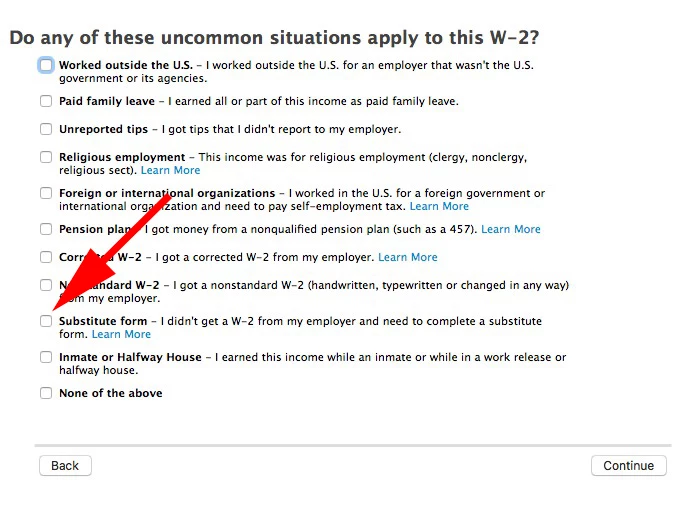
Enter a new W-2 and click through the interview without entering anything until you get a screen like this.
 

2 replies

Critter
Employee
April 26, 2020

Look again ... complete the W-2 entry screen again then look for this in the screens following ...


April 27, 2020

Thank you for your response; but I promise you, it isn't there:


BUT...after spending an hour and a half on this problem, I saw another forum response that said I need to delete the W-2 and resubmit without the employer's EIN. I have done this, and I can now finally see the "Substitute Form" box. The instructions in Turbo Tax under "How to file a form 4852" clearly say to enter the EIN if you know it. Since this creates a problem that does not allow you to file form 4852, I'd like to report this. What is the best way to do this? Thank you.

macuser_22
Employee
April 27, 2020

You did not follow my directions - I said - "Enter a new W-2 and click through the interview without entering anything until you get a screen like this."  But entering the employer EIN does not prevent that screen.


**Disclaimer: This post is for discussion purposes only and is NOT tax advice. The author takes no responsibility for the accuracy of any information in this post.**
macuser_22
Employee
April 26, 2020

Enter a new W-2 and click through the interview without entering anything until you get a screen like this.


**Disclaimer: This post is for discussion purposes only and is NOT tax advice. The author takes no responsibility for the accuracy of any information in this post.**
April 27, 2020

Thank you.




