
March 30, 2024
Solved

how do I remove an invalid 1099-B entry ?

  • March 30, 2024
  • 1 reply
  • 0 views

For some reason, the E*Trade data that gets imported (also shows up in the E*Trade consolidated tax info for 2023) contains a capital gains entry from a weird fund I inherited from my folks a few years ago that has a date of 1/9/2024. TurboTax says the date is invalid and requires changing it to a 2023 dates. But this 2024 date is the date of the $3.36 gain 


UNIT VK BUILD AMERICA BONDS 26 12008A609 01/09/24 $3.36


Is there any way to delete this entry from TurboTax ? I have not found any way to deal with this.


Best answer by RDBusser

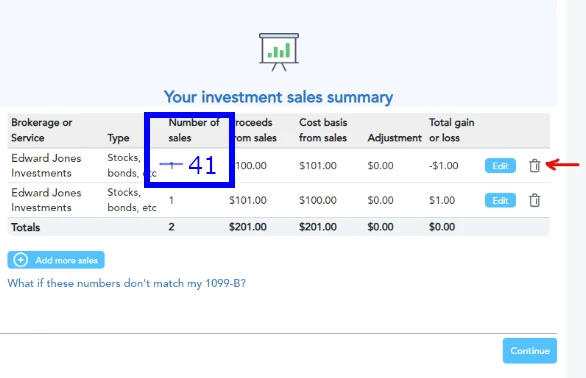
Sorry for not being more clear. But in my instance, hitting the trash can you are pointing to will delete 41 sales entries


Final Update


Turns out that I was able to deal with this issue by deleting ALL of the 1099-B entries, using the 1 garbage can delete mechanism, then re-importing the MorganStanley/Etrade account and this time answering the question "Did you purchase all of the stocks?" vs inherited or gifts with a NO. This time, during the import process you are prompted to individually address all 41 stock sale items. So, I was able to delete the 1 entry that was messed up with a date from 2024. (the reason so many is because a couple of the stocks that were sold had been collecting monthly dividends and re-investing them - so selling them all resulted in a large number of 1099-B entries.) 


Anyway, Seems that TurboTax is now happy with the Federal Review, no errors now.

1 reply

March 30, 2024

In TurboTax Desktop, you can delete imported items as follows:

  1. Open your return.
  2. From the TurboTax File menu, select Remove Imported Data.
  3. Select the item(s) you want to remove and follow the instructions.


Here's more details on How to Update or Delete Imported Data.


RDBusserAuthor
March 30, 2024

Thanks for the reply. 


But all I want to do is remove 1 of 5 entries. I don't want to remove all of the imported data. 


March 30, 2024

It's possible to delete only the entry you want removed by using the steps below.  Each entry should show a name beside it to help you find the correct one you want to delete.

You'll need to delete this form --------------------. 

  • If you're using TurboTax Online software and need to delete a form, click here.
  • If you're using TurboTax CD\Download software and need to delete a form, click here

@RDBusser 

**Say "Thanks" by clicking the thumb icon in a post**Mark the post that answers your question by clicking on "Mark as Best Answer"




