February 20, 2021
Solved

How do I successfully import my E*trade brokerage account data in Turbotax Home & Business 2020?

  • February 20, 2021
  • 4 replies
  • 0 views

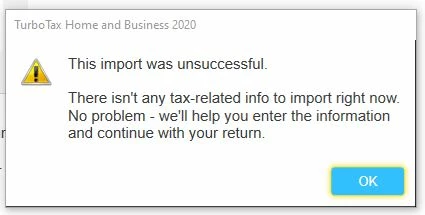
Everytime I try to use the import feature I get this error message (see below).  Yet, the tax data is available from E*trade and I can download the PDF and CSV files of my trades from Etrade.


Best answer by fanfare

At tax time, you have the option to summarize your transactions by Sales Category.

IRS requires details to be listed on a Form 8949,
or on your other forms (e.g. consolidated 1099-B) which have the same information and in the same manner as Form 8949.
Either way, if you choose to summarize, you have to mail the transaction details to the IRS within three business days of IRS accepting your e-Filed tax return.(unless you have attached a PDF of the transactions details to your e-Filed return. TurboTax does not offer this feature).
Exception: if you summarize Category A or Category D, Form 8949 is not needed for transactions without adjustments. No mailing is necessary.

---
As an active investor, be aware that your category Box A or Box D sales without adjustments do not require Form 8949, so there is no reason to import or key in those transactions.
Instead use the "enter a summary" option to put your numbers on Schedule D Line 1a or Line 8a.
--
If you have wash sales, it gets more complicated since those adjusted transactions have to be itemized on Form 8949 and the summary totals adjusted accordingly.

Enter the wash sales on Form 8949, then use the subtotal results on the bottom of that form (Line 2) to know how much to subtract. Be sure to NOT check the adjustments box in the summary window.
--
Alternatively, if entry of Wash Sales is too tedious,
summarize and check the box for adjustments and enter the disallowed amount.
This summary will go on Schedule D Line 1b.
You will be making the mail-in election.

4 replies

Cass0317
February 20, 2021

When selecting your financial institution or brokerage from the list, be sure to select the right one. For example, several participating partners' names start with First National Bank and if you select the "wrong" First National Bank, you won't be able to import. Also, the forms may not be available for import yet, please see the following link to check: When will I be able to import my 1099?

"HelenaC New Member"


Where do i go to download my etrade 1099 in turbo tax?

  1. Type import in the search bar and click search.
  2. Click on Jump to import.
  3. Click start/edit/add on 1099-INT or 1099-DIV or Stocks, Mutual Funds, Bonds, Other.
  4. Continue with the onscreen interview and identify your financial institution.
  5. Type in the Online ID and Passcode.

Related information:

0072MtnAuthor
February 20, 2021

Thanks for trying, but that answer doesn't help.

fanfare
fanfareAnswer
Employee
February 21, 2021

At tax time, you have the option to summarize your transactions by Sales Category.

IRS requires details to be listed on a Form 8949,
or on your other forms (e.g. consolidated 1099-B) which have the same information and in the same manner as Form 8949.
Either way, if you choose to summarize, you have to mail the transaction details to the IRS within three business days of IRS accepting your e-Filed tax return.(unless you have attached a PDF of the transactions details to your e-Filed return. TurboTax does not offer this feature).
Exception: if you summarize Category A or Category D, Form 8949 is not needed for transactions without adjustments. No mailing is necessary.

---
As an active investor, be aware that your category Box A or Box D sales without adjustments do not require Form 8949, so there is no reason to import or key in those transactions.
Instead use the "enter a summary" option to put your numbers on Schedule D Line 1a or Line 8a.
--
If you have wash sales, it gets more complicated since those adjusted transactions have to be itemized on Form 8949 and the summary totals adjusted accordingly.

Enter the wash sales on Form 8949, then use the subtotal results on the bottom of that form (Line 2) to know how much to subtract. Be sure to NOT check the adjustments box in the summary window.
--
Alternatively, if entry of Wash Sales is too tedious,
summarize and check the box for adjustments and enter the disallowed amount.
This summary will go on Schedule D Line 1b.
You will be making the mail-in election.
March 28, 2021

Is this issue resolved yet by TT? How are others filing their taxes? Is H&R block having similar issues? Please advise/help. Thank you all!

March 28, 2021

Are you having trouble with the negative values of your 1099-B?

If so, this has been an issue this year with the multitude of changes that have taken place.  However, we have a dedicated team to assist with this situation.  Please follow the instructions in this Help Article to reach out to them for further assistance. 

How do I fix my 1099-B negative values?

@roban

**Say "Thanks" by clicking the thumb icon in a post**Mark the post that answers your question by clicking on "Mark as Best Answer"
October 25, 2022

As far as i know you can’t download E-trade data until the end of February. This is my experience before when I file on February 20, 2022, but E-trade wasn’t ready to Turbo Tax until I bumped by the end of February which February 28, 2022. E-Trade should coordinate with Turbo Tax  in the beginning of February, so that many people can file their return early. Import data from E-Trade supposedly done before February 15 each calendar year. But for 2021-2022 was late. If you have 3000 transaction, you will takes a week or more to do manual entries. That’s ridiculous. 

March 20, 2023

I had a very long E*Trade password that did not work.  I shortened it to 8 characters and it went through.   Went back and changed it back after the inport.




