January 29, 2024
Solved

I sold a primary residence that includes a rental. How do I get the passive activity loss release?

  • January 29, 2024
  • 1 reply
  • 0 views

I had a primary residence in California that included a room that I rented out. I sold the home in TY2023. I'm reporting capital gains correctly in TurboTax. My tax accountant advises me that I can report passive activity loss on Schedule E via Form 8582. However, I'm not seeing a way to report this loss in TurboTax. 
Any suggestions? TIA
    Best answer by DianeW777


    Let's approach it another way.  

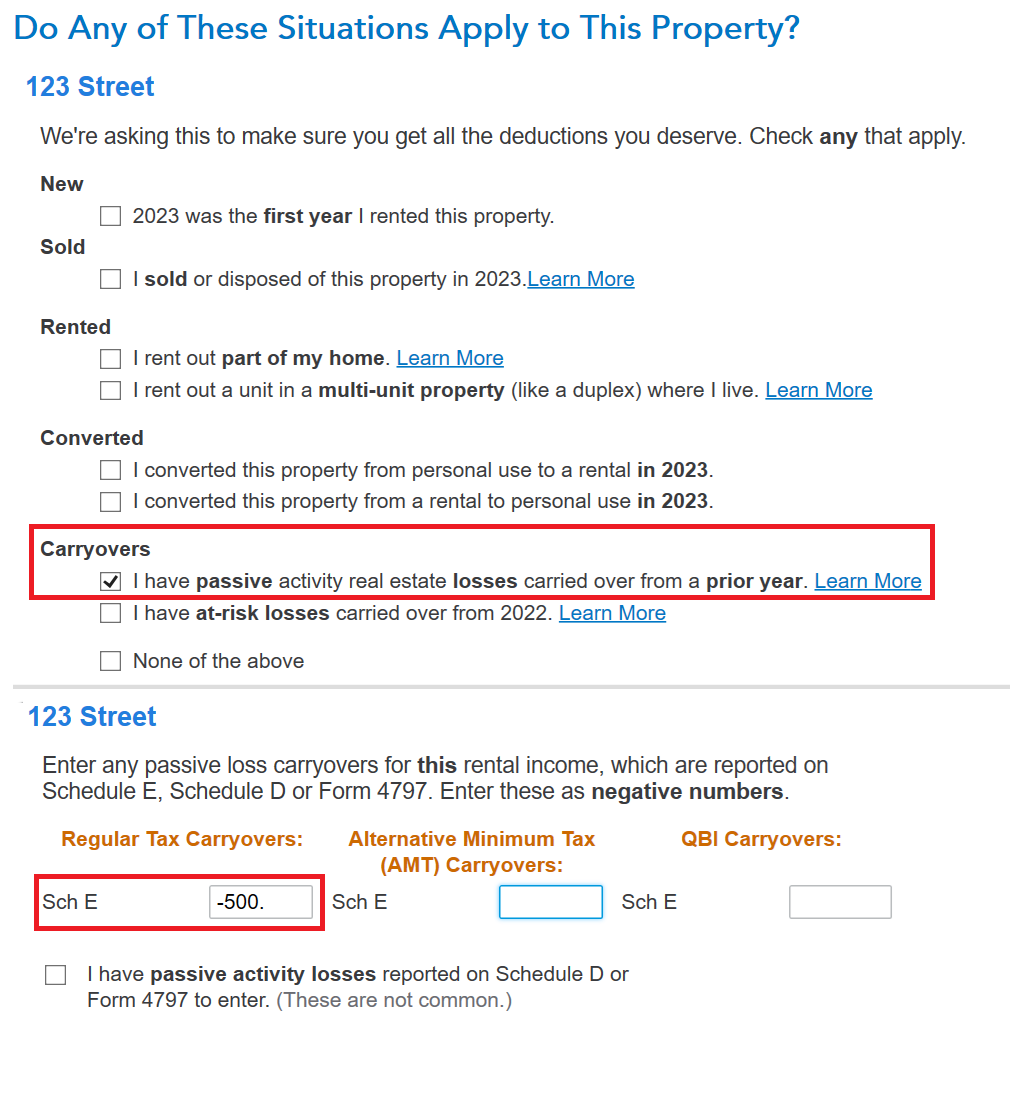
    1. Go to Income and scroll to Rental Properties and Royalties > Edit beside your property > Select Update beside Property Profile
    2. Continue until your reach the screen 'Do any of these Situations Apply...?
    3. Check the box next to 'I have passive activity real estate losses carried over from a prior year'
    4. View the image below.  It will look slightly different because it's not a Mac,

    @markforry 

    1 reply

    January 29, 2024

    You will first need to enter the rental property into TurboTax.  And then enter that it has been sold.  You will need to enter all the prior depreciation in order to calculate your gain or loss.


    Then follow the steps listed here in order to enter your prior year passive losses which are triggered by this sale.


    @markforry 

    **Say "Thanks" by clicking the thumb icon in a post**Mark the post that answers your question by clicking on "Mark as Best Answer"
    markforryAuthor
    January 30, 2024

    Thanks @RobertB4444 - I appreciate you taking the time.

    I have entered all the sale information, prior depreciation, and this years rental information for TY2023. However, when I try to follow the instructions in the linked message (editing the rental information), I don't see the "Do any of these situations apply to this property" or "I have passive activity real estate losses carried over from a prior year" dialogs. I think I saw them earlier, but I can't find any way to get back to them. I also can't find the worksheets shown in the screenshots. Parenthetically, this is one thing I find extremely frustrating in TurboTax: the difficulty in finding screens and information I've entered earlier.

    Nonetheless, the attachments gave me some ideas for worksheets to check. I'll try entering the passive losses there and see if I can get them to flow correctly to Schedule E.

    markforryAuthor
    January 30, 2024

    Specifically, Turbo Tax throws me into a loop:

    1. Your Property Assets Screen
    2. Clicked Edit, clicked through too ...
    3. Special Handling Required?
    4. Select Yes if any of the following ...
      This asset was a rental ... within a home.
      Clicked Yes.
    5. Depreciation amount deducted screen.
    6. Clicked Continue.
    7. Back to Property Assets Screen.

    There's no opportunity here to enter passive activity loss.

    If anyone can show me how and where to do that in TT, I'd be most grateful --  TIA.