

Solved
Is there a way to delete the charities I used last year, so my import of new donations doesn't duplicate?
No text available
@4091986
Well, there is no exact way to do it the way you want...but there is an easy way.
This is for the "Online" software (but probably works in desktop too)
_____________________________
Before you enter any charity donations.
1) Log in and open yoru tax file, and go to the Deductions&Credits page
2) Scroll to the bottom of the page and click on "Continue"
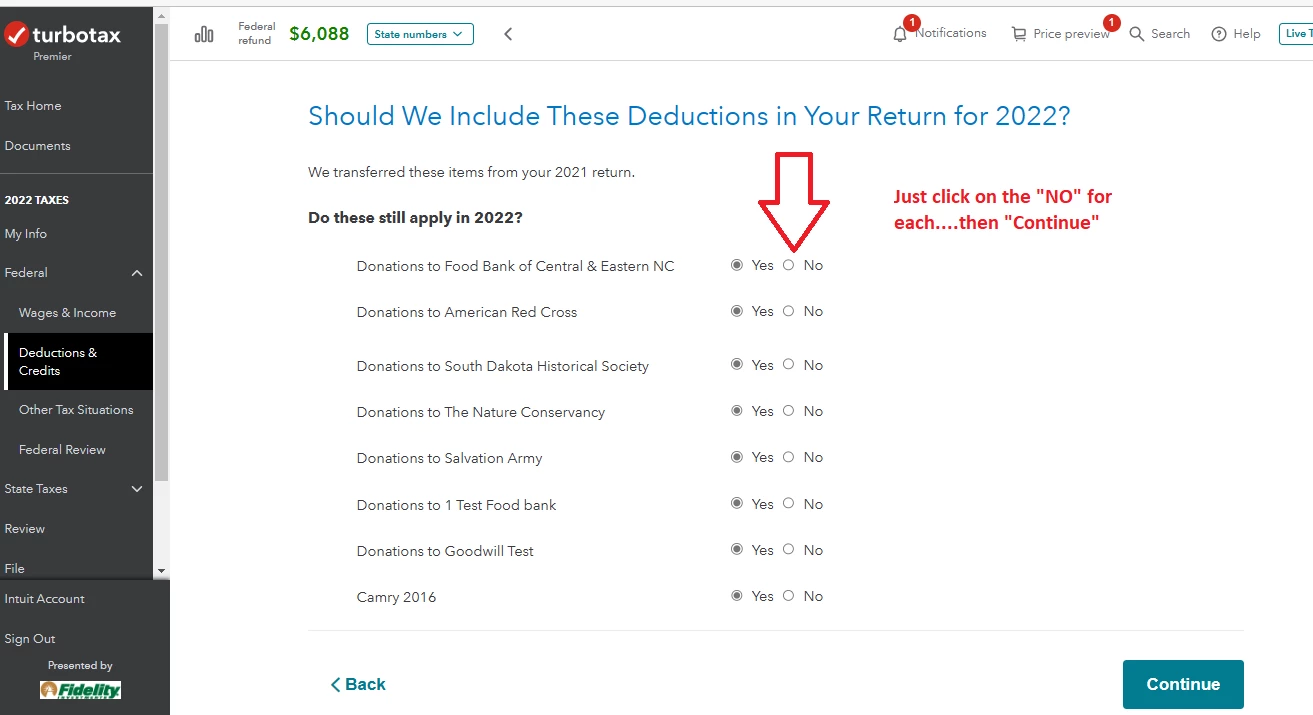
3) I get the following page to easily take out all charities not used:
(but you may see more pages that intervene, depending on what's not in your file so far)
_________________________________________
Enter your E-mail address. We'll send you an e-mail with instructions to reset your password.





©1997-2022 Intuit, Inc. All rights reserved.
Intuit,
QuickBooks, QB, TurboTax, ProConnect, and Mint are registered
trademarks
of Intuit Inc. Terms and conditions, features, support, pricing,
and service options
subject to change without notice.
Security
Certification of the TurboTax Online application has been
performed by
C-Level Security.
By accessing and using this page you
agree to the
Terms of Use.
Accessibility


