
April 13, 2022
Solved

K-1 and New Form 7203 - Allowed Loss?

  • April 13, 2022
  • 1 reply
  • 0 views

Hi.  I'm still reading up on Form 7203.  I was surprised to encounter it in TurboTax this year.  I think I put in my income and loss correctly from the K-1 but I have not yet figured out how to do all the basis details 😞  I'm hoping you can help me understand this screen:
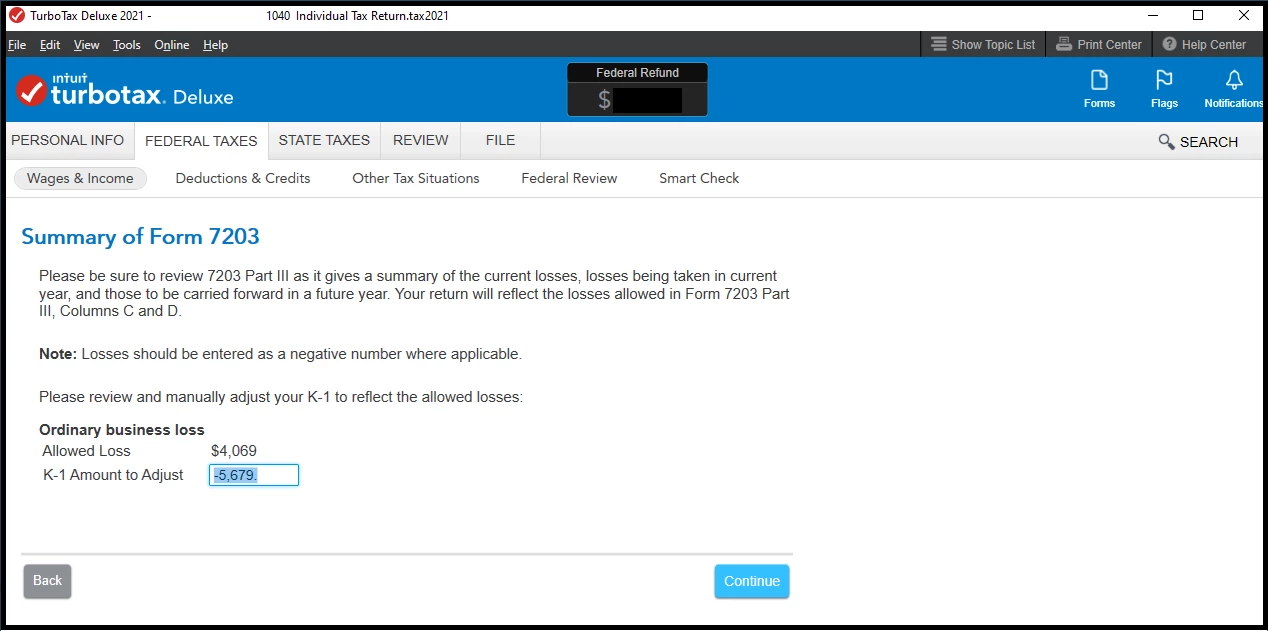


It comes near the end of the K-1 review.  The value in "Allowed Loss" ($4,069) is the income for my business and the value currently in "K-1 Amount to Adjust" (-5,679) is my expenses.  Unfortunately, this year, I had a loss.  I don't understand why the "K-1 Amount to Adjust" field is editable.  Am I supposed to change it?  Is it implying that it should not exceed the "Allowed Loss"?  I doesn't make a big difference in the end result but I want to understand it.


Anyone know what's expected?


I'm still researching 7203 so forgive me if it's an obvious question.


Thanks.


Benny


    Best answer by PatriciaV

    Yes, the K-1 number can't be more than the Allowed Loss. If you enter the same number for both, this should be resolved.

    1 reply

    PatriciaV
    Employee
    April 14, 2022

    Because your allowed losses exceed the reported K-1 losses, you need to enter no more than the allowed losses for this entry. Note this affects Form 7203 only; you are not changing your K-1 entries.

    **Say "Thanks" by clicking the thumb icon in a post**Mark the post that answers your question by clicking on "Mark as Best Answer"
    Benny HAuthor
    April 14, 2022

    Actually, my true expenses in the "K-1 Amount to Adjust" (-5,679) exceed what is listed in "Allowed Loss" ($4,069).   So, I should change the "K-1 Amount to Adjust" to equal the "Allowed Loss" (I.e., "-4,069").  Is that what you meant?


    Thanks.

    PatriciaV
    PatriciaVAnswer
    Employee
    April 14, 2022

    Yes, the K-1 number can't be more than the Allowed Loss. If you enter the same number for both, this should be resolved.

    **Say "Thanks" by clicking the thumb icon in a post**Mark the post that answers your question by clicking on "Mark as Best Answer"




