
February 13, 2024
Solved

Mathematical Error

  • February 13, 2024
  • 1 reply
  • 0 views

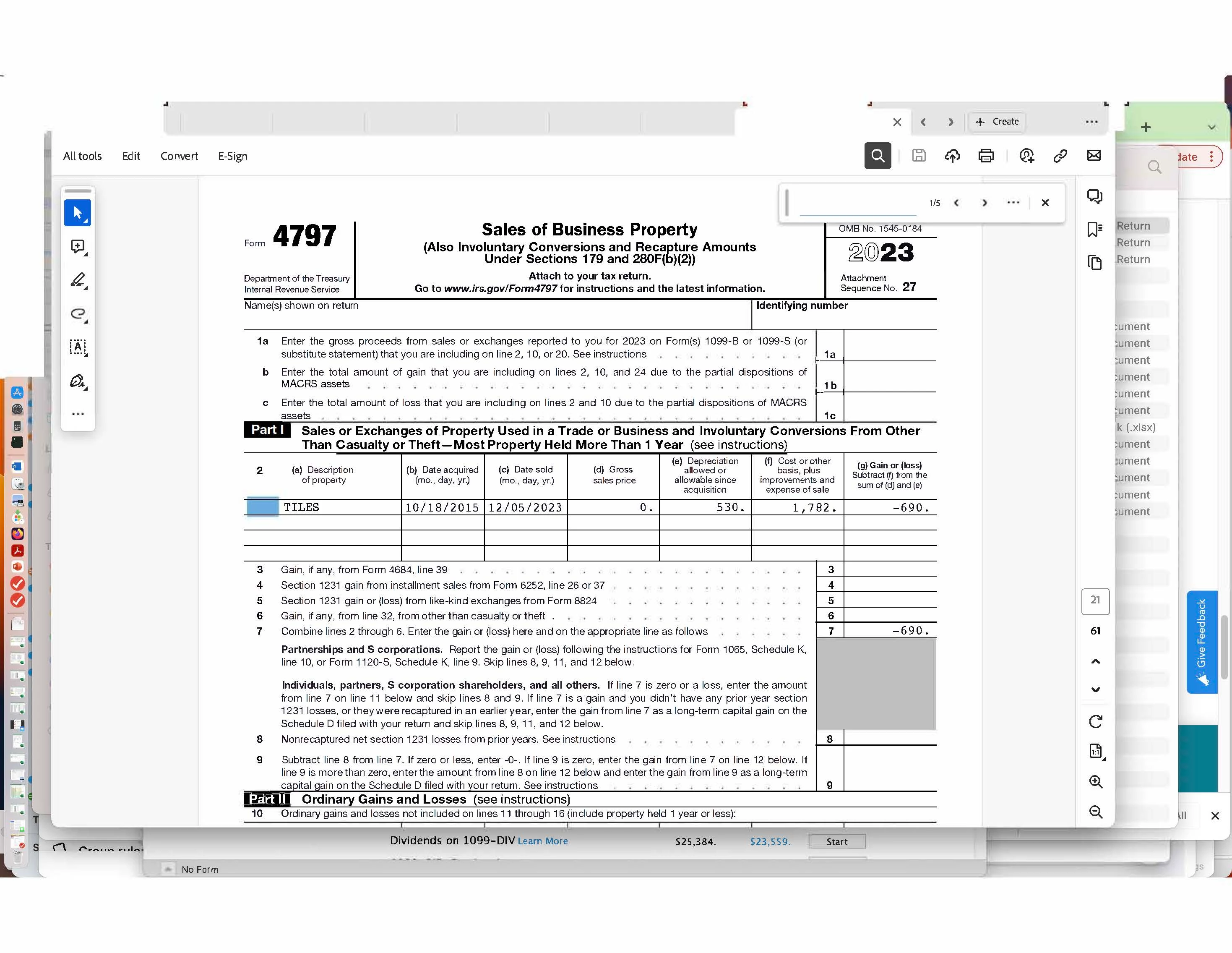
I cannot figure out why Turbotax insists that 530 - 1782 = -690.  Shouldn't the result be -1252?
 

    Best answer by KrisD15

    Hi - thanks.  There is no visible "online" tab  anywhere on the screen- at least on the MAC version.


    On a MAC, please look for HELP rather than ONLINE 


    @sjrosso 

    1 reply

    February 15, 2024

    Any chance that Section 179 deduction was claimed on this asset?

    **Say "Thanks" by clicking the thumb icon in a post**Mark the post that answers your question by clicking on "Mark as Best Answer"
    sjrossoAuthor
    February 16, 2024

    No.  Would like to note that all seems good when I override this figure in the form - except that overriding disable e-filing.

    February 18, 2024

    To look into this further and try to offer an explanation to your or submit it to the appropriate team for possible correction if it is an issue, it would be beneficial to have a diagnostic copy of the tax return experiencing the issue.  You can help by providing that diagnostic tax file.


    The diagnostic file will not contain personally identifiable information, only numbers related to your tax forms.  If you would like to provide us with the diagnostic file, follow the instructions below and post the token number along with which version of TurboTax you are using and what state you are filing in a follow-up thread.


    Use these steps if you are using TurboTax Online:


    • Sign in to your account and be sure you are in your tax return.
    • Select Tax Tools in the menu to the left.
    • Select Tools.
    • Select Share my file with agent.
    • A pop-up message will appear, select OK to send the sanitized diagnostic copy to us.
    • Post the token number here. 


    If you are using a CD/downloaded version of TurboTax, use these steps:


    • Select Online at the top of the screen.
    • Select Send Tax File to Agent.
    • Click OK.
    • Post the token number here.

    @sjrosso 

    **Say "Thanks" by clicking the thumb icon in a post**Mark the post that answers your question by clicking on "Mark as Best Answer"




