
March 19, 2023
Solved

Michigan MI 2210 does not allow for correction

  • March 19, 2023
  • 1 reply
  • 0 views

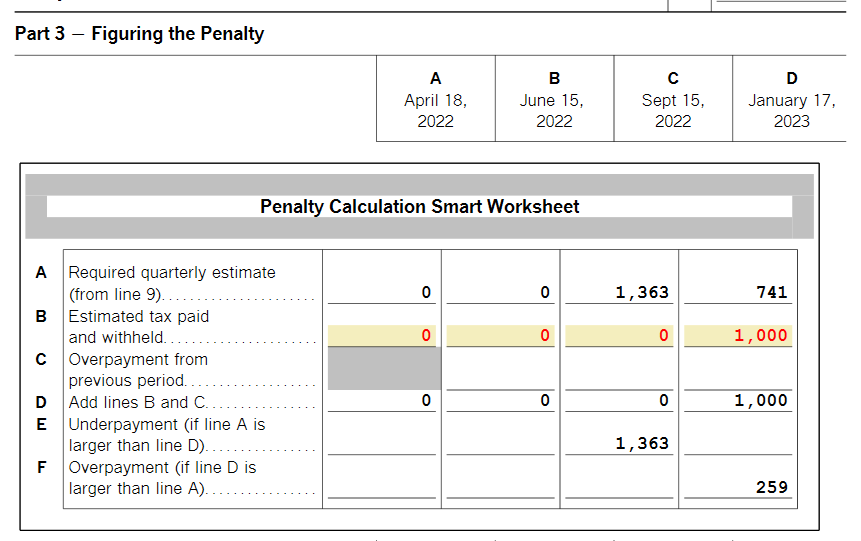
My income and the taxes I paid varied through the year.  The Federal tax part of the program had me enter the different earnings by quarter along with taxes paid by quarter.  This did not translate over to the Michigan forms so it has me paying a penalty for not paying my taxes on time.  I did pay my taxes on time but the program makes an automatic calculation based on averaging and will not allow me to input the actual timing of my withholding and estimated tax payments.  This results in it showing I owe a penalty.   TT does not allow any corrections to the withholding figures -- only automatically inserting the average.  The only way I can figure out how to correct this is to do my Michigan taxes on paper.  Very unhappy with Turbo Tax.  What good is the state return portion if it's incorrect?
    Best answer by ErnieS0

    If you are using TurboTax CD/Download you can use Forms mode to annualize your withholding.


    1. Tap Forms in the top right corner
    2. Find Form MI-2210 in the left column and tap to open the form
    3. Go to line B (Estimated tax paid and withheld) on the Penalty Calculation Smart Worksheet
    4. Highlight the first box and rIght click and select Override or Ctlr-D
    5. Change the amount in the box to what you want it to be
    6. Do this for the other four boxes
    7. Tap Step-by-Step where Forms used to be to return to the interview mode

    How do I switch from TurboTax Online to TurboTax CD/Download?


    Overrides will prevent you from e-filing and will void the TurboTax 100% Accurate Calculation Guarantee.


    1 reply

    March 21, 2023

    You should continue to e-file your MI return.  The MI State Department of Revenue is going to perform their own calculations based on information they have in their system then match to the submitted return and will notify you of any corrections.


    **Say "Thanks" by clicking the thumb icon in a post**Mark the post that answers your question by clicking on "Mark as Best Answer"
    March 23, 2023

    First of all, we never e-file our state tax return -- no need to pay more money than necessary.  So if I'm mailing our return, we might as well completely it correctly, which TT is not able to do for us.  It is clearly an issue that TT averages withholding over the year and does not allow for adjustment.  In the first quarter 2022, our withholding was $1000 more than the average, plus we paid estimated taxes.  No way do we owe an underpayment penalty and no way are we going to wait for the state to make the correction.


    Very unsatisfactory answer.  

    ErnieS0Answer
    March 24, 2023

    If you are using TurboTax CD/Download you can use Forms mode to annualize your withholding.


    1. Tap Forms in the top right corner
    2. Find Form MI-2210 in the left column and tap to open the form
    3. Go to line B (Estimated tax paid and withheld) on the Penalty Calculation Smart Worksheet
    4. Highlight the first box and rIght click and select Override or Ctlr-D
    5. Change the amount in the box to what you want it to be
    6. Do this for the other four boxes
    7. Tap Step-by-Step where Forms used to be to return to the interview mode

    How do I switch from TurboTax Online to TurboTax CD/Download?


    Overrides will prevent you from e-filing and will void the TurboTax 100% Accurate Calculation Guarantee.


    **Say "Thanks" by clicking the thumb icon in a post**Mark the post that answers your question by clicking on "Mark as Best Answer"




