
February 27, 2023
Solved

My country keeps coming up as "other country" even though I selected US Address (and CA for the state). I tried four times and the error keeps reappearing. How to fix?

  • February 27, 2023
  • 1 reply
  • 0 views
I'm getting errors down the line about foreign taxes, which I don't have any of, so I think they are related to this error.
    Best answer by JohnW152

    If you haven't already done this, then, with TurboTax open:

    1. Select the dropdown next to Personal Info, then Review/Edit
    2. Select My Info in the left pane
    3. Scroll down and select Edit to the right of Mailing address
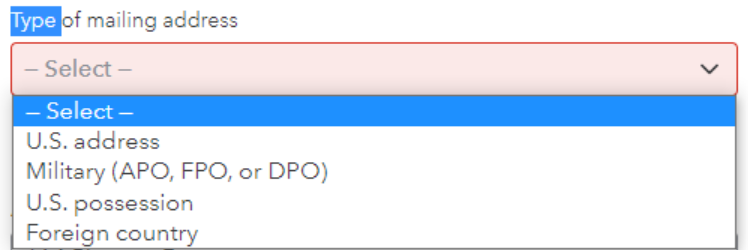
    4. In the Type of mailing address box, select the dropdown and make sure you select U.S. address
    5. Make sure that your street address, city, state and zip code are correct, then select Continue

    Close and save your return, then open TurboTax again.


    1 reply

    JohnW152Answer
    February 27, 2023

    If you haven't already done this, then, with TurboTax open:

    1. Select the dropdown next to Personal Info, then Review/Edit
    2. Select My Info in the left pane
    3. Scroll down and select Edit to the right of Mailing address
    4. In the Type of mailing address box, select the dropdown and make sure you select U.S. address
    5. Make sure that your street address, city, state and zip code are correct, then select Continue

    Close and save your return, then open TurboTax again.


    G_SmithAuthor
    February 28, 2023

    Thanks!  I didn't try the "close and reopen TurboTax" step - that did the trick.




