
February 3, 2025
Solved

Ongoing problem importing from Vanguard to TurboTax Deluxe Desktop 2024 on Windows 10
  • February 3, 2025
  • 6 replies
  • 0 views

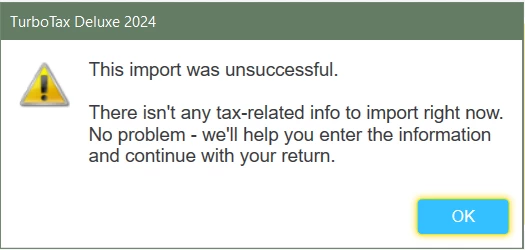
TurboTax thinks there isn't any tax-related info to import right now.  Well TurboTax is off with the fairies because I am looking at my 1099 full of tax-related info!


The error message appears after I enter a valid account number and document ID taken off a recently downloaded Vanguard 1099 form.


I have asked Vanguard about this and no surprise they said they cannot fix anything broken inside TurboTax.


I have imported from Vanguard in the past and am feeling surprised, disappointed and very frustrated.

    Best answer by mglauner

    Problems remain on Feb 15.  NONE of my imports are working, not from Vanguard not Schwab. 


    By the way, Schwab just advanced the date that their 1099s will be ready to Feb 28, 2025.


    Download a PDF copy of your consolidated 1099.  If it contains 1099-Int/Div, you can make a one-line entry for the totals in those sections for each Payer. 


    Some users have reported successful imports by temporarily disabling all virus software (including modem).


    Depending on the types of transactions you have, you can enter a summary in TurboTax Desktop, and may not need to mail anything.  The IRS has a copy of all your 1099's anyway.


    You may need to enable third-party access in your Schwab account.  Here's more info on Issues Importing from Schwab.


    @UnderDuress2023 


    6 replies

    February 7, 2025

    Double check that the transaction limits have not been meet.  TurboTax Desktop has a limit of 10,000 of any combination of transactions and imports.  The import file size also is limited to 4MB.  If your file size or transaction numbers approaches these limits it is causing the system to time out and give the error.  If your transactions are close to this number enter the sales totals instead of individual sales.  If this does not correct your issue, try the troubleshooting in the link listed below:


    **Say "Thanks" by clicking the thumb icon in a post**Mark the post that answers your question by clicking on "Mark as Best Answer"
    February 9, 2025

    Interesting.  Do you know how to find out how many transactions are already in my copy of TurboTax? I would guess less than 1000.  

    How can I know the size of the file-to-import since the import happens as a direct communication between Vanguard and TurboTax Desktop with zero status details?  Again, I doubt the file from Vanguard is more than 4MB, but how can I prove that?


    I decided to wait until Feb 15 which is when Schwab says their data will be ready, and see what happens when I try to import from there.

    Surely TurboTax could report at least an error code when a specific limit is reached, to help with all this.


    Thank you very much for trying to help and if you have further answers, I am definitely interested.

    CatinaT1
    February 10, 2025

    Here’s what we recommend for Vanguard:

    First, the Primary owner of the brokerage account must be logged on to import the information. Then, make sure you have selected the Vanguard brokerage account and not the mutual funds account. Customers have found that when they click on the Vanguard icon in the Select financial institutions section, it didn't give a choice of brokerage or mutual funds. However when they typed in Vanguard instead of clicking on the icon, they did get a choice and were able to select brokerage.


    To import from your Vanguard account, please follow the steps below:

    1. Go to Federal > Wages & Income
    2. Scroll down to the Retirement Plans and Social Security section and click Start next to IRA, 401(k), Pension Plan Withdrawals (1099-R)
    3. On the Choose your bank or brokerage page, click the Vanguard tile or type Vanguard in the search .
    4. Then click Continue to begin the import process
    **Say "Thanks" by clicking the thumb icon in a post**Mark the post that answers your question by clicking on "Mark as Best Answer"
    beejay926
    February 17, 2025

    I feel your frustration!!  I cannot get any of my financial institutions (Vanguard, eTrade, M1 Finance) to import.  I'm using TurboTax Deluxe 2024 on a Windows 11 PC.  The only item I was able to import successfully was the W2 from my employer.  I've spent 2 days trying to figure this out.  My message is always the same, I get "THIS IMPORT WAS UNSUCCESSFUL.  INTERNAL SERVER ERROR."  That's what I get for Vanguard, eTrade, and M1 Finance.   At least 20 times now.  I even uninstalled TT2024 and reinstalled.  I went to eTrade and selected to share data with 3rd party and disconnected my VPN  (a recommendation I found), and nothing.  I buy TTax every year (20 years now) so I don't have to figure this particular financial stuff out, that TT imports what is needed and puts it in the right place.  I do mine and my kids.  Yes, I can put it in myself, but that's why I buy TT.   I buy it so it is easier on me, asks the right questions, and imports the info.  I have been so disappointed in it this year.  There were lots of glitches just finding where to download from (I buy from Amazon and it used to be easy), download process kept stalling, took three times to finally get it.  I thought it was a problem on my side, but now I think not. The Help is no help when I want to thoroughly understand a question being asked. I'm going to try to call TT Support since I've followed all other on-line help I could find.

    February 17, 2025

    What you just wrote is exactly where I'm at. So frustrating.  Same number of years, versons, win 11, exactly what you said. If you figure it out, please post your solution. Good luck to both of us!


    February 20, 2025

    Yes, I also have used TT for years and never had this level of trouble with the import. 


    For anyone who has not already spent the money on TurboTax for 2024, you should check out the free options. There are more every year.


    https://www.irs.gov/filing/irs-free-file-do-your-taxes-for-free 

    And if you don't trust the link, search for IRS Free File.


    The part that bothers me the most is that Intuit has designed an import system for which it is impossible to give  feedback that would let them fix important bugs.  TT blames Vanguard, Vanguard blames TT. 


    February 18, 2025

    I had the same problem on windows11. kept getting a captia error message. someone said they had success by disabling real time virus and threat protection. i went into security and temporarily turned real time off and it imported just fine. simple fix, customer service needs to know this. 

    March 2, 2025

    HAVE NEVER HAD PROBLEMS IN THE PAST.......WHATS UP.

    March 3, 2025

    At the institution page, type in Vanguard in the search area, then double-click on it in the search results.  You should get to the Vanguard Sign In page.


    If you're using TurboTax Online, close the program and clear your Cache and Cookies between attempts.


    If you get this far, give details of what happens next and we'll try to help.


    @KRUSKA1 


    March 4, 2025

    With Vanguard, my originally reported error message is what precisely what happens after providing valid account and document entries to the screens you showed, @mglauner.


    The reason I am posting today is to report that, after waiting for Schwab to notify me that tax documents were finally ready to download (early Feb then late Feb), the import from Schwab to TurboTax desktop worked perfectly, as it had in previous years.


    My guess, based on 30 years experience writing web applications and back-end data transfer systems, is that Intuit changed the spec on the error handling, and partners did not keep up with the (likely terribly documented) API changes.  


    Anyway, if you had trouble with Schwab, try them again.  I never got anywhere with Vanguard this year.


    Good luck, everyone. 


    March 18, 2025

    Cannot import DIV or INT from Vanguard account. Asking for type of file which it never did in the past. 

    March 22, 2025

    Hi Underduress, Have you or anyone figured out the same VERY frustrating vanguard turbo tax import issue? I'm not a conspiracy theory person but do notice this year intuit is pushing the pay for live tax advice on tv and radio not just online. This is pissing me off because I started with vanguard and turbo tax 30 yrs ago.

    thanks


    March 22, 2025

    Hi @rockymadness and everyone else stuck on this

    I feel your pain! 


    I saw one person earlier in the thread managed to get their Vanguard data on Feb 18th.  It could be worth getting yesterday's updates and trying one more time.


    I am guessing it has something to do with the complexity of the account structure.  It is impossible to know without diagnostic help from Vanguard and Intuit at the time of the attempts.


    I ended up typing my Vanguard numbers into TurboTax --- off the PDFs which I had been able to download directly off the Vanguard portal.


    Next year I will work pretty hard to avoid buying a TurboTax license.  Intuit seems to be spinning completely out of control, completely out of touch with its user base.  


    For anyone looking for alternatives to QuickBooks, I can point you to https://manager.io  which is free for any single user on Windows, Mac and Linux.  It does not have ALL the QB features but it is extremely useful. 


    Here's hoping your day (night) involves more than tax preparation.




