
February 21, 2023
Question

Online 1099-K Link Issue

  • February 21, 2023
  • 3 replies
  • 0 views

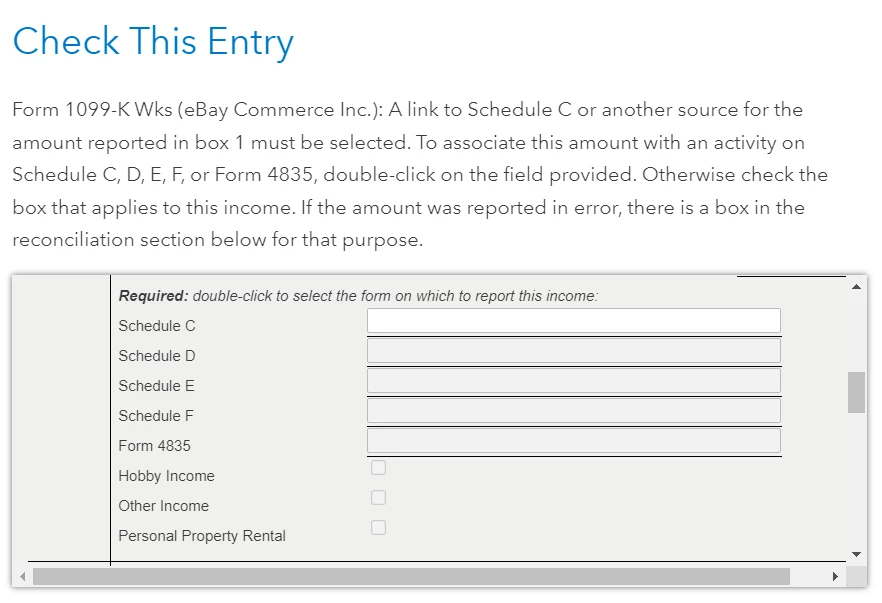
I received a 1099-K from eBay for selling personal used items. I added Form 1099-K under Other Common Income as instructed in other posts. I selected Personal item sales and All items were sold at a loss or had no gain. It works well until the Federal Review session. It keeps showing me the From 1099-K needs review in the screenshot. I tried to double-click the blank but nothing happened. 


It seems TurboTax is trying to link this 1099-K to Schedule C. But for my case, I believe I don't need Schedule C and the 1099-K should proceed as selling the capital asset, which is supposed to appear on Schedule D. Did I miss anything? Or should I try the desktop version which provides more flexibility to work on the form directly?
 

3 replies

February 21, 2023

Try deleting and typing in your 1099-K yourself. If you choose Personal item sales and "All items were sold at a loss or had no gain," TurboTax will report your sales on Schedule 1, line 8z.

**Say "Thanks" by clicking the thumb icon in a post**Mark the post that answers your question by clicking on "Mark as Best Answer"
3Do0oXTTAuthor
February 21, 2023

Just tried to manually input 1099-K but the review issue is still there. 

KrisD15
February 21, 2023

When you enter the 1099-K, and select "Personal Item sales" the TurboTax program will link it to Schedule D. 


After entering the 1099-K and selecting "All items were sold at a loss or had no gain" 

finish the "Other Common Income" interview. 


NEXT

Go to Income

Investment Income

Stocks, Mutual Funds, Other

Start or update

The 1099-K you entered should be listed there, click Edit for that 1099-K

Continue through the screen "Confirm your financial info"

Click Edit again for that 1099-K which should be listed

Choose "Summary" if applicable

Enter the amount reported on the 1099-K as BOTH Total Proceeds and Total cost basis 

Select Long term in the drop-down if all items were held for more than one year

(if some items were held for one year or less, you will need to split the entries, although since there was no gain, and loss is not allowed, it would make no difference)

Click Continue 


This should eliminate the error. 


**Say "Thanks" by clicking the thumb icon in a post**Mark the post that answers your question by clicking on "Mark as Best Answer"
February 26, 2023

I just got off the phone with a TurboTax agent who got me through to completion. The key is to not use the personal sales radio button (because there's no way to get to the finish line using that route) - instead mark self-employed. Continue through with that, and then I think we entered another self-employment form under wages and income, but now that I've actually completed everything, I can't go back to see what form I entered. But I do know that there's a form where it asks you for a business code and you use 999999. (six 9's).


I hope this helps anyone, because I definitely got to the finish line using this route. Maybe if someone finds this and successfully completes it as well, they can fill in the blanks I missed.


Good luck!

April 2, 2025

I've had the exact same issue and it is indeed a TurboTax software bug. I have found a solution. 


Click "Forms" on the upper right of the screen. Then select "Form 1099-K Wks (ebay)". Scroll down to the bottom that says "1099-K Reconcilliation". In 2b, "Payments for personal property sold at a loss", the box is checked, BUT THE VALUE IS NOT ENTERED!!! Enter the same value as "1" and then "3" should become 0.


It will then not ask you to link schedule C. 


TurboTax, please fix this issue!!




