March 27, 2020
Solved

QBI Deduction not calculating

  • March 27, 2020
  • 2 replies
  • 0 views

Hello,

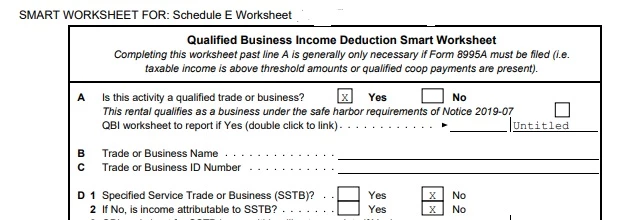
On my personal return, I have rental income on Sch E and it's not calculating the QBI deduction even after selecting "yes" to the question.   Line 10 on my 1040 is blank.   I looked at the Turbo Tax Smart Worksheet for Sch E (see attached pic) and the box where it would qualify for safe harbor is not checked.   How do I check that box?  I presume this is the reason it's not calculating the QBI deduction.   I'm well under the income threshold for 2019. 


Other items on my return include the following (if it makes a difference):

  • Small W2 income (unrelated to sch E)
  • 401k Rollover (tax free)
  • Roth IRA conversion (taxable)
  • Sch D Capital loss
  • Sch A expenses
  • Dividends

Help!


Best answer by DavidS127

Try to go back through the Step-by-Step interview for each Schedule E, and you will see a screen requesting Business name and EIN enter the name you are using for the rental property in the box for Business name. You don't need to enter anything in the EIN box.


You can do this in TurboTax Download/CD in Forms mode on the QBI Component form for each Schedule E by entering the name you are using for the rental property in the first box, "aggregate trade or business name".


2 replies

DavidS127
DavidS127Answer
March 27, 2020

Try to go back through the Step-by-Step interview for each Schedule E, and you will see a screen requesting Business name and EIN enter the name you are using for the rental property in the box for Business name. You don't need to enter anything in the EIN box.


You can do this in TurboTax Download/CD in Forms mode on the QBI Component form for each Schedule E by entering the name you are using for the rental property in the first box, "aggregate trade or business name".


**Say "Thanks" by clicking the thumb icon in a post**Mark the post that answers your question by clicking on "Mark as Best Answer"
March 27, 2020

That worked, thank you!  I knew it had to be simple.   I called support TWICE and they were clueless.


January 31, 2021

The software will not do it automatically and does not work. You need to go to the forms page for schedule C and click on the box that you are qualified for the QBI. Do not listen to ANYONE who says it does it automatically. It has not since the 20% was instituted. Are these people working for the IRS and trying to get you to overpay?