
February 1, 2022
Solved

Receiving "You may be due a refund from your employer" message

  • February 1, 2022
  • 3 replies
  • 0 views

I changed jobs in the middle of 2021, and the sum of my Social Security withholdings across both employers exceeds the maximum, so I should be due a credit on the overpayment.


When this has happened in years past, TurboTax has handled it without any issue, but this year, it's giving me a "You may be due a refund from your employer" message -- and I think in this case there is a bug in TurboTax that is causing this.


The error message lists one of my two W-2 forms, but the Box 4 (Social Security Tax Withheld) amount is actually the total across both of my W-2 forms. This is making it appear as if a single employer over-withheld -- which they didn't. 


Curious if anyone else has seen this. I'm on version [phone number removed].
Best answer by jtaylordfw

@ErnieS0 


If you have excess social security from two different employers, you'll also see a message in the W-2 section that says Congrats! Looks like you're getting some cash back after TurboTax asks you to verify your entries @billcraneco.


No, this is NOT working as you describe. After verifying entries, I do NOT get a message congratulating me that I'm getting cashback. Instead, I get a message stating that I need to get a correct W-2c from an employer and I should not proceed until I have the corrected form.


TurboTax is not generating schedule 3, and Form 1040 line 31 has no value.


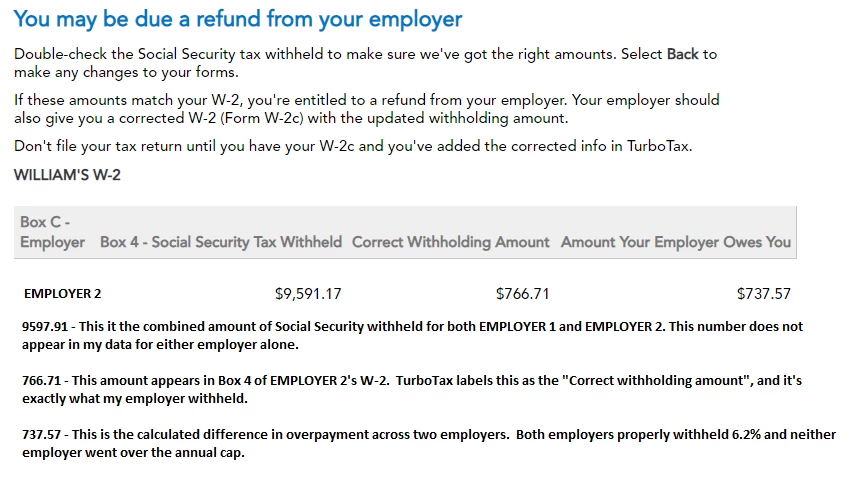
The screen I do get looks like this (sensitive info deleted, I've added some comments at the bottom of the screen shot)

The screen above seems to falsely state that EMPLOYER 2 withheld 9591.17 which is not true.  They only withheld 766.71 (which TurboTax says is the correct withholding).


This looks like a bug that needs to be fixed.


In case you missed my other posting on this issue -- double-check that the TIN for each W-2 is correct. I found (by working with support) that the software had copied the TIN from one employer into the W-2 for the second employer, and that's what was causing the issue.

3 replies

February 1, 2022

It sounds like two things are going on here. You are correct, if your Social Security is over-withheld due to changing jobs, the amount of additional withholding is returned to you on your 2021 tax return. TurboTax should make this calculation automatically. 


However, if any single employer over-withheld then they would need to re-issue a corrected W-2 and refund you the amount they over-withheld. It sounds like all your Social Security withheld is only being reported on one of the W-2s? I could not re-create this error. This may be due to an importing issue. Please ensure that the correct Box 4 amount is being reported from each of your employers. It should be 6.2% of the Box 3 Social Security wages up to a maximum of $8,854. 

February 1, 2022

I double checked my forms. Neither of my two employers over-withheld any social security taxes. I have entered each form accurately into TurboTax, but it is doing some sort of incorrect calculation in my case that is causing this error. 

February 1, 2022

If you do have two different employers, then the employers do not have access to the information about each other in reference to your income. For this reason they would not pay too much FICA on your wages.  In this case, any excess because you have earned more than $142,800 in wages when combined, the IRS will refund any excess social security tax because each employer would have paid it all to them.


On your tax return the excess will show up on line 11, of Schedule 3, Form 1040.  You can view your 1040 form before you e-file:

  1. Open or continue your return. (TurboTax Online)
  2. With the Tax Tools menu open, you can then:
    • View only your 1040 form: Select Tools. Next, select View Tax Summary in the pop-up, then Preview my 1040 in the left menu.
  3. TurboTax CD/Desktop - Select Forms (upper right) > Scroll to Schedule 3 (left) > View line 11

Please update here if you have more questions and include more detail for clarification.

**Say "Thanks" by clicking the thumb icon in a post**Mark the post that answers your question by clicking on "Mark as Best Answer"
February 6, 2022

I have the same problem.  Two employers.  Both withheld Social Security at a rate of 6.2%.  My income with either employer was below $142,800 and Social Security with either employer was below the $8853.60 max.  But together, my income exceeded $142,800 and combined too much social security was withheld.


According to this Intuit page (updated 12/20/2021), look under Multiple employers:

You don't need to take any action. We'll automatically add the excess to your federal refund or subtract it from federal taxes you owe, whichever applies.

The excess will appear as a tax credit on Line 11 of your Form 1040, Schedule 3.


https://ttlc.intuit.com/community/credits-and-deductions/help/can-i-get-a-refund-for-excess-social-security-tax-withheld/00/25710


Unfortunately, my return does not seem to include Form 1040, Schedule 3 as indicated above and I don't have a sense that my desktop version of Turbo Tax premiere is properly handling this issue.


February 7, 2022

I ended up working with TurboTax support on this issue. It looks like a glitch in the software accidentally copied the TIN from my first employer's W-2 form to the second employer's W-2 form. Because the software uses the TIN to aggregate the W-2 information, it then combined the values across both W-2's, even though each was really from a different employer.


My recommendation to you is to open up each W-2 and validate that the TIN is correct. My hunch is that both W-2's will have the same TIN, but when you fix the one that is wrong, it should recalculate everything. Once I re-updated the W-2's TIN the issue went away and hasn't come back.

February 7, 2022

@jtaylordfw 

Thanks for this.  Double checking Employer EIN's it was noted that they were both same. After correcting the EIN on a W2 that had been previously imported. I now see the credit on schedule 3 and 1040 line 31.

February 5, 2024

This my first time to file, can I put the total amount I and my employer paid for box3 social security for SSA-1099 .. and the amount we both paid to box5 Medicare




