
March 20, 2023
Solved

Schedule K-1 form 1065 is triggering a review that I can't clear

  • March 20, 2023
  • 1 reply
  • 0 views

Using TurboTax premier online for tax year 2022. I have filled out the federal return form my schedule K-1. Box 20 has code Z and STMT. Statement A only has values in the rental income box and the UBIA of qualified property box. When I get to the 199A "survey" there isn't a checkbox for the rental income, so I checked only the UBIA box. Now at the federal review, it keeps saying that "code Z is selected but no section 199A income has been entered."


Am I missing something? Is there supposed to be a checkbox to allow me to enter the rental income value, and would that clear the condition? I saw in another post that perhaps I should just change the code to AH instead?
Best answer by JamesG1

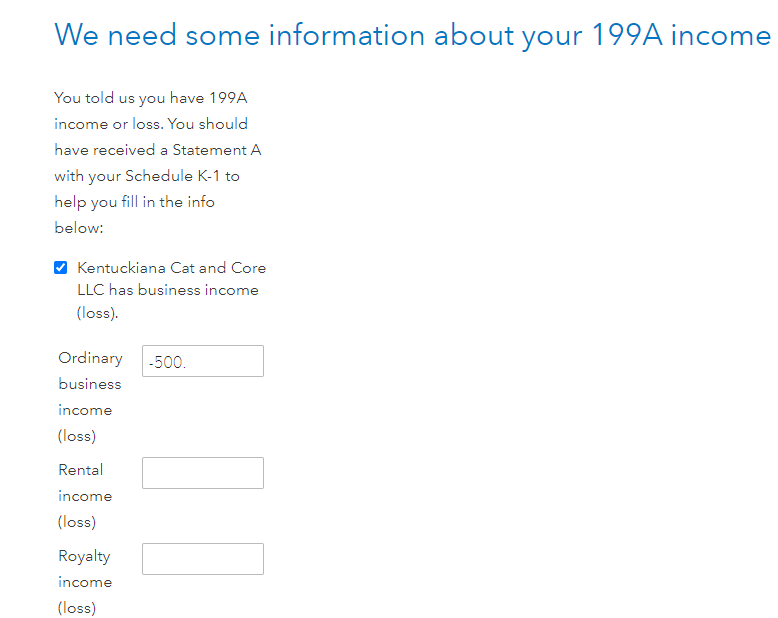
At the screen We need some information about your 199A income, click the box to the left of XXX has business income (loss).


Multiple boxes should appear and allow you to enter rental income (loss).


@bdgranger 

1 reply

JamesG1Answer
March 20, 2023

At the screen We need some information about your 199A income, click the box to the left of XXX has business income (loss).


Multiple boxes should appear and allow you to enter rental income (loss).


@bdgranger 

**Say "Thanks" by clicking the thumb icon in a post**Mark the post that answers your question by clicking on "Mark as Best Answer"
bdgrangerAuthor
March 20, 2023

Thank you, @JamesG1 


That wasn't at all obvious that clicking that box was going to open up and show more options... especially since "has business income" made it seem like that was only for the "Ordinary business income" line of Statement A.


However, I did open it up and put in the rental income and all is good now.


I appreciate the help. I would recommend that the UI designers figure out a better way to show that the check box will actually open a whole new set of options.




