May 25, 2020
Solved

Schedule K-1, Section 199A, Box 20, Code Z: What do I enter in TTx

  • May 25, 2020
  • 1 reply
  • 0 views

I worked for a company and received a K-1.

Box 20, Code Z has three entries:

Ordinary Income :  (negative value)

W-2 Wages:  Amount much higher than my W-2 statement box 1.

Adjusted Basis of Assets:   Amount slightly higher than the entry above (W-2 Wages).

The notes in the K-1 only say to consult your tax advisor on the calculation of the QBI deduction.

Any advise on what I need to enter in the turbo tax box?


thanks!


Best answer by DavidS127

Enter the code Z when you enter the K-1 box 20 screen, but you don't need to enter an amount on that screen.  Continue on, and you'll eventually find the screen  "We need some more information about your 199A income or loss".  When you check the box next to a category on that screen, a place will open up to enter the amounts from the Statement that came with your K-1.  The applicable category (or categories) on this screen must be completed in order for your K-1 QBI information to be correctly input into TurboTax.


Note that the "Adjusted Basis of Assets" number goes on the "....has UBIA of qualified property" line.


To get back to the K-1 summary screen and find the Schedule K-1 to edit, click the "magnifying glass Search" icon on the top row, enter "k-1" in the search window and press return or enter, and then click on the "Jump to k-1" link to find the K-1 you need to edit.


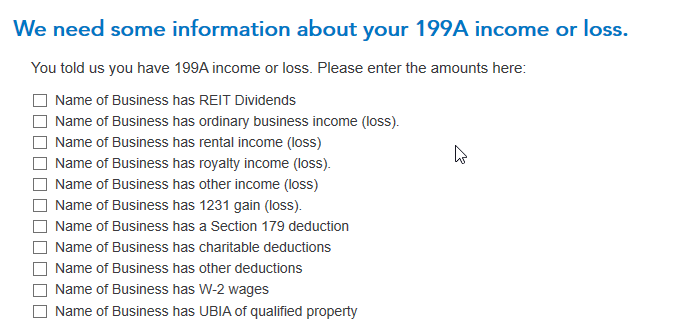
Here is a screenshot of the "We need some information about your 199A income or loss" screen where you enter the information from your K-1 Section 199A Statement:
1 reply

DavidS127
DavidS127Answer
May 25, 2020

Enter the code Z when you enter the K-1 box 20 screen, but you don't need to enter an amount on that screen.  Continue on, and you'll eventually find the screen  "We need some more information about your 199A income or loss".  When you check the box next to a category on that screen, a place will open up to enter the amounts from the Statement that came with your K-1.  The applicable category (or categories) on this screen must be completed in order for your K-1 QBI information to be correctly input into TurboTax.


Note that the "Adjusted Basis of Assets" number goes on the "....has UBIA of qualified property" line.


To get back to the K-1 summary screen and find the Schedule K-1 to edit, click the "magnifying glass Search" icon on the top row, enter "k-1" in the search window and press return or enter, and then click on the "Jump to k-1" link to find the K-1 you need to edit.


Here is a screenshot of the "We need some information about your 199A income or loss" screen where you enter the information from your K-1 Section 199A Statement:

**Say "Thanks" by clicking the thumb icon in a post**Mark the post that answers your question by clicking on "Mark as Best Answer"
scurlingAuthor
May 26, 2020

Thanks so much for the clarification of additional screens to view.  That really cleared up the confusion.




